
HP Laserjet M501 M506 M507 Printer Repair:
50.XX Fuser Errors, Resets, and What Actually Clears Them
Almost every HP Laserjet M501 M506 M507 Printer Repair call that opens with a 50.XX code lands in the same place — the fusing assembly. The message is not generic. Each suffix after the decimal describes a specific thermal, drive, or sensor condition that the formatter detected before it halted the machine.
That specificity is useful. It tells you whether a power cycle has any real chance of working, whether the fuser is genuinely failing, and whether the printer needs a technician today. Below we break the codes apart, walk the documented recovery sequence, and separate the resets that help from the ones that erase a configuration you will spend an afternoon rebuilding.
Preview Snapshot
- Every documented 50.XX suffix on this platform and the fuser condition each one reports
- The first-response sequence HP documents, including the surge protector step that trips people up
- A plain comparison of cold reset, restore factory settings, partial clean, and format disk
- Fusing assembly part numbers, kit contents, and how the maintenance counter behaves afterward
- The 13.XX jam codes, 49 firmware faults, and print defects routinely mistaken for fuser failure
HP LaserJet Repair for $69.99 Onsite Labor
Having trouble with an HP LaserJet M501, M506, or M507? Our $69.99 Onsite Printer Repair Promotion provides an affordable way for new customers to have an experienced technician diagnose and repair an eligible HP LaserJet printer onsite. Parts are additional, and limitations may apply.
Call (888) 657-0021 or email info@printer-repair-experts.net to request service.
Why Does the Fuser Cause More Hard Stops Than Any Other Assembly?
Thermal faults dominate HP Laserjet M501 M506 M507 Printer Repair volume for a structural reason. The fuser is the only assembly in these printers that must reach and hold a precise temperature hundreds of times a day. It bonds toner to the page with heat and pressure, using a heating element, thermistors that report temperature, and a thermal fuse as a last-resort cutout.
When a reading falls outside its expected window, the firmware stops the printer rather than risk an overheat condition. That is why a HP LaserJet M501 Fuser Error or a HP LaserJet M506 Fuser Error rarely allows partial operation. The device is either inside thermal specification or it is offline.
Printer Repair Experts sees this most often on machines that crossed their maintenance interval without a kit installation. A HP LaserJet M507 Fuser Error on a low-page-count device points somewhere else entirely — a marginal outlet, a shared circuit, or a power strip that cannot deliver clean current during warm-up.
Which 50.XX Code Is On Screen, and What Is It Reporting?
The control panel message reads 50.XX Fuser Error, Turn off then on. HP documents the condition as an internal fuser hardware error, with the suffix identifying the fault:
| Code | Reported condition |
|---|---|
| 50.00 | Generic fuser error |
| 50.10 | Low fuser temperature error |
| 50.11 | High sub thermistor area 3 fuser error |
| 50.12 | Low sub thermistor area 3 fuser error |
| 50.20 | Slow fuser error |
| 50.30 | High fuser temperature error |
| 50.40 | Fuser drive circuit error |
| 50.70 | Fuser open error |
| 50.80 | Low sub thermistor fuser error |
| 50.90 | High sub thermistor fuser error |
A pattern worth learning: the 50.10, 50.12, and 50.80 group describes temperatures that came in under target. Those often follow a power delivery problem or a heating element that is no longer drawing properly.
The 50.11, 50.30, and 50.90 group describes readings that came in over target, which usually means a thermistor has drifted or a control circuit is misreading. Effective HP LaserJet M506 Troubleshooting starts by writing the full suffix down before anyone touches the power switch, because the printer does not always redisplay the same code after a restart.
Two codes stand apart. A 50.40 points at the drive circuit rather than the thermal sensors, and 50.70 — the open error — typically indicates the circuit is broken, which is what a blown thermal fuse looks like from the formatter’s side.
What Should You Try Before Calling Anyone?
HP’s documented recommended action is short, and it is worth following exactly rather than improvising. Two attempts, then the assembly is suspect.
Step one — reset the product. Turn the power off using the power switch. Wait at least 30 seconds before restoring power, then let the printer fully initialize without sending a job. The wait matters; it allows control circuits to discharge and the thermistors to report a genuine cold start.
Step two — remove the surge protector from the equation. Power the printer off. Remove the surge protector, plug the printer directly into the wall socket, and power it back on. This is the step that gets skipped, and it resolves a surprising share of intermittent faults.
Field observation worth passing along: a laser printer draws a heavy inrush current when the fuser lamp fires. Older or heavily loaded power strips sag under that load, the fuser warms too slowly, and the printer reports a low-temperature fault it does not actually have. Sound HP LaserJet M501 Troubleshooting always eliminates the outlet before it condemns a part.
If the code returns after both steps, HP’s next documented action is replacement of the fusing assembly. Repeating the power cycle a fifth time is not HP LaserJet M507 Troubleshooting — it is just delay, and on a busy device it usually costs more in lost output than the visit would have.
Paper Jams, Fuser Errors or Print Quality Problems?
Recurring paper jams, 50.xx fuser errors, worn rollers, and print-quality problems often require more than clearing paper or restarting the printer. We service HP LaserJet M501, M506, and M507 printers onsite and can replace failed assemblies when needed. Ask about our $69.99 Onsite Printer Repair Promotion. Limitations may apply.
Call (888) 657-0021 or email info@printer-repair-experts.net to schedule service.
Which Reset Do You Actually Need, and Which Ones Will Cost You Settings?
This is where good intentions do real damage. “Reset the printer” describes at least five different operations on these models, and they are not interchangeable.
Power cycle. Off at the switch, thirty seconds, back on. It clears transient faults and changes nothing you configured, so always start here.
Restore factory settings. On the Enterprise M506 and M507, this lives under the control panel administration menus or the General tab of the Embedded Web Server. The Pro M501 exposes an equivalent restore under its own setup and service menus. It returns configuration to defaults and discards your customizations.
Cold reset. Performed from the pre-boot menu, this returns network configuration, tray paper size and type settings, and fuser mode settings to defaults. It is the standard move when a printer is being redeployed or a formatter has been swapped, not a repair for a thermal fault. Entry into pre-boot differs by control panel type, so follow HP’s documented sequence for your exact panel rather than guessing.
Partial clean. Also a pre-boot operation, available through the Embedded Web Server on later FutureSmart firmware. It reinitializes the device but preserves the firmware repository, so the printer still boots afterward. Customer settings, stored solutions, and jobs are gone.
Format disk. This one reinitializes every partition and leaves the device unbootable, displaying a 99.09.67 until firmware is reloaded through pre-boot. It is a last-resort recovery procedure, not a troubleshooting step, and it should never be attempted casually on a production machine.
Supply counter reset. After a kit installation, Administration › Manage Supplies › Reset Supplies › New Maintenance Kit clears the interval. Note that a genuinely new fuser will often return the counter to full on its own once installed.
Here is the part that saves everyone time: none of these resets repairs a failed heating element, a drifted thermistor, or an opened thermal fuse. A reset clears a state. A 50.XX that survives the documented power cycle is reporting hardware.
When Does HP Laserjet M501 M506 M507 Printer Repair Mean Replacing the Fusing Assembly?
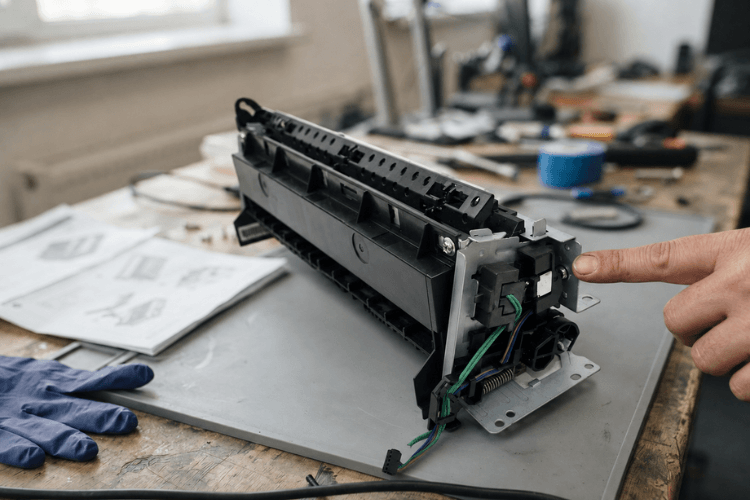
When the code returns after a clean power cycle on a direct wall outlet, the fusing assembly is the documented next step. HP’s parts list for this platform shows the fusing assembly as RM2-5679-000CN for 110–127 VAC operation and RM2-5692-000CN for 220–240 VAC operation, with RM2-2585-000CN and RM2-2586-000CN appearing as the current equivalents across the M507 and M528 generation.
Voltage matters more than the model number here. Installing a 220 V assembly in a 110 V environment produces exactly the symptom you were trying to cure. We verify the part against the device serial number before an HP LaserJet M501 Fuser Replacement ever leaves the van.
Because the platform is shared, one fuser family covers a wide span of machines. That means an HP LaserJet M506 Fuser Replacement and an HP LaserJet M507 Fuser Replacement draw from the same stocked inventory, which is a large part of why same-day turnaround is realistic on these models.
There is also a smarter version of the same visit. If the device is anywhere near its service interval, installing an HP LaserJet M501 Maintenance Kit instead of a bare fuser addresses the rollers at the same time. A kit for this family typically pairs the fusing assembly with the transfer roller, the tray 1 pickup roller and separation pad, and the tray 2 pickup and separation rollers.
The economics usually favor the kit. An HP LaserJet M506 Maintenance Kit or HP LaserJet M507 Maintenance Kit costs modestly more than the fuser alone but removes the second service call three months later when the feed rollers start slipping. Owners of the larger HP Laserjet M606 Perform Printer Maintenance class of machines will recognize the same logic from that message on their own fleet.
On repair versus replace: these are 40-plus page-per-minute workgroup machines with readily available parts and long service life. A fuser or kit installation on a healthy chassis is a fraction of replacement cost, and it does not require redeploying drivers, print queues, or scan destinations across an office. We generally recommend replacement only when a device has accumulated multiple unrelated failures or the chassis itself is worn out.
Why Do 13.XX Jam Codes Show Up Around the Same Time?
Fuser wear and feed wear tend to arrive together, because both are driven by the same page count. A printer throwing 50.XX errors is often a printer whose rollers are equally overdue.
The jam codes localize the fault:
| Code | Location |
|---|---|
| 13.B2 | Tray 1 or the toner cartridge area |
| 13.A2 | Tray 2, the standard 550-sheet tray |
| 13.A3 / 13.A4 / 13.A5 | Optional tray 3, 4, or 5 |
| 13.D3 | Inside the duplexer |
| 13.FF | Near the fuser or the front and rear door area |
A recurring 13.FF deserves attention on a machine that has also shown thermal codes, since both point toward the same end of the paper path. Persistent HP LaserJet M501 Paper Jam reports at 13.A2 usually mean a glazed tray 2 pickup or separation roller, not a paper problem.
Repeated HP LaserJet M506 Paper Jam events across multiple trays point at the shared feed components rather than any single cassette. A HP LaserJet M507 Paper Jam that only appears during duplex work isolates cleanly to the 13.D3 path.
The related complaint we hear most is a printer that never picks at all. HP LaserJet M501 Not Picking Up Paper is nearly always roller surface condition — the rubber hardens and polishes with age and simply stops gripping. When HP LaserJet M506 Not Picking Up Paper or HP LaserJet M507 Not Picking Up Paper appears alongside a rising jam rate, the printer is asking for a roller kit rather than a repair mystery.
Get Your HP LaserJet Back in Service
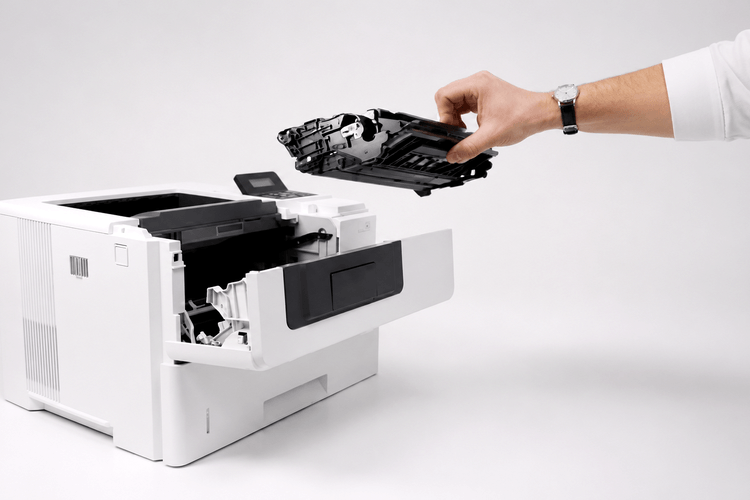
When your HP LaserJet M501, M506, or M507 needs a fuser, rollers, maintenance components, or another repair, we provide onsite troubleshooting and use HP Parts or high-quality replacement parts when appropriate. Repairs include our 6-month warranty. New customers can also ask about the $69.99 Onsite Printer Repair Promotion. Limitations may apply.
Can Firmware Fix a Fuser Error, a 49 Error, or Neither?
Firmware will not repair a thermal fault. It matters for a different family of failures, and confusing the two wastes service time.
HP Inc. — HP Customer Support, Software and Driver Downloads
The 49.XXXX error is the one firmware genuinely addresses. HP documents it as a condition the printer enters when it attempts an operation its firmware cannot handle — often triggered by an unsupported command inside a specific print job. Recovery is a power cycle; prevention is finding the job.
Our sequence on a repeating 49 is straightforward. Clear the print queue on the server or workstation, identify the job that was processing when the error appeared, and check whether one driver or one application is responsible. Standardizing on the current HP-supplied driver resolves a large share of these.
Then confirm the firmware level. Both the Enterprise M506 and M507 and the Pro M501 receive periodic firmware releases addressing connectivity behavior, driver interaction, and specific documented faults. Downloads come from the model’s official HP support page, and enterprise environments should stage a version across a test device before rolling it to a fleet.
One caution from the field: never interrupt power during a firmware update. A partial update on a FutureSmart device can leave you in pre-boot recovery, which is a considerably longer afternoon than the update was.
Which Print Defects Point at the Fuser Rather Than the Toner Cartridge?
Cartridges get blamed for a lot of fuser symptoms. The distinction is easier than it sounds once you know what to look for.
Fuser-side defects share one signature — toner that never fully bonded to the sheet. Rub a fresh print with your thumb. If the image smears or lifts, the page did not fuse properly, and no cartridge will fix it.
The second signature is repetition at a fixed interval. A mark that recurs at the same spacing down every page corresponds to the circumference of a specific roller, and technicians measure that spacing to identify which one. HP LaserJet M501 Poor Print Quality presenting as evenly spaced smudges is a roller surface defect, not a supply problem.
Cartridge-side defects look different. Vertical streaking, fading that follows coverage, and horizontal banding that shifts as the cartridge depletes all point at the supply. Reports of HP LaserJet M506 Poor Print Quality frequently resolve with a cartridge swap and a cleaning page.
Toner quality is worth a note here. Low-grade third-party toner is a genuine source of HP LaserJet M507 Poor Print Quality, because inconsistent particle formulation changes how the toner melts and releases. We stock high-quality third-party toner backed by a one-year warranty precisely because the cheap end of that market generates service calls rather than savings.
How Do You Keep These Printers Out of the Service Queue Next Year?
Fuser failures are among the most predictable events in a printer’s life, which makes them among the easiest to schedule around. The device tracks its own page count and announces the interval well ahead of the failure.
Build the habit of reading supply status during quarterly reviews rather than waiting for a panel warning. Machines running near their maintenance threshold should be flagged for a planned kit installation during a slow period, not on a Monday morning with a payroll run queued.
Environment matters as much as page count. Keep printers off shared circuits with space heaters and copiers, allow clearance at the rear vents, and store paper somewhere with stable humidity. Damp stock is a leading cause of jams and poor fusing, and it costs nothing to fix.
Fleet consistency is the other lever. Offices standardized on one or two model families carry fewer spare parts and get faster resolution, which is why HP LaserJet M501 Printer Repair, HP LaserJet M506 Printer Repair, and HP LaserJet M507 Printer Repair work so well as a group — one fuser family, one roller kit, one firmware process.
Printer Repair Experts brings more than twenty years in the office equipment industry to HP Laserjet M501 M506 M507 Printer Repair planning conversations. We use HP Parts for repairs, and where a premium parts option offers better value on an older chassis we say so rather than defaulting to the most expensive line item.
Our stocking approach is what makes HP LaserJet Printer Repair Same Day service realistic on this platform. Many fusers and maintenance kits for these families ride on the van, so an HP LaserJet Printer Repair Onsite visit frequently ends with the printer back in production the same afternoon rather than scheduled for a return trip.
Every service visit and installed part carries a six-month, 180-day warranty. New customers can take advantage of our $69.99 flat labor rate on one qualifying onsite visit — limitations apply, and the promotion covers qualifying HP LaserJet and HP Color LaserJet models only.
We work throughout Orange County and portions of Los Angeles County. That includes Printer Repair Santa Ana CA, Printer Repair Pico Rivera CA, Printer Repair Santa Fe Springs CA, and Printer Repair South El Monte CA.
The same diagnostic approach carries across the heavier Enterprise families we service. It runs from HP Laserjet M601 Printer Repair and HP LaserJet M604 Printer Repair through HP LaserJet M607 Printer Repair and HP LaserJet M610 Printer Repair, and extends to multifunction work such as HP Laserjet MFP M631 Printer Repair and HP LaserJet MFP M634 Printer Repair.
General HP LaserJet Printer Repair questions are welcome even when you are not sure which code you are looking at.
Conclusion
A 50.XX message is one of the more honest errors these printers produce. The suffix names the condition, the documented recovery sequence is two steps long, and when the code survives those two steps the fusing assembly is the answer rather than a theory.
What separates a fast resolution from a long one is knowing where resets stop being useful. Clearing a state is free; replacing hardware is a scheduled visit; and confusing the two is how a printer sits dark for a week. That distinction is the core of good HP Laserjet M501 M506 M507 Printer Repair work.
If a 50.XX code is on your panel now, write down the full suffix, try the power cycle on a direct wall outlet, and call us at (888) 657-0021 or email info@printer-repair-experts.net. We will tell you honestly whether it is a five-minute fix or a fuser.
FAQ's - Frequently Asked Questions -
No. The printer halts on purpose when a fuser reading falls outside its expected range, and that protection is not something to work around. Power the unit down and follow the documented reset sequence before deciding on next steps.
For this printer family the physical work is typically well under an hour once the technician is on site, including the supply counter reset and a test print run. The larger variable is parts availability, which is why we stock fusers and kits for these models on the van.
It will not. A 50.XX code reports a thermal, drive, or sensor condition inside the fusing assembly, and the cartridge has no role in it. Swapping supplies at that point only delays the diagnosis.
Not that minute, but do not let it drift. That message means the page counter has reached the service interval, and the components it covers are wearing whether or not a fault has appeared yet. Scheduling the kit during a quiet week is far cheaper than an emergency call during month-end.
Restoring factory settings will clear network configuration, tray settings, and any customizations your IT team put in place, so it is not a casual step. On a domain-joined or MPS-managed device we recommend documenting the configuration first, or letting a technician handle it during the service visit.
It can, though it is uncommon, and when it does the cause is usually external rather than the new assembly. A marginal outlet, a failing surge protector, or a shared circuit under heavy load will reproduce a low-temperature fault on any fuser you install. That is why we test the power source during the visit rather than only the printer.
New customers can use our $69.99 flat labor rate on one qualifying onsite visit, and limitations apply. If we determine during the call that the fix is something you can handle yourself, we will tell you that directly rather than manufacture work.
