
HP LaserJet M610 M611 M612 Perform Maintenance:
Kit Contents, Counter Reset, and Onsite Service Expectations
HP LaserJet M610 M611 M612 Perform Maintenance is the printer’s way of reporting that the fuser and the paper-path rollers have reached a scheduled service interval. It is a wear notification tied to page count, not a sign that the formatter or engine has failed. Printer Repair Experts services these units throughout Orange County and parts of Los Angeles County, and the corrective work is usually a kit, a verified reset, and a short print test.
Preview Snapshot
- What the control panel is actually reporting, and which supply codes travel with it
- Which components ship inside the fuser kit for the M610, M611, and M612
- How the maintenance counter behaves once the new fuser goes in
- Which feed symptoms usually appear weeks before the alert does
- When printing can safely continue and when it should stop
- How a fleet can be scheduled so the alert never lands on a deadline
$69.99 Onsite HP LaserJet Service
Our $69.99 Onsite Printer Repair Promotion includes no travel charge, a flat labor rate, and professional onsite printer repair. Parts are additional if needed. Please see our Policy Page for complete promotion details, service limitations, and exclusions.
What Is the Printer Reporting When It Asks for Maintenance?
The message means the engine has counted enough pages to reach its programmed service threshold. Nothing has broken. The fuser sleeve, the transfer roller, and the tray rollers are simply approaching the end of their rated duty life.
HP builds this alert into the supply-status system so that a wear event becomes a planned task rather than an emergency. Some firmware releases display a Maintenance/Low status well ahead of the hard replacement prompt. Treating that early notice as a Preventive Maintenance trigger is the difference between a scheduled twenty-minute visit and an unplanned outage.
Our technicians see the same pattern across the M607 through M612 family. Offices that act on the first warning rarely experience a print-quality complaint. Offices that dismiss it for several months usually call us about smeared toner or repeat jams instead.
Which Control Panel Codes Travel With a Maintenance Event?
Four supply codes commonly accompany the maintenance sequence on these models. Each one describes a different point on the same timeline, from early warning through installation confirmation.
| Control Panel Code | What It Indicates |
|---|---|
| 10.23.60 Fuser Kit low | The fuser kit is approaching the end of its rated life; order the kit and schedule service. |
| 10.23.70 Replace Fuser Kit | The fuser kit has passed the very-low threshold; HP’s premium protection warranty on that supply ends here. |
| 10.23.15 Install Fuser kit | The engine is not reading a usable fuser kit and is asking for one to be seated correctly. |
| 10.26.15 Reset Maintenance | A maintenance-kit indicator tied to the roller and transfer components rather than the fuser itself. |
A configuration page and the event log are the fastest way to confirm which of these is actually driving the display. We pull both before touching a single screw. Code numbering can shift slightly between firmware releases, so we verify the exact wording against the HP service documentation for the installed firmware version rather than assuming.
What Ships Inside the Kit, and What Does Each Part Do?
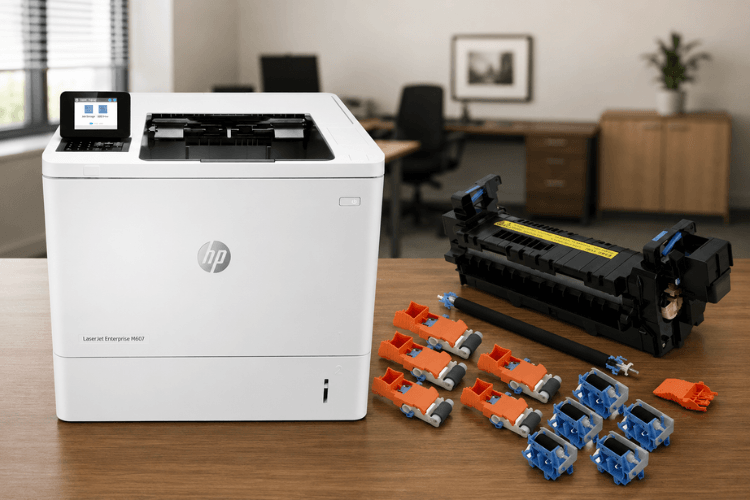
The fuser maintenance kit for this family carries HP part number L0H24A for 110-volt installations and L0H25A for 220-volt installations. Inside are the components that wear together across the paper path.
- Fuser Replacement — the RM2-1256 fusing assembly on 110V units, rated at roughly 225,000 pages
- Pickup Roller Replacement — RM2-1275 rollers that lift the top sheet out of the cassette
- Feed Roller Replacement — the drive rollers that move the sheet into the registration area
- Separation Roller Replacement — RM2-6772 retard rollers that prevent multi-sheet pulls
- Transfer roller — the RM2-6800 roller that moves toner from the drum onto the page
One clarification matters here. Secondary Transfer Roller Replacement is a service term that belongs to HP Color LaserJet models, which move toner through an intermediate transfer belt before it reaches the page. The M610, M611, and M612 are monochrome engines with a single transfer roller, so a request to Replace Maintenance Kit on these units covers that one roller rather than a secondary assembly.
Kit contents vary slightly by region and revision. When a quantity or part revision is unclear, we confirm against the HP parts catalog before ordering rather than relying on a cross-reference listing.
Accurate Diagnosis. Reliable Repairs.
Not every maintenance message requires the same repair. We inspect your HP LaserJet, confirm what actually needs attention, and recommend only the necessary service to restore reliable performance.
How Does Printer Repair Experts Handle HP LaserJet M610 M611 M612 Perform Maintenance Onsite?
A visit starts with verification, not with parts. We confirm the actual engine page count, review the event log for repeat jam codes, and inspect the rollers before opening a kit. That order of operations prevents a customer from paying for a fuser when the real complaint was a worn tray 2 retard roller.
The physical work is straightforward for a trained technician. Maintenance Kit Installation on these models means removing the rear cover assembly to reach the fuser, swapping the transfer roller without touching its sponge surface, and replacing the cassette rollers on every installed tray. Skipping the optional trays is one of the most common reasons a printer keeps jamming after a kit goes in.
We use HP Parts for this work, and many fusers and kits stay on the van so that a call can be closed the same day. Every service visit and installed part carries our 6-month, 180-day warranty. For sites that also run older units, our HP Laserjet Printer Repair work and our Printer Repair City of Industry CA coverage follow the same verification-first process.
Full HP LaserJet M610 M611 M612 Perform Maintenance service typically runs under an hour on a single unit once the machine is accessible. Clearing a path to the rear of the printer before we arrive saves real time.
Why Do Paper Feed Problems Appear Before the Message Does?
Rollers wear on a curve, and the curve starts long before the counter trips. Rubber hardens, the surface glazes, and grip drops off gradually. The engine keeps printing, so nobody escalates it.
The early symptoms are consistent. Sheets arrive skewed by a few degrees, tray 2 occasionally pulls two pages at once, and duplex jobs wrinkle at the trailing edge. Staff start loading tray 1 because it “works better,” which is a workaround rather than a fix.
Paper Feed Problems of this kind are the clearest signal that a kit is due. When a receptionist tells us the printer has been double-feeding for a month, we already expect the counter to be close. HP LaserJet M610 Perform Maintenance requests that begin with a jam complaint rather than a message on the display are extremely common in our queue.
Humidity and paper stock matter too. A recycled 20 lb stock in a warehouse office wears rollers noticeably faster than a sealed ream in a climate-controlled suite.
Does the Counter Reset Itself, or Does Someone Have to Clear It?
On this generation, the fuser carries a reset element that the engine reads on the first power-up after installation. In normal operation the counter clears on its own. That is a change from older LaserJet families where a technician had to enter a service menu to complete a Maintenance Counter Reset.
When the automatic reset does not take, there is a short verification sequence worth running before anything else.
- Power the printer completely off, unplug it for roughly thirty seconds, and power it back on.
- Confirm the fuser is fully seated and both latches are engaged.
- Print a configuration page and read the current supply status.
- Confirm the installed fuser is genuinely new, since a previously used unit will report its original count.
If the count still refuses to clear after Maintenance Kit Replacement, the fault is usually the fuser’s reset element or, less often, the DC controller. That is a diagnostic call rather than a parts-swap call. We do not guess at hidden service-menu procedures on these models; when a documented reset path is needed, we work from the HP service manual for the installed firmware.
A Reset Maintenance Message that reappears after a successful install almost always means one of the four checks above was skipped. Reset Maintenance Count questions make up a large share of the HP LaserJet M611 Perform Maintenance calls we take by phone.
Keep Your HP LaserJet Working Like It Should
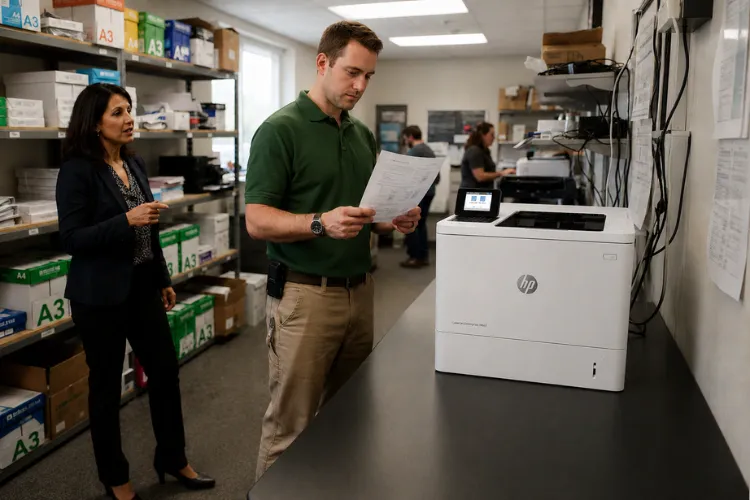
With over 20 years of experience, we provide onsite HP LaserJet maintenance, repairs, and maintenance kit installations throughout our service area. Fast, dependable service helps reduce downtime and keeps your office productive.
Can You Keep Printing After the Alert, or Should You Stop?
Yes, printing can usually continue for a period after the first warning. HP designs the low and very-low thresholds to give an office time to order parts and schedule service. The printer does not stop at the alert.
The judgment call is print quality, not the message. Once toner begins to smear under a fingertip, once ghost images repeat down the page, or once jams cluster inside the fuser area, the fuser is past useful service. Continuing at that point risks a wrap jam that damages the sleeve and turns a routine visit into a longer repair.
Interval figures vary across the HP LaserJet line. Several older families were configured to Perform Maintenance After 150,000 Pages, while the L0H24A and L0H25A kits used on this family are rated at approximately 225,000 pages. We read the configuration page rather than assume a number, because duty cycle, media weight, and duplex volume all move the real-world figure. HP LaserJet M612 Perform Maintenance timing in a high-volume mailroom looks very different from the same model in a small accounting office.
Toner condition factors in as well. A cartridge that is failing at the same time will imitate fuser symptoms, which is why we verify both before recommending parts.
What Does an Unplanned Maintenance Event Cost a Busy Office?
The part is rarely the expensive line item. The cost sits in the hours a department spends routing jobs to another floor, reprinting smeared invoices, or waiting on a shipment. A single M612 handling a payroll run is a productivity bottleneck the moment it stops.
Repair versus replace is usually an easy call on this family. A fuser kit and a service visit cost a fraction of a comparable new unit, and these engines routinely run well past a million pages with scheduled care. Replacement makes sense when a chassis has accumulated multiple failing subsystems, not when a single wear kit is due.
Mixed fleets complicate the picture. Sites we cover often pair these units with color devices, and our HP Color Laserjet Printer Repair work follows the same scheduling logic. Related calls such as an HP LaserJet MFP M635 Fuser Error or a recurring HP LaserJet MFP M636 Paper Jam frequently trace back to the same deferred-maintenance habit.
One pattern we see repeatedly: a site defers a kit through a busy quarter, then loses two machines in the same week because both crossed the threshold together. Staggering installs by a few thousand pages avoids that entirely.
Same-day onsite service is available for many of these issues, including throughout our Printer Repair La Mirada CA coverage area. New customers can use our $69.99 flat onsite labor special for one qualifying visit; limitations apply.
How Should a Fleet Be Scheduled So the Alert Never Lands on a Deadline?
Build the schedule around page counts, not calendar guesses. Pull engine counts quarterly from the embedded web server, note which units are inside twenty thousand pages of their threshold, and stage kits for those machines only. That single habit removes most emergency calls.
A few practices consistently hold up in the field:
- Record the page count at every service visit so the trend is visible
- Keep one kit on the shelf for any site running more than three of these units
- Replace rollers in every installed tray, not just the tray that jams
- Keep firmware current, since HP resolves paper-handling and supply-reporting behavior in updates
- Log which cartridge brand is in use when quality complaints begin
Toner choice belongs in the same conversation. We stock high-quality third-party toner backed by a 1-year warranty for offices managing print budgets, and we are direct with customers about which quality tier suits their volume. Sites in our Printer Repair South El Monte CA area often run this mixed approach across several buildings.
The same scheduling discipline applies to adjacent hardware. HP LaserJet MFP M634 Printer Repair visits and legacy HP Laserjet P3015 Printer Repair calls both go smoother when counts are tracked rather than discovered.
Conclusion
A maintenance prompt on these printers is a scheduling problem, not a crisis. The kit is well documented, the parts are available, and the counter clears on its own in nearly every correct installation. What separates a smooth service event from a bad week is whether the office acted on the first warning or the last one.
Handled early, HP LaserJet M610 M611 M612 Perform Maintenance is a routine visit measured in minutes. Handled late, it becomes a jam investigation, a print-quality complaint, and a department working around a machine it should be able to trust.
Printer Repair Experts brings more than twenty years of office equipment experience to this work, with HP Parts, stocked fusers, same-day availability for many calls, and a 6-month warranty on service and installed parts. If your display is asking for service, or if tray 2 has been double-feeding for weeks, we can verify the count and handle the kit in one visit.
Call (888) 657-0021 or email info@printer-repair-experts.net to schedule service across Orange County and Los Angeles County.
FAQ's - Frequently Asked Questions - HP Laserjet M610 M611 M612 Perfrom Maintenance Message
For a single unit with clear access to the rear panel, most installations run well under an hour, including the roller swap on every installed tray and a post-install print test. Multiple units at one site go faster per machine. Clearing space behind the printer before the technician arrives is the single biggest time saver.
In nearly every correct installation, yes. The fuser used on this generation carries a reset element the engine reads at the first power-up, so the count clears without a service menu. If it does not clear, the usual causes are an unseated fuser, a previously used fuser, or a fault in the reset element.
Using HP Parts keeps you aligned with HP’s supply and warranty expectations. Our own coverage is separate: service labor and the parts we install carry a 6-month, 180-day warranty. Toner we supply is backed for one year.
Almost never on this family. A kit plus a service visit is a fraction of a comparable replacement, and these engines routinely run well past a million pages with scheduled care. Replacement becomes reasonable only when several subsystems are failing at once, not when a single wear kit is due.
- Many IT teams do. The risks we see are skipped optional-tray rollers, a transfer roller handled by its sponge surface, and a count that never clears because the fuser was not fully latched. If your team wants to handle it, we are happy to talk through the checkpoints by phone.
If your office runs more than three of these printers, keeping one maintenance kit on the shelf can easily pay for itself the first time a deadline collides with a Perform Maintenance message. However, it’s not required. We routinely stock HP LaserJet M610, M611, and M612 fusers, maintenance kits, and roller kits for same-day installation, allowing most customers to get back up and running without keeping spare parts in inventory.
The most common reason is that only the jamming tray was serviced. Rollers wear across every installed cassette, and replacing one set leaves the others at the same age. Firmware level and paper stock are the next two things we check.
We cover Orange County and a substantial portion of Los Angeles County, including Whittier, Cerritos, Norwalk, Downey, Pico Rivera, and the surrounding communities. Call and we will confirm coverage for your address before scheduling.
