
Printer Repair Near Me: Onsite HP LaserJet Service
Across Orange County and Los Angeles County
Nobody searches for printer repair near me while things are going well. That search usually follows a jammed tray, a fuser error, or a page of streaked print forty minutes before a deadline. Printer Repair Experts answers those calls onsite, with stocked parts, experienced technicians, and same-day availability across Orange County and much of Los Angeles County.
Preview Snapshot
- Onsite diagnosis and repair for HP LaserJet, HP Color LaserJet, and MFP models — no shipping, no drop-off counter.
- Same-day service is available for many HP LaserJet failures because fusers and maintenance kits are stocked, not ordered.
- Over 20 years in the office equipment industry, HP Parts, and a 6-month (180-day) warranty on service and installed parts.
- A $69.99 flat labor promotion for new customers on one qualifying HP LaserJet or HP Color LaserJet visit. Limitations apply.
- Coverage across Orange County and much of Los Angeles County, so printer repair near me stays a short drive rather than a shipping label.
When businesses in Orange County or Los Angeles County search for HP LaserJet Printer Repair Near Me, our onsite service provides diagnosis and repair for supported HP LaserJet, HP Color LaserJet, and MFP printers.
$69.99 Onsite Printer Repair Near You
Searching for Printer Repair Near Me? Get professional onsite HP LaserJet diagnosis with our $69.99 Onsite Printer Repair Promotion. Call (888) 657-0021 or email info@printer-repair-experts.net. Limitations may apply.
What Does “Printer Repair Near Me” Actually Mean When an HP LaserJet Stops?
In practice, printer repair near me means how quickly a qualified technician can stand in front of the machine with the correct part already in hand. Distance matters less than dispatch. A provider twenty minutes away holding the right fuser on the shelf beats one ten minutes away that has to order it.
That gap is the whole argument for Local Printer Repair over a national call queue. Proximity only pays off when parts inventory and technician availability line up behind it, and that is the real test of any printer repair near me result.
Most people who type printer repair near me are not shopping for a lecture on laser physics. They want a realistic answer to two questions: can this be fixed today, and what will it cost to find out. We answer both before a technician is dispatched.
There is a second reason Printer Service Near Me matters for HP LaserJet Enterprise hardware. These machines are heavy, awkward to transport, and often sit on network jacks and print servers that nobody wants to reconfigure. Repairing them where they sit avoids a second problem created by solving the first.
Which HP LaserJet Failures Send Offices Looking for Help First?
Five categories account for the overwhelming majority of our dispatches: paper jams, fuser failures, feed and pickup problems, degraded print quality, and printers that will not print at all. Nearly every printer repair near me call we receive lands in one of those five. Everything else is a long tail.
Our technicians see a strong pattern by machine age. Newer units fail on media handling and configuration; high-mileage units fail on wear components. That pattern is why HP LaserJet Printer Repair work is less about exotic diagnostics and more about disciplined inspection of the paper path.
Fleet position matters too. A single HP LaserJet M609 handling 12,000 pages a month behaves nothing like an HP LaserJet M604 that prints packing slips twice a day. Duty cycle drives failure rate, and it should drive your maintenance planning as well.
Demand for HP Printer Repair Near Me also spikes seasonally. Month-end billing, open enrollment, and tax season all push devices past their comfortable duty cycle, and marginal components fail under that load rather than during a quiet week.
Model-specific patterns are real. HP LaserJet M606 Printer Repair calls skew toward roller wear and jam sensors, while HP LaserJet M609 Printer Repair requests more often involve fuser life and maintenance kit intervals. Knowing which model you own turns a vague printer repair near me search into a targeted one.
Why Does the Same Tray Keep Jamming After You Clear It?
Because clearing paper removes the symptom, not the cause. A jam that returns within a day or two almost always points to a worn feed component or a sensor that no longer reports the paper’s position accurately. Recurring jams are the most common reason an office runs the same printer repair near me search twice in one month.
HP LaserJet printers report jams in the 13.xx error family, and the digits after the decimal identify where in the paper path the sheet was expected and did not arrive. That location code is diagnostic gold. It tells a technician which assembly to inspect first instead of pulling the machine apart.
HP’s official jam-clearing procedure
HP’s own documentation notes that when a jam message persists after all paper has been removed, a sensor or sensor flag may be stuck or broken. We see exactly that in the field. Toner dust and paper fiber accumulate around flags until they stop toggling cleanly.
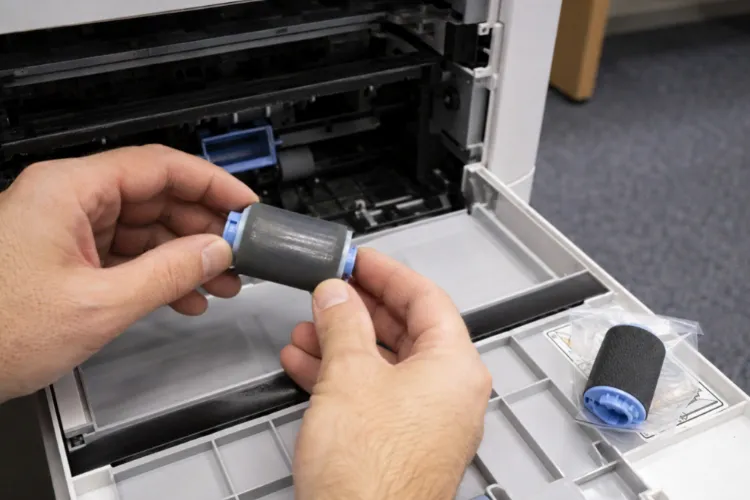
The other common root cause is roller wear. Pickup, feed, and separation rollers rely on surface texture to grab a single sheet, and once that surface polishes smooth they either mis-pick or pull multiples. That single worn part drives a surprising share of printer repair near me traffic.
Proper HP LaserJet Paper Jam Repair therefore starts with the error code, moves to a physical inspection of the rollers and registration area, and ends with sensor verification. Skipping steps produces repeat visits.
- Smooth, shiny rollers instead of textured ones — replace, do not clean and hope
- Tray guides not snug against the stack, or a tray loaded above the fill line
- Paper stored in a humid room or a stack that has absorbed moisture over a weekend
- Torn fragments left behind in the rear door or fuser opening
- Sensor flags coated in paper dust
HP LaserJet Pickup Roller Replacement is inexpensive relative to the downtime it prevents, which is why we inspect rollers on nearly every jam call even when the customer only reported one bad tray. HP LaserJet M612 Printer Repair visits frequently end this way — one worn component, replaced onsite, and the tray behaves again.
Fix the Cause, Not Just the Jam
Recurring paper jams often point to worn rollers, paper-path components, or sensors. Have Printer Repair Experts diagnose the cause before replacing parts. Call (888) 657-0021 for onsite service.
What Is the Printer Telling You With a 50.x Fuser Error?
That the fuser subsystem failed a temperature self-check. The fuser bonds toner to the page with heat and pressure, and the printer monitors it constantly. When it does not reach or hold the expected temperature in the expected time, the machine stops rather than risk damage.
Before assuming the worst, check the power source. HP specifically advises plugging the printer directly into a wall outlet rather than a surge protector or UPS, because insufficient or unstable supply can trigger fuser errors on a healthy assembly. We have cleared plenty of 50.x messages by moving a plug.
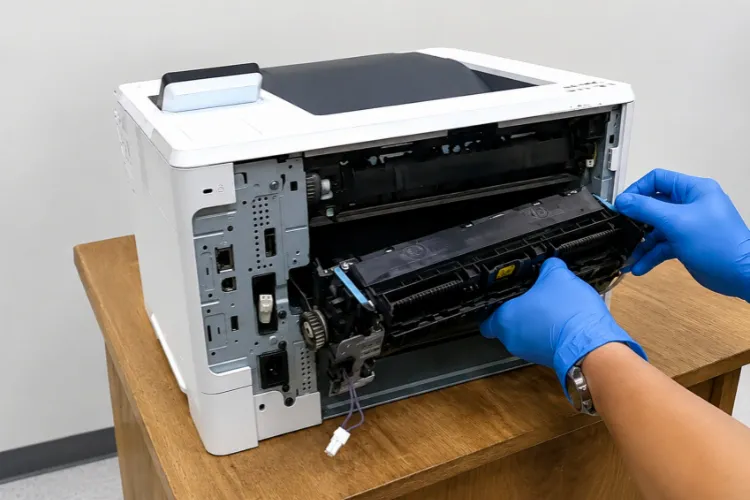
A power cycle occasionally clears the error long enough to print a few more pages. That is not a repair, and it is the point where most people start a printer repair near me search. When the message returns, the fuser is usually at the end of its service life and HP LaserJet Fuser Repair becomes a replacement conversation rather than a troubleshooting one.
Fusers are consumables, and a fuser message is one of the few failures where a printer repair near me search genuinely has to end in a same-day visit. Every HP LaserJet will need one eventually, and the interval depends on page volume, media weight, and duty cycle. Exact sub-codes within the 50.x family vary by model family, so we verify against HP documentation for the specific unit rather than generalizing across product lines.
This is where stocked inventory changes the outcome. HP LaserJet Fuser Replacement on a common Enterprise model is often a same-visit job for us because the part is already on the shelf. That is the practical meaning of Same Day Printer Repair Near Me — parts availability, not marketing language.
Printer Repair Experts verifies the actual cause before replacing an expensive assembly. Occasionally the fuser is fine and the fault sits upstream in power delivery, and swapping parts without diagnosis simply moves money around.
How Much Reliability Does a Maintenance Kit Actually Buy You?
Quite a lot, and it is the single most underused preventative measure we encounter. Maintenance kits are the one thing that reduces printer repair near me searches rather than answering them. A maintenance kit bundles the components that wear out on a predictable schedule — the fuser plus the rollers that move paper through the machine — so they get replaced together instead of one emergency at a time.
HP publishes a recommended page-count interval for each supported model, and the printer tracks its own usage against it. When that counter comes due, the machine is telling you something useful. Ignoring it is how a planned thirty-minute service becomes an unplanned outage during month-end close.
HP LaserJet Maintenance Kit Installation also requires resetting the maintenance counter after the parts go in. Skipping the reset leaves the printer reporting a service message it no longer needs, which trains staff to ignore control panel warnings entirely.
For customers running several machines, we recommend scheduling kits by actual page count rather than calendar date. Onsite Office Printer Repair planned around usage data is dramatically cheaper than reactive service, and it lets you take a device offline at 4 p.m. on a Thursday instead of 9 a.m. on a Monday.
Our field observation after two decades: the offices that rarely need a printer repair near me search are not the ones with the newest equipment. They are the ones that install kits on schedule and replace rollers before they fail.
What Do Streaks, Smears, and Faded Pages Reveal About the Machine?
Each defect has a signature, and the pattern on the page usually identifies the component before anyone opens a cover. A vertical line in the same position on every sheet is different from a smear that wipes off with a finger, and both are different from overall fading.
Repetitive defects are the most useful clue. When a mark repeats at a consistent interval down the page, that spacing corresponds to the circumference of a specific rotating component, and measuring it points straight at the culprit. Bring a sample page to any printer repair near me conversation and the diagnosis moves faster.
Toner smearing that rubs off indicates the image is not being fused properly, which brings the discussion back to the fuser. Faded output across the whole page more often points to toner supply or a cartridge nearing the end of its life. Print quality complaints drive more printer repair near me calls than most managers expect.
HP LaserJet Print Quality Problems are also where toner quality shows up. We supply high-quality third-party toner backed by a 1-year (365-day) warranty, and we see meaningfully fewer print-defect callbacks from customers using it than from those buying whatever was cheapest that month.
Color adds variables to any printer repair near me request. Registration, individual cartridge condition, and transfer components all affect output, so HP Color LaserJet Repair Near Me requests generally require a calibration and test-print sequence before any part is condemned.
Multifunction units bring scanner and ADF glass into the picture. A streak that appears on copies but not on printed files is a scanning defect, not a print defect — a distinction that saves a wasted part on HP Laserjet MFP M633 Printer Repair calls more often than you would expect.
Keep Your HP LaserJet Worth Repairing
With 20+ years of experience, HP Parts, and a 6-month/180-day warranty, Printer Repair Experts can help determine whether repair makes sense for your HP LaserJet. Call (888) 657-0021 to schedule onsite service.
When Does Repairing an HP LaserJet Beat Replacing It?
Usually when the failed component is a known consumable and the chassis still has life in it. HP LaserJet Enterprise hardware is built for high duty cycles, and a fuser or roller replacement on a structurally sound machine is a fraction of the cost of new equipment plus deployment.
Replacement makes more sense when failures stack up across unrelated subsystems, when the model is no longer supported with parts, or when the device is badly undersized for its workload. A machine jamming because it prints triple its rated volume is not broken. It is miscast, and no printer repair near me visit will fix a capacity problem.
Downtime cost is the number most people underestimate when they weigh a printer repair near me visit against new equipment. A department that cannot print invoices, shipping labels, or patient forms loses hours that never appear on the repair invoice, and Business Printer Repair Near Me decisions look very different once that figure is honest.
Fleet standardization pays here too. Offices that run one or two HP LaserJet families can stock a single maintenance kit and swap parts between units, which shortens every future repair. Commercial Printer Repair Near Me searches drop sharply once a fleet is standardized and on a maintenance schedule.
We also weigh parts quality in the recommendation. We use HP Parts and high quality HP Parts on repairs, because a premium part on a well-built chassis extends useful life, while a marginal part invites the same technician back in six weeks.
The Office Printer Repair Near Me calculation is ultimately about total cost of ownership, not the price of one visit. Laser Printer Repair Near Me is worth the call whenever the repair restores a machine that still matches its workload.
What Happens During an Onsite Service Call With Our Technicians?
A structured diagnosis before any part is replaced, which is what separates a printer repair near me provider from a parts swapper. We start with the reported symptom, review the control panel message and event log, run the applicable diagnostic tests supported for that model, and inspect the paper path physically before forming a conclusion.
That sequence — symptom, root cause, diagnosis, remedy, component — is deliberate. Onsite Printer Repair Near Me goes wrong when a technician arrives with a theory instead of a process and replaces the part they happened to bring.
When the diagnosis points to a stocked component, the repair typically finishes in the same visit. When it points to something we do not carry, you get a clear explanation, a part on order, and a return appointment rather than a machine left in pieces. That transparency is what a printer repair near me search should actually deliver.
Every Onsite HP LaserJet Repair we perform carries a 6-month (180-day) warranty on service and installed parts. That length is intentional. It covers a realistic duty cycle, which means a marginal repair would come back to us rather than to you.
New customers can use our $69.99 flat labor promotion on one qualifying HP LaserJet or HP Color LaserJet repair visit. The promotion is subject to limitations, applies to qualifying HP LaserJet and HP Color LaserJet models only, and excludes OfficeJet, DeskJet, Envy, Smart Tank, DesignJet, and non-HP LaserJet equipment.
Our HP Printer Repair Service also covers driver installation, firmware upgrades, and network setup, but those are handled separately from the promotional repair visit and are not included in the $69.99 labor rate.
Multifunction devices get the same treatment with additional scope. HP LaserJet MFP Repair and HP LaserJet Repair Near Me requests involving ADF feeding, scanning defects, or finishing accessories are diagnosed against the applicable HP service documentation for that specific model.
How Do You Choose the Right Provider, and Where Do We Actually Work?
Ask three questions: do you stock parts for my model, do you diagnose before quoting, and what warranty backs the work. A credible Printer Repair Company Near Me answers all three without hedging. Those answers separate a real printer repair near me option from a dispatch service.
Be cautious of providers who quote a part over the phone without seeing the printer, or who cannot tell you which HP families they actually service. Real Local Printer Repair Service starts with a diagnosis, not a parts invoice.
We specialize narrowly and deliberately. Local HP Printer Repair on HP LaserJet, HP Color LaserJet, HP LaserJet MFP, and HP Color LaserJet MFP models is what we do, and we do not represent ourselves as a service option for inkjet families such as OfficeJet, DeskJet, Envy, Smart Tank, or DesignJet.
Our coverage runs across Orange County and a large portion of Los Angeles County. Printer Repair Santa Fe Springs CA and Printer Repair Commerce CA requests sit right in the middle of our daily route, and Printer Repair City of Industry CA calls cover the entire city.
To the south and east, Printer Repair Santa Ana CA, Printer Repair Anaheim CA, and Printer Repair Brea CA are all regular stops, along with Fullerton, Buena Park, Irvine, Tustin, Cerritos, Whittier, Norwalk, and Downey.
That footprint is what makes Printer Repair Service Near Me a meaningful phrase rather than a marketing one. HP LaserJet Printer Repair Near Me only works if the technician and the part are genuinely nearby, and ours are. When you search printer repair near me from an office in our coverage area, you are reaching a technician who can usually be onsite the same day.
Conclusion
A printer repair near me search is really a request for a working machine today, not a service philosophy. Printer Repair Experts is built around that reality: onsite diagnosis, stocked HP LaserJet fusers and maintenance kits, HP Parts, and a 6-month warranty on service and installed parts.
If an HP LaserJet or HP Color LaserJet is jamming, throwing a fuser error, or printing poorly, we can usually tell you over the phone whether it is a same-day fix. Call (888) 657-0021 or email info@printer-repair-experts.net to schedule a visit, and ask about the $69.99 new customer onsite promotion — limitations may apply.
The most valuable outcome of any printer repair near me search is not one repaired device. It is a fleet that stops failing at the worst possible moment, which is what a maintenance schedule and honest diagnosis are for.
Printer Repair Near Me Service Areas – Los Angeles County
Alhambra
Arcadia
Artesia
Azusa
Baldwin Park
Bell
Bell Gardens
Bellflower
Carson
Cerritos
Commerce
Compton
Covina
Cudahy
Diamond Bar
Downey
Duarte
El Monte
Gardena
Glendora
Hawaiian Gardens
Hawthorne
Huntington Park
Industry
Inglewood
Irwindale
La Habra Heights
La Mirada
La Puente
Lakewood
Long Beach
Los Angeles
Lynwood
Maywood
Monrovia
Montebello
Monterey Park
Norwalk
Paramount
Pasadena
Pico Rivera
Rosemead
San Gabriel
San Marino
Santa Fe Springs
Signal Hill
South El Monte
South Gate
South Pasadena
Temple City
Vernon
Walnut
West Covina
Whittier
Printer Repair Near Me Service Areas – Orange County
Anaheim
Brea
Buena Park
Cypress
Fountain Valley
Fullerton
Garden Grove
Huntington Beach
Irvine
La Habra
La Palma
Los Alamitos
Orange
Placentia
Santa Ana
Seal Beach
Stanton
Tustin
Westminster
FAQ's - Frequently Asked Questions -
For many HP LaserJet failures, yes. We stock fusers, maintenance kits, and common roller sets for widely used HP LaserJet and HP Color LaserJet models, so if the diagnosis points to one of those parts the repair usually finishes on the first visit. If the fault points to a component we do not carry, we tell you that onsite and schedule the return rather than leaving the machine apart.
It is a flat labor rate for one qualifying onsite repair visit for new customers on a qualifying HP LaserJet or HP Color LaserJet printer. Parts are separate, the promotion is subject to limitations, and it does not apply to OfficeJet, DeskJet, Envy, Smart Tank, DesignJet, or non-HP LaserJet equipment. Driver installation, firmware upgrades, and network setup are handled as separate work and are not included in the promotional labor rate.
Often it is, if the failure is a consumable and the chassis is sound. HP LaserJet Enterprise hardware is engineered for very high lifetime page counts, and a fuser or roller replacement on a machine that still matches its workload costs a fraction of buying and deploying a new device. We give you an honest recommendation when a unit genuinely is not worth the parts.
Six months, which is 180 days, on both the service performed and the parts we install. Toner we supply carries a separate one-year, 365-day warranty. The longer service window is deliberate — it spans a realistic duty cycle, so a marginal repair comes back to us rather than surprising you months later.
We use HP Parts and high quality HP Parts for repairs. On a well-built chassis, part quality is what determines whether a repair lasts through the next maintenance interval or fails again within weeks, so we do not economize there.
The printer usually tells you. HP publishes a recommended page-count interval for each supported model and the device tracks its own usage, so a maintenance message on the control panel means the wear components are due. A specific error code or a print defect that appears well before that interval points to a repair instead. We can often tell you which situation you are in over the phone.
We service HP LaserJet, HP Color LaserJet, HP LaserJet MFP, and HP Color LaserJet MFP models only. We do not service HP OfficeJet, DeskJet, Envy, Smart Tank, DesignJet, PageWide, other inkjet printers, or copiers. Being narrow about this is what lets us stock the right parts.
Write down the exact model number from the front of the machine, the full error code shown on the control panel including the digits after the decimal, and roughly how long the problem has been happening. If the issue is print quality, keep a sample page. Those three details frequently let us bring the right part on the first trip.
