
HP Laserjet MFP M631 M632 M633 Fuser Error: Causes, Diagnosis, and Repair
HP Laserjet MFP M631 M632 M633 Fuser Error messages usually appear as a 50-series code on the control panel, and they always point to a problem inside the fuser assembly. The error can show up during startup, after the printer wakes from sleep, mid-print, or right after a fuser replacement, and where it appears often narrows down the cause.
- Explains what a 50-series fuser code on the M631, M632, and M633 actually means
- Shows how control-panel timing (startup, sleep, mid-print, post-replacement) points to different causes
- Covers the fuser film, pressure roller, heaters, and thermistors that do the actual fusing
- Details HP’s documented 50.7F.00 fuser error and its pressure-release connection
- Distinguishes a fuser error from a 13.B9 jam-in-fuser code
- Explains when onsite HP LaserJet Enterprise MFP fuser repair makes sense
1. What an HP LaserJet MFP M631 M632 M633 Fuser Error Actually Means
A fuser error on these printers means the control board has detected a condition inside the fuser that falls outside its normal operating range. That could be a heating problem, a pressure-release problem, or a mechanical fault, and the printer usually cannot continue printing safely until the condition clears.
General background on how to fix a fuser error on an HP printer applies to many HP LaserJet models, but the M631, M632, and M633 share their engine platform with the M607, M608, and M609, so an HP LaserJet M631 fuser error, HP LaserJet M632 fuser error, or HP LaserJet M633 fuser error all fall into the same 50-series fault family.
A confirmed HP support document for the 50.7F.00 fuser error lists the M631, M632, and M633 among the affected models, which is the clearest official confirmation available for this specific code. When the fuser code points to a hardware fault rather than a temporary glitch, it typically calls for the same HP LaserJet M631 M632 M633 printer repair service used for other hardware faults on this platform, just focused on the fuser assembly.
A fuser fault on a shared office MFP is rarely a minor inconvenience. When one printer serves an entire floor, a fuser error can stop every print job in the queue at once, which is why identifying the actual cause quickly matters more than guessing at a fix.
2. When the HP Laserjet MFP M631 M632 M633 Fuser Error Appears on the Control Panel
Timing matters. A fuser error at power-on or after the printer wakes from sleep often points to a heater or thermistor that never reaches target temperature. An error that appears mid-print more often suggests a pressure-release or drive fault that develops once the fuser is under load.
A message that clears after a restart but keeps returning is not resolved; it is an intermittent fault working toward a hard failure. That pattern differs from an HP M631 M632 M633 fuser error after replacement, which usually points to seating, a connector, or the wrong assembly rather than a worn-out part.
Knowing the timing helps an IT manager decide whether to monitor the printer for another cycle or request service right away. A fault that only appears once after a power outage is treated differently than one that repeats every time a large print job runs.
IT staff managing several HP LaserJet Enterprise MFPs across a building often notice the pattern before end users report anything. Logging when the error occurs, and whether it follows a specific job type, gives a technician useful information before ever arriving onsite.

M631, M632, M633 Fuser Error? We Come to You.
Fix the fuser issue and take advantage of our $69.99 Onsite Printer Repair Promotion for your HP LaserJet Enterprise MFP M631, M632, or M633. Limitations may apply. Call (888) 657-0021 or email info@printer-repair-experts.net to schedule a visit.
3. How the Fuser Bonds Toner to Paper
The fuser uses heat and pressure to melt toner into the paper fibers as the sheet passes between a heated fuser film sleeve and a pressure roller. Internal heating elements bring the sleeve up to operating temperature, while thermistors continuously report that temperature back to the printer’s control board.
A thermal protection device shuts the fuser down if temperature readings move outside a safe range, which is a safety feature rather than a defect. We do not perform onsite fuser rebuilding; when the internal fusing components fail, the applicable fuser assembly is replaced as a unit.
On a busy office MFP, the fuser sees continuous heat cycles throughout the workday. Frequent large jobs, duplex printing, and heavier paper stocks all add wear to the film sleeve and pressure roller faster than light, single-sided use.
4. HP LaserJet MFP 50.7F.00 Fuser Error Across the M607–M633 Platform
HP documents the 50.7F.00 fuser error across the shared M607, M608, M609, M631, M632, and M633 platform, tying the code to the fuser’s pressure-release operation rather than a simple heating failure. Pressure release is the mechanism that separates the fuser film sleeve from the pressure roller between print jobs and during certain startup sequences.
An HP LaserJet MFP fuser pressure-release failure can leave the fuser mechanically unable to complete that release-and-engage cycle, which the control board reports as a 50.7F.00 fault even though the heating circuit itself may be working correctly. That distinction matters because a technician troubleshooting a 50.7F.00 code should not assume the heaters or thermistors are the problem.
We rely on HP’s own documentation for this error rather than treating every 50-series wildcard code family as a complete, interchangeable list. Coverage on this page stays limited to what applies to the M631, M632, and M633 rather than borrowing detail confirmed only for a different model.
50.7F.00 Compared to Older-Style Fuser Codes
Older HP LaserJet platforms often reported a simpler “50.x Fuser Error” format. This platform instead uses an extended subcode format, of which 50.7F.00 is one documented example, so a technician should confirm the exact subcode rather than assuming it behaves like a legacy code from an older printer.
5. Distinguishing Temperature, Pressure-Release, and Mechanical Fuser Faults
Not every 50-series code has the same cause, and M631 M632 M633 fuser troubleshooting should treat them differently. A code that appears only during warm-up usually points to a heater or thermistor issue, while a code tied to pressure release, like 50.7F.00, points to the release mechanism instead.
A mechanical fault, such as a jammed gear or a fuser that will not seat correctly, can trigger either type of code without being a true electrical failure. Confirming which category applies before recommending a repair avoids replacing a part that was never the actual cause.
This is also where repair-versus-replacement reasoning starts. A fuser with a confirmed pressure-release fault is a straightforward assembly replacement, while a printer with recurring faults across multiple subsystems may call for a broader conversation about the equipment’s overall condition.
An MFP that has already needed several unrelated repairs in a short period is a different conversation than a single, isolated fuser fault. Age, print volume, and repair history all factor into whether continued repair or eventual replacement of the printer itself makes more sense.
A Fuser Error Deserves a Real Diagnosis, Not a Guess
We test the fuser motor, pressure-release sensor, and power supply before recommending a repair, so you get a real answer instead of a parts swap. Reach our technicians at (888) 657-0021 to describe what your M631, M632, or M633 is doing.
6. Checking Fuser Seating, Connections, and the Replacement Assembly
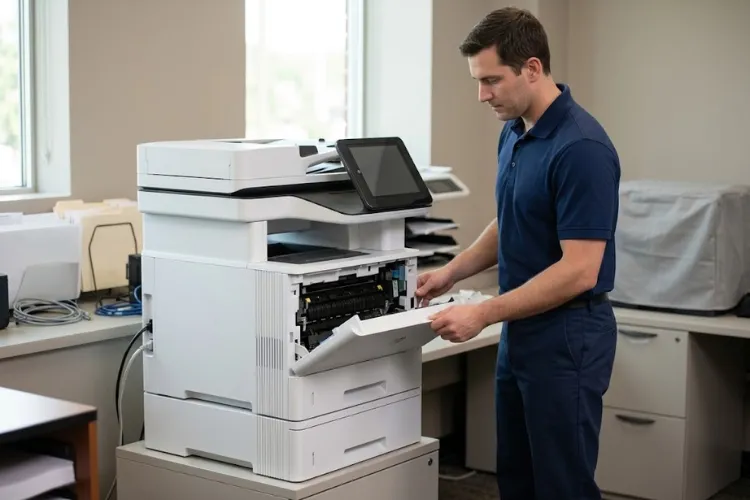
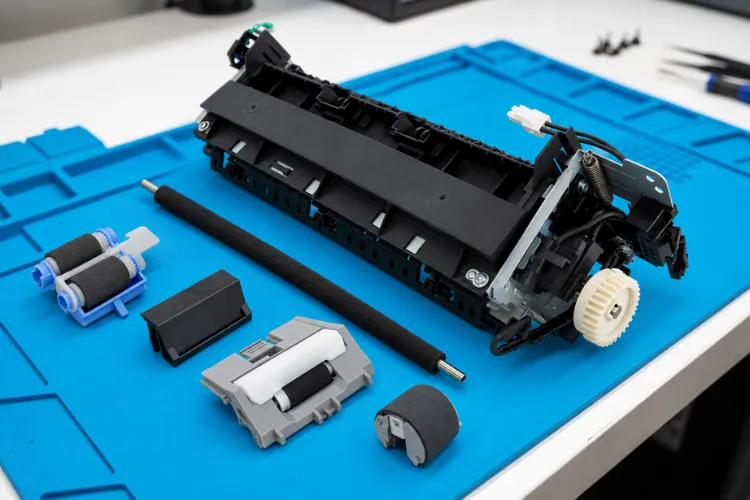
Before assuming an internal component has failed, a technician checks whether the fuser is fully seated in its cradle, whether the connector pins are clean and undamaged, and whether any trapped paper or visible damage is present. A correct HP M631 M632 M633 fuser replacement also depends on using the assembly built for this platform and confirming the voltage rating matches the printer.
Routine wear items are different from a failed fuser. Our HP LaserJet printer maintenance kits page covers scheduled roller and consumable replacement, while this page focuses specifically on diagnosing and correcting an active fuser fault rather than routine maintenance.
Internal electrical inspection, motor testing, and full assembly diagnosis are reserved for our service personnel, both for safety around a hot fuser and because those checks require test equipment most offices do not keep on hand.
A fuser stays hot well after a print job finishes, so office staff should let the printer cool and avoid touching the fuser area directly. Visible tray damage, unusual odors, or a fuser that will not seat are useful details to report rather than diagnose yourself.
Right-Door Access on the M631, M632, and M633
The M631, M632, and M633 share a right-door fuser layout, the same location HP’s documentation uses for clearing paper jams in the fuser area on these three models. That is different from the M607, M608, and M609, which use a rear-door fuser layout, so a procedure written for the rear-door platform should not be applied to this MFP family.
7. What the Fuser Motor, Pressure-Release Sensor, and Control Electronics Tell a Technician
The fuser motor drives the rotation of the fuser film sleeve and, on this platform, also drives the pressure-release mechanism. A dedicated pressure-release sensor and flag report the mechanism’s position back to the printer, so the DC controller knows whether the fuser is engaged or released at any given moment.
The low-voltage power supply provides the drive power the fuser motor and related circuits need to operate. When one of these components reports an unexpected state, replacement is recommended only after the applicable model-specific diagnostic procedure supports it, not simply because a code appeared.
That distinction protects the customer from an unnecessary parts swap and protects the printer from downtime spent chasing the wrong repair. It is also why a documented diagnostic sequence, not a guess, is what should determine which component actually gets replaced.
20+ Years Fixing HP LaserJet Enterprise Printers
Over 20 years servicing HP LaserJet Enterprise equipment means your fuser goes in right the first time. Every replacement uses High Quality Parts backed by our 6-month / 180-day warranty, and same-day service may be available.
8. Toner Rubbing Off, Repeating Shadows, and the Fuser Test Page
HP M631 M632 M633 toner not fusing correctly can look like a fuser fault even without a control-panel error. Toner that rubs off the page or repeating image shadows spaced at consistent intervals can point to the fuser, but the wrong paper type setting or unsupported paper stock can cause the same symptoms.
When the printer can still print, the documented Fuser Test Page, found under Support Tools, Troubleshooting, Print Quality Pages, is a useful first diagnostic step. Do not attempt to print a diagnostic page while an active fault is preventing printing altogether.
Before concluding the fuser has failed, confirm the paper type setting matches the stock actually loaded, since heavier or coated stock run on a light-paper setting can mimic a fusing defect. Ruling out paper suitability first avoids an unnecessary fuser replacement.
Toner quality also plays a role in fusing performance. We install high-quality third-party toner backed by a 1-year / 365-day warranty, which is formulated to fuse correctly on this platform rather than run at settings that stress the fuser unnecessarily.
A 13.B9 jam error in the right door is a paper-feed problem, not the same thing as a 50-series fuser error, even though both occur in the same area of the printer. General feed-path and duplex jam troubleshooting stays secondary to an actual fuser-error diagnosis on this page.
HP’s documentation for this platform also lists a 13.B4 jam code in the same right-door and fuser area. Both codes describe a physical paper obstruction rather than the electrical or mechanical fault behind a true 50-series fuser error, so clearing a jam does not resolve an underlying fuser fault.
9. When Onsite HP M631 M632 M633 Fuser Repair Makes Sense
We recommend service when a fuser error recurs, when a component shows visible damage, when fusing defects continue after paper and settings have been ruled out, or when the error returns after a replacement has already been installed. Post-repair verification confirms the fix actually resolved the reported HP Laserjet MFP M631 M632 M633 Fuser Error rather than only clearing the message temporarily.
Our technicians bring more than 20 years of office equipment experience to onsite printer repair for HP LaserJet Enterprise MFP equipment, including service for businesses covered by our HP LaserJet printer repair in Orange County service area. Same-day service may be available depending on scheduling.
Replacement fuser assemblies are installed using High Quality Parts backed by our 6-month / 180-day warranty on service and installed parts, and resetting a maintenance counter is never treated as a substitute for repairing damaged fuser hardware.
When you request service, a technician arrives onsite, tests the fuser and related components using the diagnostic sequence appropriate to the reported fault, and confirms the printer is producing clean, properly fused output before considering the visit complete.
Keeping an HP LaserJet Enterprise MFP fleet reliable is mostly about catching fuser wear before it turns into unplanned downtime. Preventative maintenance intervals, paired with prompt attention to a fuser fault the first time it appears, keep printing predictable rather than reactive.
FAQ's - Frequently Asked Questions -
Not always. HP ties the 50.7F.00 code to the fuser’s pressure-release mechanism rather than a single fixed cause, so a technician checks seating, connections, and the release mechanism itself before concluding the fuser assembly has failed.
A code that clears after a restart but returns later is an intermittent fault, not a resolved one. It typically means the underlying condition is still present and worth having diagnosed before it develops into a hard failure during a large print job.
This usually points to how the new assembly was installed rather than a defective part. Improper seating, a loose connector, or an assembly built for a different model in the M607–M633 family are the most common reasons an error returns immediately after replacement.
These models share the same engine platform, and HP documents the 50.7F.00 fuser error across all of them. The correct replacement assembly still needs to match the specific printer and its voltage rating rather than being assumed interchangeable without verification.
A jam, such as a 13.B9 code, means paper is physically stuck in the right door and fuser area. A 50-series fuser error is an electrical or mechanical fault reported by the fuser itself, and clearing a paper jam will not resolve an underlying fuser error.
Resetting a maintenance counter does not repair damaged fuser hardware. The counter only tracks page volume for scheduled maintenance, so an active fuser fault will continue even after the counter is reset.
Fuser replacements are covered by our standard 6-month / 180-day warranty on service and installed parts, giving you coverage on both the labor and the assembly itself.
We provide onsite service throughout Orange County and approved portions of Los Angeles County, and same-day service may be available depending on scheduling. Call (888) 657-0021 or email info@printer-repair-experts.net to check availability for your location.
