
HP LaserJet MFP M634 M635 M636 Printer Repair
When an HP LaserJet MFP M634 M635 M636 Printer Repair is done right, the machine stops fighting your staff and quietly goes back to work. These enterprise-class monochrome multifunction units are built for heavy office volume, and when one stalls, the whole workflow feels it. We service the M634, M635, and M636 families onsite, and this guide walks through what actually goes wrong with them and how a proper repair unfolds.

Preview snapshot:
- Why the M634, M635, and M636 jam, and which rollers are usually to blame
- What a 50.x fuser error means and when the fusing assembly needs replacing
- How the maintenance kit resets the wear clock on these MFPs
- How to read and clear print-quality defects like streaks and repeating marks
- How to open and use the pre-boot menu safely, including cold reset
- What a real onsite visit looks like, and how to decide between repair and replacement
Schedule Your $69.99 HP LaserJet MFP M634 M635 M636 Printer Repair
What Does HP LaserJet MFP M634 M635 M636 Printer Repair Actually Cover?
Repair on the M634, M635, and M636 covers the full mechanical and electronic service of these FutureSmart 4 multifunction printers, from paper handling to the fuser to the scanner and network stack. In plain terms, it means diagnosing why the unit misbehaves and fixing the root cause rather than the symptom.
Our HP LaserJet MFP Printer Repair work on this family usually starts at the control panel. The event log and configuration page tell us what the printer has been complaining about before anyone touched it.
From there, HP LaserJet Printer Repair on the M6-series splits into a few predictable buckets: pickup and feed faults, fuser wear, print-quality drift, connectivity trouble, and firmware issues. Most calls land in one of those. HP Customer Support
Because these are shared, high-duty devices, our approach to HP Printer Repair is built around uptime. We carry common M634, M635, and M636 wear parts on the vehicle so a single visit can usually close the ticket. We also service HP Color LaserJet Printer Repair for shops running mixed mono and color fleets.
Why Does the HP LaserJet M634, M635, or M636 Keep Jamming?
A printer that jams repeatedly is almost never “just paper.” On this platform, recurring jams trace back to worn rubber, a tired separation roller, or a sensor flag that no longer reads cleanly. A single HP LaserJet M634 Paper Jam can be bad media; a daily one is a mechanical pattern.
When we see a HP LaserJet M635 Paper Jam that repeats in Tray 2, the first suspects are the pickup and separation rollers. Glazed rollers slip, grab two sheets, or grab late, and the printer reports a mispick. A repeating HP LaserJet M636 Paper Jam in the same location points the same direction.
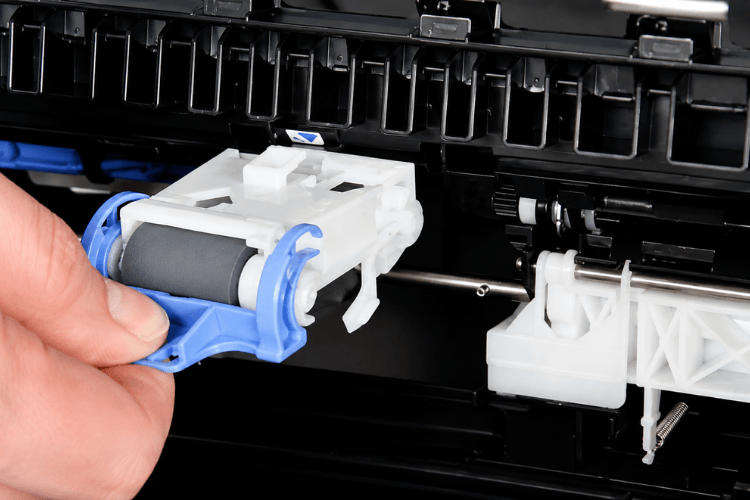
The tray rollers are wear items. We replace the HP LaserJet M634 Pickup Roller when its surface goes hard and shiny, and the same logic applies to the HP LaserJet M635 Pickup Roller and the HP LaserJet M636 Pickup Roller. New rubber restores grip and separation in one pass.
Feed rollers downstream matter just as much. A worn HP LaserJet M634 Feed Roller lets sheets arrive skewed or late at the registration sensor. We inspect the HP LaserJet M635 Feed Roller and HP LaserJet M636 Feed Roller on the same visit, since they wear on the same duty cycle.
Jam-clearing technique matters too. Yanking paper backward against the feed direction can tear the leading edge and leave a scrap behind a sensor, which triggers the next phantom jam. We clear along the paper path and confirm every sensor flag returns to rest.
. What Causes a Fuser Error on the M634, M635, and M636?
A fuser error means the printer cannot reach or hold the temperature needed to bond toner to the page, and it usually surfaces as a 50.x code. The HP LaserJet M634 Fuser Error family (50.1 through 50.5, and 50.11) covers low heat, high heat, warm-up, and thermistor faults.
A HP LaserJet M635 Fuser Error often shows up first as toner that smears or wipes off the page before the printer ever posts a hard code. When a HP LaserJet M636 Fuser Error locks the unit out entirely, the fusing assembly is usually at or past its rated life.
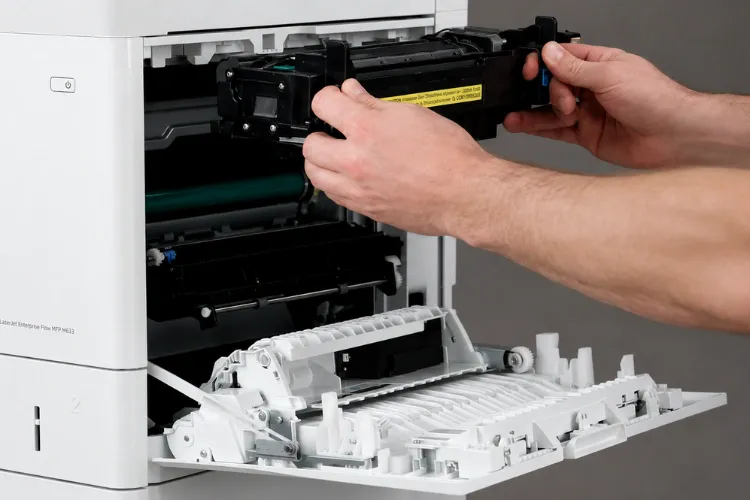
We do not simply swap parts on a fuser complaint. Before any HP LaserJet M634 Fuser Replacement, we verify the code, check the fuser connectors, and confirm the fault is the fuser and not the low-voltage power supply feeding it.
Once verified, replacement is straightforward. A HP LaserJet M635 Fuser Replacement or HP LaserJet M636 Fuser Replacement uses the RM2-1256 fusing assembly, the same fuser shared across this M6-series platform. We use HP Parts so the temperature curve and fit match the engine exactly.
When Should You Install the Maintenance Kit on These MFPs?
The maintenance kit is preventive, not reactive: it bundles the highest-wear paper-path parts so you replace them together on schedule instead of chasing them one failure at a time. On this platform the kit is HP L0H24A (110V), also cataloged as J8J87A, and it carries the RM2-1256 fuser plus tray roller sets.
Install the HP LaserJet M634 Maintenance Kit when the printer signals the kit is low, or around its rated interval near 225,000 pages. Waiting past that point is where jams and fuser codes start to cluster.
The HP LaserJet M635 Maintenance Kit and HP LaserJet M636 Maintenance Kit follow the same schedule because all three models share the engine. After installation we reset the maintenance-kit counter so the printer tracks the new interval correctly.
Based on our field experience, installing the kit on time is the single most effective way to keep a busy M6-series MFP out of the repair queue. It resets the wear clock on the fuser and rollers in one planned visit.
Professional HP LaserJet MFP M634 M635 M636 Repair Service
How Do You Fix Print Quality Problems on These MFPs?
Print-quality faults are a language: the pattern on the page tells you which component is failing. Vertical lines, faded output, gray backgrounds, and evenly spaced repeating marks each point somewhere specific. That is why HP LaserJet M634 Print Quality Problems are diagnosed by reading the defect, not by guessing.
A repeating spot at a fixed interval usually means a nick or contamination on a rotating roller, and the spacing tells us which one. Many HP LaserJet M635 Print Quality Problems resolve once the offending roller or the toner cartridge is addressed.
Streaking, smearing, and light print are the most common HP LaserJet M636 Print Quality Problems we see in the field. Smear that rubs off signals the fuser; light print often traces to a low cartridge, a dirty registration area, or an economode setting left on.
We also run the printer’s own cleaning page and internal print-quality test pages before condemning any part. Confirming the pattern on a known test page keeps the repair honest and avoids replacing good components.
How Do You Use the Pre-Boot Menu on the M634, M635, and M636?
The pre-boot menu is a low-level startup menu that opens before the printer fully loads its firmware, and it is where cold resets, disk operations, and firmware recovery live. Per the special instruction for this page, here are the pre-boot menu options and instructions, drawn from HP’s own service documentation for this platform.
To open it, turn the printer on and, when the HP logo appears on the touchscreen, touch and hold the logo until the Pre-boot menu opens. Use the on-screen arrow buttons to move and touch OK to select an item.
The top-level options on these FutureSmart units are: Continue, which resumes the normal boot and is also the default; Sign In, which prompts for an administrator or service PIN when one is set; Administrator, which contains firmware download and disk-management tools; and Startup Options, which includes the cold reset.
To perform a cold reset, open the menu, navigate to Startup Options, highlight Cold Reset, then select Continue so the printer initializes with many settings returned to factory defaults. If no selection is made within about 30 seconds at the first screen, the printer boots normally on its own.
The Administrator branch also holds Manage Disk, with Partial Clean and Format Disk. Treat these with care.
One important caution, straight from HP: Format Disk performs a full disk initialization and will erase the operating system, firmware, and third-party files on the drive. HP advises not to run it without contacting HP support first. Deeper items in this menu are reserved for authorized service, and HP publishes the complete pre-boot table in the service manual.
What Should You Expect From an Onsite Service Visit?
An onsite visit means the technician comes to the printer, so the machine never leaves your floor and downtime is measured in hours, not days. Our Onsite Printer Repair on the M634, M635, and M636 begins with the event log and a short set of test prints to reproduce the fault.
Because we stock common fusers, maintenance kits, and rollers, Same Day Printer Repair is available for many M6-series issues. Having the part on the vehicle is what turns a two-visit job into one.
We frame our Office Printer Repair work around the reality that these units are shared. A single stalled MFP can back up an entire department, so we prioritize getting the device fully back into rotation, not just cleared of its current code.
That same standard drives our Commercial Printer Repair and Business Printer Repair service: verify the root cause, use HP Parts, test under a real workload, and leave the printer running before we close the ticket. Every repair carries our 6-month (180-day) warranty on service and installed parts.
Our coverage spans the approved service area, including Printer Repair City of Industry CA, Printer Repair Pico Rivera CA, Printer Repair Santa Ana CA, and Printer Repair South El Monte CA. For mixed mono-and-color fleets, we also handle HP Color Laserjet Printer Repair and HP Laserjet Printer Repair on the same visit.
Need HP LaserJet MFP M634 M635 M636 Printer Repair Today?
Is It Better to Repair or Replace an Aging M6-Series MFP?
The repair-versus-replace decision comes down to remaining life against the cost of the fix, and on this platform repair usually wins for a wide margin of faults. A fuser, a set of rollers, or a maintenance kit is a fraction of a new enterprise MFP and restores full function.
Replacement starts to make sense when multiple major systems fail close together, or when a unit is far past its rated duty and the scanner, formatter, and engine are all aging at once. We will tell you honestly when a printer has reached that point.
Before recommending replacement, Printer Repair Experts performs a complete diagnosis to verify the actual cause of the failure. We would rather save a serviceable machine than sell you out of one that has years left.
For most M634, M635, and M636 units in daily office service, a timely maintenance kit and prompt attention to jams and fuser codes keep total cost of ownership low and the printer productive.
How Do You Keep a Fleet of M634, M635, and M636 MFPs Reliable?
Fleet reliability is a maintenance rhythm, not a single event: track pages, replace wear parts on schedule, and keep firmware current. A fleet that follows its maintenance-kit intervals simply jams and faults far less often.
We recommend logging page counts per device so kits and rollers are replaced before failure, not after. Predictable maintenance turns emergency downtime into planned, quiet service windows.
Keeping FutureSmart firmware reasonably current also matters, since updates address handling and security behavior. On dynamic-security-enabled firmware, HP chips are required for cartridges to be recognized, which is one more reason we discuss supplies strategy with fleet customers.
High-quality toner keeps a fleet running between service calls, and we back the toner we supply with a 1-year (365-day) warranty. Reliable supplies plus on-time kits are what keep an M6-series fleet boringly dependable, which is exactly what an office wants.
Ready to Get Your M634, M635, or M636 Back to Work?
If one of these MFPs is jamming, throwing a fuser code, or printing poorly, we can help fast. Our technicians service the HP LaserJet M634, M635, and M636 onsite, use HP Parts, and back the work with a 6-month warranty.
Call (888) 657-0021 or email info@printer-repair-experts.net to schedule a visit. New customers can ask about our $69.99 flat onsite labor special for one qualifying HP LaserJet or HP Color LaserJet repair visit; the promotion is subject to limitations and applies to qualifying models only. Same-day service is available for many M6-series repairs.
FAQ's - Frequently Asked Questions -
Plan on the kit around its rated interval, roughly 100,000 to 200,000 pages, or sooner if the control panel flags the kit as low. Installing on schedule prevents most jams and fuser codes rather than reacting to them after a failure.
The RM2-1256 fusing assembly is a modular swap on this platform, and no soldering is involved. After installation we reset the appropriate counter so the printer tracks the new interval; verifying the original code first ensures the fuser was actually the fault.
Almost always, yes. Recurring jams on this family are usually worn pickup, feed, and separation rollers or a scrap of paper behind a sensor, all of which are inexpensive to service compared to a new MFP.
For many common faults, yes, because we stock fusers, maintenance kits, and rollers for the M6-series. Same-day depends on parts availability and scheduling, but carrying the parts on the vehicle is what makes single-visit repairs realistic.
Toner that rubs off has not been fused, which points to the fuser reaching end of life or a developing 50.x condition. It is one of the clearest signals that a fuser inspection, and often a replacement, is due.
It is a low-level startup menu used for cold resets, disk management, and firmware recovery. The cold reset is generally safe, but disk-format operations erase the printer’s firmware and files, so those should not be run without HP support guidance.
Yes. We service HP LaserJet and HP Color LaserJet enterprise printers, so a single onsite visit can address a mixed fleet, and we can set up maintenance intervals so the whole group stays on schedule.
