
Why Does My Printer Keep Jamming? Recurring HP LaserJet Paper Jams Explained
Why does my printer keep jamming is the question we hear most often from office managers who have already cleared the same jam three times this week. A single jam is usually just one bad sheet. Repeated jams mean the underlying paper, loading, paper-feed, paper-path, sensor, or mechanical condition has not been corrected yet.
We service HP LaserJet, HP Color LaserJet, and HP LaserJet MFP equipment every week, and when a customer asks why does my printer keep jamming, the answer is almost always identifiable rather than random. The printer is telling you where it lost control of the sheet. Learning to read that message is what turns a weekly nuisance into a one-visit repair.
Preview Snapshot
Here is the short version of why does my printer keep jamming, before the detail:
- One jam is an event. Recurring printer paper jams are a symptom of a condition that keeps repeating itself.
- Jam location answers why does my printer keep jamming faster than anything else — tray, registration, fuser area, output, and duplex path each implicate different components.
- Worn printer pickup rollers, worn feed rollers, and worn separation rollers cause the largest share of repeated paper jam problems on high-volume HP LaserJet printers.
- A printer keeps saying paper jam with nothing visible when a sensor, sensor flag, or paper fragment holds the paper-path circuit closed.
- Paper condition and tray loading account for a surprising number of jams that look mechanical at first.
- 13.xx paper jam errors are model-specific, and the subcode must be read against documentation for that exact HP LaserJet family.
1. Why Does My Printer Keep Jamming Instead of Jamming Once and Stopping?
Why does my printer keep jamming after you have already cleared the sheet, closed the doors, and restarted the job? Because clearing a jam removes the evidence, not the cause. The printer stops when a sheet fails to reach a sensor within an expected window, and if the reason it arrived late is still present, the next sheet does exactly the same thing.
That distinction matters more than most people expect. An isolated jam has a one-time explanation: a stapled sheet went back into the tray, a label sheet fed from the wrong tray, someone added paper mid-job. A recurring jam has a standing explanation, and standing explanations are mechanical, environmental, or configuration-based.
Isolated Jam vs. Recurring Mechanical Problem
We use a simple field test. If the printer runs a 200-page job cleanly after the jam is cleared, treat it as isolated. If it jams again inside the next few hundred pages — especially at the same point in the path — stop clearing it repeatedly and start diagnosing it.
The commercial cost is real. Every repeated clear interrupts a print queue and risks tearing paper deeper into the machine. Offices still asking why does my printer keep jamming after twenty clears usually face a longer repair than offices that called after the third.
2. Where the Paper Stops: Using Jam Location as Your First Diagnostic Clue
When someone asks us why does my printer keep jamming, our first question back is always the same: where does it stop? Symptom: the control panel names a location — Tray 2, rear door, output bin, duplexer — and names the same one repeatedly. Root cause: a sheet is being delayed or stopped at one stage of the paper path, and each stage is driven by different components.
HP documents jam locations separately for a reason. On the HP LaserJet Enterprise M607, M608, and M609 family, jam-clearing procedures are published individually for Tray 1, Trays 2 through 5, the high-capacity input tray, the rear door and fuser area, the output bin, the duplexer, and the envelope feeder. Those divisions map onto the components you should suspect.
| Where it repeatedly jams | What that stage usually implicates |
|---|---|
| Inside or just past the tray | Pickup roller, feed roller, separation roller or pad, tray guides, paper condition |
| Registration area | Registration rollers, paper skew, debris in the path, sheet arriving late |
| Rear door / fuser area | Fuser assembly, paper wrap, heavy or damp media, output delivery |
| Output bin | Delivery rollers, output sensor or flag, stacking obstruction |
| Duplex path | Duplex assembly, reversing area, curl carried over from the first pass |
Diagnosis: record the location and the error text for three consecutive jams before touching anything. If all three name the same stage, why does my printer keep jamming has already narrowed to a handful of components. If they scatter across the whole path, suspect paper, humidity, or a fragment traveling through the machine.
When we recommend service: once the same location repeats three times on correctly loaded, undamaged paper, why does my printer keep jamming has a mechanical answer, and it belongs to a technician with parts on hand.

Recurring Jams? Start With Our $69.99 Onsite Printer Repair Promotion
One printer, one onsite visit, one flat promotional rate — including hands-on inspection of the rollers, sensors, and paper path that keep jamming. Call (888) 657-0021 or email info@printer-repair-experts.net to schedule. Limitations may apply.
3. Paper Condition, Tray Loading, and Settings That Trigger Repeated Paper Jam Problems
Before assuming why does my printer keep jamming is a hardware question, eliminate the sheet itself. Symptom: jams cluster around one tray, start after a new case of paper arrives, or worsen in summer humidity. Root cause: the paper is not behaving predictably as it enters the path.
Curled, damp, wrinkled, previously printed, or unsupported media changes how a sheet separates from the stack. So does storage. Paper left open in a humid stockroom takes on a wavy edge; paper kept very dry builds static and clings sheet-to-sheet. Either condition answers why does my printer keep jamming without a single worn part being involved.
Tray Loading Faults We Find Constantly
- Overfilled trays. HP instructs that the top of the stack stay below the tray-full indicator specifically to prevent jams.
- Guides not touching the stack. Guides should contact the paper without bending it; loose guides allow skew, tight guides bind the sheet.
- Paper added during printing. HP warns against adding or removing paper from Tray 1 mid-job.
- Two trays extended at once on floor-standing units, which HP cautions against.
- Mixed stock in one tray — letterhead, three-hole, and plain paper stacked together feed inconsistently.
Configuration matters too. If a tray is set to Plain while the job runs heavy cardstock or labels, the printer applies the wrong feed and fusing behavior. Size mismatches do the same. Correcting paper size and type per tray answers why does my printer keep jamming for a meaningful share of printer paper feed problems at no parts cost.
Remedy and diagnosis: open a fresh ream, load it correctly, set tray type and size to match, and run 250 pages. If the recurring printer paper jams stop, the cause was media or configuration. If they continue, paper has been eliminated as a variable. HP’s own HP LaserJet Enterprise M607, M608, M609 user guide includes a dedicated section on frequent and recurring jams that follows this same sequence.
4. Worn Printer Pickup Rollers, Feed Rollers, and Separation Components
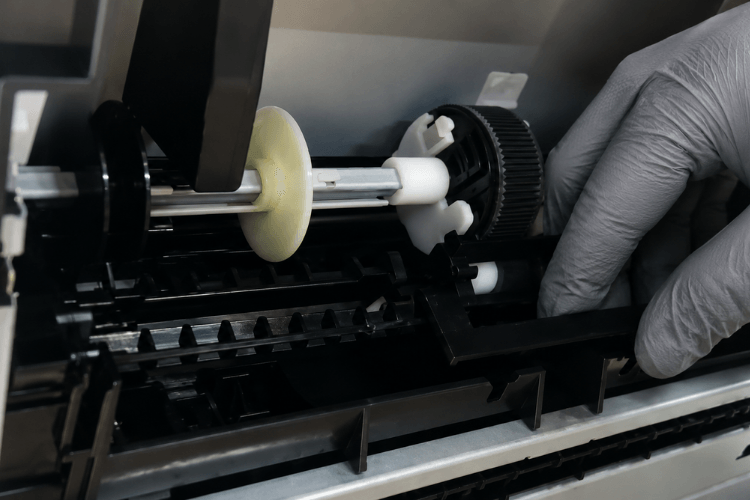
This is where most recurring jams end up. Why does my printer keep jamming on good paper in a correctly loaded tray? Because the rubber that grips that paper has a service life, and it wears out quietly long before anything looks broken.
Pickup Rollers: Losing Grip First
Symptom: the printer hesitates, then reports a jam with the sheet barely inside the machine, or reports an empty tray that is not empty. Root cause: worn printer pickup rollers have glazed, hardened, or lost traction and can no longer pull the top sheet. On a five-year-old unit this is the most likely answer to why does my printer keep jamming at the tray.
Diagnosis: a technician inspects the roller surface for glazing and flat spots, checks whether the roller rotates without dragging the sheet, and correlates the failure against the printer’s page count. Repair component: the pickup roller — and on many HP LaserJet families the tray roller set is a documented customer self-repair part.
Feed Rollers and Separation Rollers: Misfeeds and Multi-Feeds
Symptom: two or three sheets enter together, or a sheet enters crooked and jams downstream. Root cause: worn feed rollers no longer advance a single sheet cleanly, and worn separation rollers or separation pads no longer hold back the sheet underneath.
Multi-feeding is the signature of a separation problem specifically, and it is the most frequent mechanical answer to why does my printer keep jamming on a busy tray. HP treats a printer that picks up multiple sheets as its own troubleshooting path, distinct from one that fails to pick up at all. Repeat that distinction to your technician.
Remedy: replace worn feed and separation components as a set rather than individually. Replace one and leave the other, and why does my printer keep jamming returns within weeks. We use HP Parts, High Quality Parts, or Premium Parts depending on the model and availability.
When we recommend service: when a tray misfeeds or multi-feeds after paper has been ruled out. This pattern is common enough on high-volume units that we maintain dedicated references for HP LaserJet M604 M605 M606 paper jam problems and for HP LaserJet M601 M602 M603 paper jam repair.
5. Why Does My Printer Keep Jamming in the Same Place Every Time?
Why Does My Printer Jam in the Same Place
Why does my printer keep jamming at one identical point while the rest of the path runs clean? A repeating location is the most valuable signal a printer can give you, because it eliminates almost everything upstream and downstream of that point.
Root cause, in the order we actually find them: a torn fragment or foreign object lodged in the path; a damaged or deformed guide surface; a worn roller at that exact stage; or a registration component that no longer squares the sheet before it advances.
Diagnosis: the path is inspected with a light at that stage, including behind guides where a torn corner can sit for months. Registration behavior is checked against the sheets that do make it through — when skew or shift appears on printed output, why does my printer keep jamming points at registration rather than the tray.
Repair component: depending on the stage, the registration assembly, transfer roller, feed roller, or a paper-path guide. When we recommend service: immediately, because forcing sheets through a damaged stage tends to enlarge the damage. Model-specific behavior differs here, which is why we maintain separate HP LaserJet M610 M611 M612 paper jam repair coverage rather than generalizing across families.
Torn paper deserves its own warning. When printer jams after removing paper become the pattern, why does my printer keep jamming usually has a very literal answer: a strip of the previous sheet stayed behind. Pulling paper against the direction of travel causes that, and it turns a five-minute clear into a repeat visit.
Why Does My Printer Keep Jamming? We Find the Failing Part
Our technicians inspect pickup, feed, and separation components for wear, test paper-path sensors and flags, and read the printer’s jam history onsite — so the part that gets replaced is the part that actually failed. Same-day service may be available. Call (888) 657-0021.
6. Why Does My Printer Keep Jamming When the Sheet Is Already Gone?
Why Does My Printer Say Paper Jam When There Is No Paper
Why does my printer keep jamming according to the display when the paper path is visibly empty? This is a paper jam with no paper stuck, and it is a sensor conversation rather than a paper conversation. HP’s error guidance is explicit: when a jam message persists after all media has been cleared, a sensor or sensor flag may be stuck or broken.
Symptom: the printer keeps saying paper jam after every door cycle, or throws a jam at power-on before anything has printed, leaving why does my printer keep jamming with no physical evidence at all. Root cause: a mechanical sensor flag is bent, sticking, or held down by debris; an optical sensor is contaminated or failed; or a fragment small enough to hide still blocks the beam.
Diagnosis: a technician checks every accessible flag for free movement, inspects sensor windows for toner dust and paper lint, and uses the printer’s jam history and event log to identify which sensor reported the fault. That log is the fastest route to an answer, and it is the main reason paper jam sensor problems are worth diagnosing onsite rather than over the phone.
Remedy and repair component: clear the obstruction, free or replace the sensor flag, or replace the failed sensor or sensor assembly identified by documentation for that model. When we recommend service: as soon as why does my printer keep jamming produces no recoverable sheet, since guessing at sensors without documentation is how good assemblies get replaced unnecessarily.
7. Why Does My Printer Keep Jamming Only on Double-Sided Jobs?
Why Does My Printer Jam When Printing Double-Sided
Symptom: single-sided jobs run fine, and duplex paper jams begin the moment two-sided printing is enabled. Root cause: the duplex path asks more of the sheet. It has already passed through the fuser once, which drives out moisture and adds curl, and it then has to reverse direction and re-enter a narrower route.
Marginal components tolerate a simplex job and fail a duplex one. A roller with slightly reduced grip, a sheet with slightly too much curl, or paper slightly heavier than the tray setting will each pass in one direction and jam on the second.
Diagnosis: run the identical job simplex and duplex from the same tray with the same ream. If simplex is clean and duplex jams, why does my printer keep jamming narrows to the duplex assembly, the reversing area, and media curl. Verify as well that the media is a supported weight for two-sided printing.
Paper Jam in Fuser Area: What It Usually Means
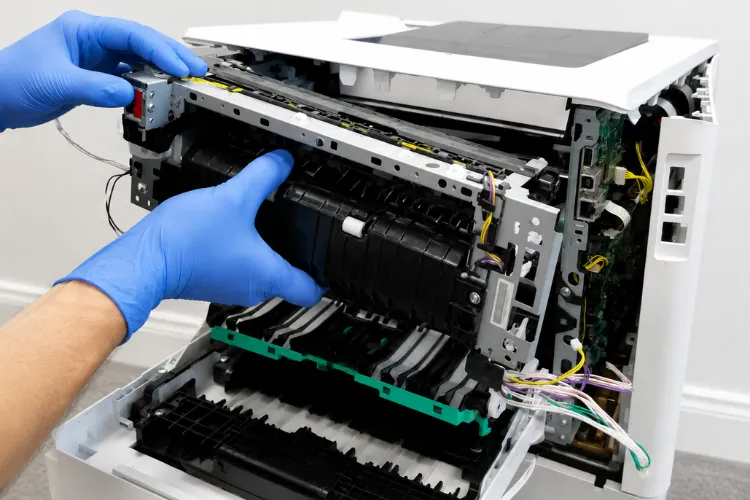
When why does my printer keep jamming points at the back of the machine, a repeating paper jam in fuser area on an HP LaserJet is something we take seriously. Symptom: sheets stop at the rear door, or arrive at the output bin creased, accordioned, or wrapped. Root cause: media is not moving correctly through the fuser — worn or damaged fuser rollers, a deformed guide, debris, or a paper type setting driving incorrect fusing behavior.
Repair component: the fuser assembly, when documentation supports it. We replace applicable fuser assemblies; we do not rebuild fusers onsite. On HP LaserJet Enterprise models the fuser is documented as a replaceable part, and replacement is the appropriate corrective action once the assembly is the confirmed cause.
When we recommend service: promptly. The fuser area runs at high temperature, jams there crease and tear paper deep in the machine, and repeated wrapping can damage adjacent components.
Two Decades of HP LaserJet Paper-Path Repairs
We repair HP LaserJet, HP Color LaserJet, and HP LaserJet MFP paper-feed failures onsite using HP Parts, High Quality Parts, and Premium Parts, backed by our 6-month / 180-day warranty on service and installed parts. Call (888) 657-0021 or email info@printer-repair-experts.net.
8. HP LaserJet 13.xx Paper Jam Errors, Maintenance Kits, and High Page Counts
Customers frequently phrase it as why does my HP printer keep jamming, and the HP-specific answer starts with the code on the panel. HP LaserJet 13.xx paper jam errors name both the fault and its location: the 13 prefix identifies a jam, and the subcode identifies where the sheet was expected and did not arrive on time.
HP also documents that when a 13.xx message persists after all media is cleared, a sensor or sensor flag should be suspected. That single line resolves a great many cases where why does my printer keep jamming has no visible sheet behind it.
Subcodes are not universal. The same digits can mean different stages on different HP LaserJet families, so a subcode only answers why does my printer keep jamming when it is read against documentation for the exact model in front of you. HP publishes model-scoped articles for this reason — a 13.A1 jam at the Tray 1 feed sensor, for example, is documented specifically for the HP LaserJet M607 through M612 and the related HP LaserJet Managed E60055 through E60175 families.
We keep model-scoped notes rather than one universal chart. For recurring jams on the 600-series Enterprise units, our HP LaserJet paper jam repair reference covers the paper-path components involved. Future references for HP LaserJet M501 M506 M507 Paper Jam and HP LaserJet M631 M632 M633 Paper Jam symptoms follow the same model-scoped approach.
Maintenance Kits and the Page-Count Connection
Printer maintenance kit paper feed problems are predictable in a way most jams are not. Long-life consumables are rated in pages, and on the HP LaserJet Enterprise M607, M608, and M609 the maintenance kit carries an estimated life of roughly 225,000 pages under HP’s stated test conditions.
Those conditions matter. HP notes that narrow media, paper heavier than 75 g/m², and short print jobs all shorten consumable life against the estimate. For an office running two-page invoices on heavy stock, why does my printer keep jamming can simply mean the kit is due earlier than the page counter suggests.
When a printer at 240,000 pages starts jamming, the page count is the diagnosis. Installing the correct HP LaserJet printer maintenance kit replaces the worn feed components and, where the kit includes it, the fuser assembly — addressing several potential jam causes in a single visit.
How To Prevent Paper Jams in an HP LaserJet Printer
- Store paper sealed and acclimated, and keep the room within the printer’s stated operating humidity range.
- Load below the tray-full indicator and set guides to touch without bending the stack.
- Set paper type and size per tray to match what is actually loaded.
- Track page counts against maintenance-kit intervals instead of waiting for symptoms.
- Log jam locations and error codes — the pattern is worth more than any single incident.
9. When Recurring Jams Justify Onsite HP LaserJet Paper Jam Diagnosis
At some point why does my printer keep jamming stops being a troubleshooting question and becomes a scheduling one. Clearing a visible sheet, reloading a tray correctly, opening a fresh ream, and correcting a tray setting are all reasonable in-house steps. Everything past that involves wear measurement, sensor testing, and parts.
Stop asking why does my printer keep jamming and call us when any of these are true: the same location jams three times on good paper; the printer multi-feeds; the printer keeps saying paper jam with nothing stuck; jams appear only on duplex jobs; or the unit is deep into maintenance-kit territory. Those patterns rarely resolve themselves.
What an Onsite Visit Actually Involves
Our technician reads the jam history and error log, inspects pickup, feed, and separation components for wear, checks registration and paper-path sensors and flags, examines the duplex and fuser areas where applicable, and identifies the failed component before quoting anything. That is what onsite HP LaserJet paper jam diagnosis means in practice, and it is how why does my printer keep jamming gets a definite answer.
Repairs use HP Parts, High Quality Parts, or Premium Parts as appropriate for the model, and every repair and installed part carries our 6-month / 180-day warranty. We have worked on HP LaserJet equipment for more than 20 years, across medical offices, law firms, accounting practices, schools, warehouses, and distribution facilities in Anaheim, Irvine, Santa Ana, Fullerton, Huntington Beach, and the surrounding Orange County communities we serve.
Repair or Replace?
Most jam-related failures are worth repairing. Rollers, separation components, sensors, and fuser assemblies are serviceable parts on high-volume HP LaserJet hardware, and professional printer paper jam repair typically costs a fraction of replacing a working printer. We say plainly when age and accumulated wear make replacement the better call.
So the next time someone in your office asks why does my printer keep jamming, treat it as a diagnosable mechanical question with a short list of answers. If your HP printer keeps jamming, or an HP LaserJet keeps jamming despite fresh paper and a clean tray, we can identify which component is responsible.
Schedule onsite HP LaserJet printer repair and we will find it, replace it, and get the fleet running full jobs again without a technician standing over it. Why does my printer keep jamming should be a question you ask once, not every week.
FAQ's - Frequently Asked Questions - Recurring HP LaserJet Paper Jams
Usually not. A single jam often traces to one damaged sheet, a stapled page returned to the tray, or paper added mid-job. Treat it as isolated if the printer then runs a few hundred pages cleanly. If it jams again inside that window, why does my printer keep jamming has become a diagnostic question rather than an isolated event.
There is no universal number, but a practical threshold is three jams at the same location on correctly loaded, undamaged paper. At that point the remaining causes are mechanical. Repeatedly clearing the same jam also raises the chance of tearing paper deeper into the machine, which turns a straightforward repair into a longer one.
Two explanations cover most cases. Either a fragment of the previous sheet stayed behind in the path, or the worn component that caused the original jam was never replaced. A jam clear is not a repair. If jams resume within a few hundred pages, the underlying feed, sensor, or paper-path condition is still present.
Cleaning can restore grip temporarily when the surface is contaminated with paper dust or toner. It does not help once the rubber has hardened or glazed, because the material itself has changed. If cleaning buys a few hundred pages and the misfeeds return, the components are worn rather than dirty and replacement is the correct remedy.
Yes, more than most offices expect. Weight, moisture content, and cut quality all affect how a sheet separates from the stack. Paper stored open in a humid room absorbs moisture and develops wavy edges; very dry storage builds static that makes sheets cling together. Keeping stock sealed until use eliminates a real share of jams at no cost.
An overfilled tray is one of the most common causes we see. HP specifies that the top of the stack stay below the tray-full indicator precisely to prevent jams, because an over-tall stack changes the pressure at the pickup point. Guides set slightly too tight against a full stack produce the same result by binding the sheet as it lifts. When the pattern tracks the tray level, why does my printer keep jamming usually has a loading answer rather than a parts answer.
They overlap without being identical. A maintenance kit replaces wear components on a scheduled page-count basis and often resolves feed-related jams as a side effect. A jam repair targets a specific failed component, which may be a sensor, registration part, or duplex assembly no kit includes. We install HP Parts, High Quality Parts, or Premium Parts, and we do not install or guarantee customer-supplied parts.
Service and installed parts carry our 6-month / 180-day warranty. Scheduling depends on technician availability and your location within our Orange County service area and approved portions of Los Angeles County; same-day service may be available. Call (888) 657-0021 or email info@printer-repair-experts.net and we will give you a realistic window when you call.
