
HP Laserjet M607 M608 M609 Perform Maintenance
The HP Laserjet M607 M608 M609 Perform Maintenance prompt is the printer telling you that its fuser kit has reached the page interval HP assigned to it. Nothing has failed yet. Pages keep coming out, the queue keeps moving, and that is exactly why the notice gets dismissed for months at a time.
Waiting is where the cost shows up. A scheduled kit installation takes a technician roughly half an hour; a fuser that fails mid-shift takes a department offline. This guide walks through what the message means, which parts wear, how the kit goes in, and why the counter sometimes refuses to clear.

Preview Snapshot
- What triggers HP Laserjet M607 M608 M609 Perform Maintenance and what the related control panel codes indicate
- Which components inside the M607, M608, and M609 actually wear out, and in what order
- What ships inside kit L0H24A and L0H25A, including fuser, transfer roller, and tray roller sets
- How the counter clears on this printer family, and why there is no reset entry buried in the menus
- The feed symptoms that appear weeks before the printer ever posts a maintenance notice
- What a scheduled onsite visit looks like, and how it compares to an emergency call
69.99 Onsite Printer Repair Promotion
What Is the Printer Actually Telling You When It Asks for Maintenance?
It is reporting a page count, not a defect. These printers track fuser kit life on a counter that runs separately from toner life, and the notice is a scheduling prompt rather than a fault condition. On the day the message appears, output quality is usually still acceptable.
The wording varies by firmware level and control panel type. Keypad models tend to show a supplies status line, while touchscreen M608x and M609x units surface the same condition inside the supplies app. A status of Maintenance/Low simply means the counter has crossed the advance-warning threshold.
Owners searching for Perform Maintenance After 100,000 Pages are usually carrying a habit forward from older LaserJet families, where kits were rated near that figure. On the M607, M608, and M609, HP rates the fuser maintenance kit at up to 225,000 pages. Managed E600xx and E601xx variants are rated slightly higher.
Verify before you act. A supplies status page shows current fuser kit life as a percentage alongside toner levels, and it settles arguments about whether a printer is genuinely due or simply displaying a stale message from a previous cycle.
That gap matters for budgeting. A department running 8,000 pages a month will not see this notice for roughly two years, so it rarely appears in anyone’s planning calendar. It arrives unannounced, on a deadline day, in a machine nobody was thinking about.
Which Components Wear Out First Inside These Printers?
The fuser leads, and the paper path follows close behind. Heat and pressure degrade the fusing film and pressure roller steadily, while every sheet that passes through abrades the pickup, feed, and separation rollers in each tray.
Our technicians see the wear pattern repeat across sites. Tray 2 rollers glaze first because that tray absorbs the bulk of daily volume, and optional 500-sheet feeders age at very different rates depending on which tray the drivers default to. Preventive Maintenance exists to reset all of that at once instead of chasing it part by part.
Tray 1 gets overlooked almost universally. The multipurpose tray uses its own pickup and separation rollers, and offices that run envelopes, labels, or heavy stock from it wear those parts far faster than the cassette rollers. If a printer feeds cleanly from Tray 2 but fights every envelope, that is the tray to inspect first.
The transfer roller is the quiet one. It does not announce itself with a code, but a worn or contaminated roller shows up as faint background haze or uneven density across wide fills. Because it ships inside the same kit, Secondary Transfer Roller Replacement is a phrase that follows technicians over from color hardware; on these monochrome models the correct component is simply the transfer roller.
Which Control Panel Codes Point Back to the Fuser Kit?
Four codes cover nearly every maintenance-related message on this family, and each one calls for a different response.
| Code | What It Indicates | Practical Response |
|---|---|---|
| 10.23.60 Fuser Kit low | Fuser kit life has crossed the low threshold | Order the kit; no interruption yet |
| 10.23.70 Replace Fuser Kit | The printer is running past the very low threshold | Schedule installation now; premium protection warranty has ended |
| 10.23.15 Install Fuser kit | A required fuser kit is not installed or was not recognized | Verify seating, then verify the part is correct for the voltage |
| 10.26.15 | A maintenance kit supply event; confirm against the service manual | Treat as a kit replacement prompt and diagnose per HP documentation |
Two related codes are worth knowing. A 10.23.35 event indicates an incompatible fuser, which we most often trace to a 220V assembly landing in a 110V machine. The 10.23.5x family reports that kit life was reset above a threshold, which is informational and needs no action.
Reading them in sequence tells the real story. A single 10.23.60 followed by silence means someone ordered a kit and installed it. The same code repeating weekly for four months, then escalating, means a printer has been running past its interval while quietly shedding roller life.
None of these codes stop the printer outright. That is precisely why they accumulate in the event log while nobody acts on them.
HP Laserjet M607 M608 M609 Perform Maintenance: What Is In the Kit and How Does It Go In?
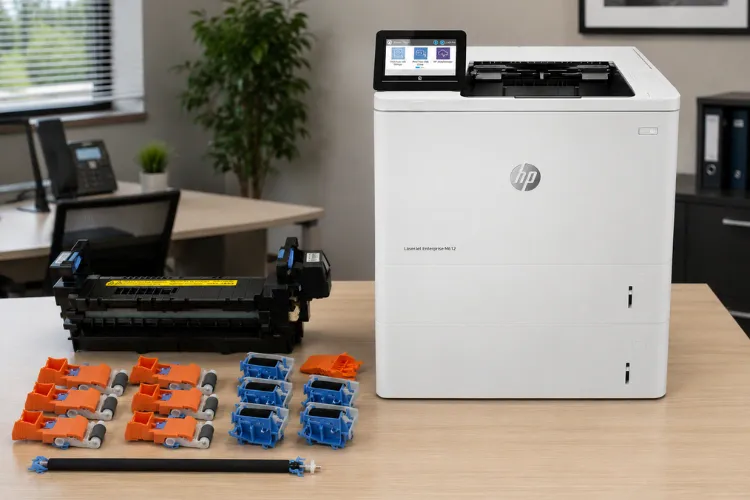
The kit is built around the fuser, with the wear items from the paper path bundled alongside it. HP lists L0H24A for 110V installations and L0H25A for 220V, and a complete Maintenance Kit Replacement covers the fuser, the transfer roller, and pickup and separation rollers for the installed trays. HP Customer Support (Hewlett-Packard Development Company, L.P.)
Typical contents include:
- RM2-1256 fuser assembly, the component the counter is actually tracking
- RM2-6800 transfer roller
- Tray 2–6 pickup rollers and separation rollers, commonly supplied as J8J70-67904 sets
- A separation roller tool for the cassette roller holders
- Tray 1 pickup and separation rollers in kit versions that include them
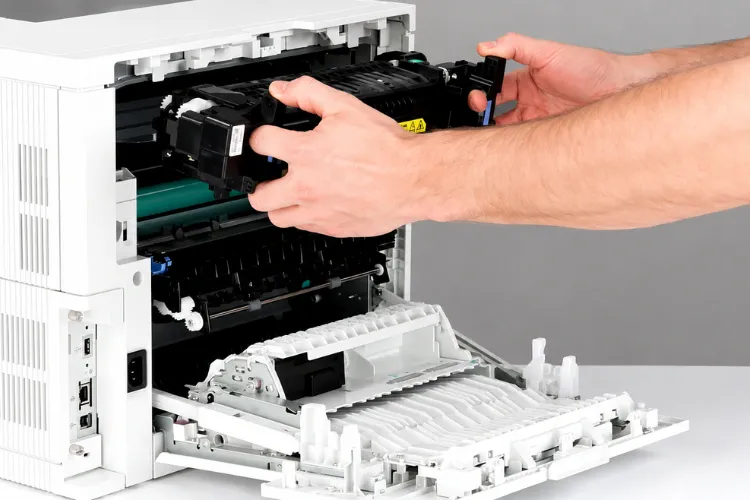
Maintenance Kit Installation starts with power down and patience. The fuser runs hot, so we turn the printer off, unplug it, and let it cool before opening the rear door. Fuser Replacement itself is straightforward: squeeze the blue release levers, draw the assembly out of the rear opening, seat the replacement, and listen for both levers to click.
That click is not a formality. A fuser sitting slightly proud of its locked position wears its own drive gears and generates jams at the rear of the paper path within weeks.
Roller work is the part most people underestimate. Pickup Roller Replacement and Feed Roller Replacement are quick once a tray is out, and Separation Roller Replacement in the cassette holder is where the supplied tool earns its place. Skipping the rollers is the single most common reason a printer keeps misfeeding after a kit install.
Keep Your HP LaserJet M607 M608 M609 Running Reliably
Why Does the Maintenance Message Sometimes Refuse to Clear?
Because on this family the counter is not cleared from a menu. The M607, M608, and M609 use a fuser that carries its own memory chip, and the printer performs the Maintenance Counter Reset on its own once the new assembly is recognized.
This trips up experienced technicians. Older LaserJet models required Administration, then Manage Supplies, then Reset Supplies, then New Maintenance Kit. On these printers that path does not exist, so hunting for a Reset Maintenance entry in the sub-menus is time spent on a control panel that will never offer one.
Timing explains most of the remaining confusion. Professional service references document that on this series the Reset Maintenance Count completes after roughly 100 pages have printed following installation, rather than instantly at power-on. If you power up, see the notice still on screen, and assume the install failed, you are simply looking too early.
Document the counter reading at both ends of the job. Recording page count before removal and after the reset gives the customer a defensible service history, which matters when a fleet is under contract or when warranty questions come up later.
When the message genuinely persists, the causes narrow quickly. We check that the fuser is fully latched, that the assembly matches the printer’s voltage, and that the chip is being read at all. A configuration page printed before and after the job confirms whether the Reset Maintenance Message has actually taken effect.
What Feed Symptoms Show Up Before the Printer Ever Asks for Service?
The paper path complains long before the counter does. Paper Feed Problems are the leading early indicator, and they follow a recognizable progression that gives you a window to schedule work on your own terms.
Watch for this sequence:
- Occasional multi-sheet feeds from the heaviest-use tray, usually blamed on the paper
- Sheets that arrive skewed by a few degrees, producing crooked headers
- Repeat jams in one specific tray while others behave normally
- Toner that smudges under a fingernail, pointing at fusing temperature or pressure
- Repetitive marks at fixed intervals down the page
Users rarely report any of this. They flip the sheet, reload the tray, and move on, which is why a fleet can drift into HP Laserjet M607 Paper Jam territory months before anyone opens a service ticket. By the time a call comes in, the rollers are usually well past the point where cleaning helps.
Smearing deserves separate attention. A fuser losing pressure or temperature stability produces output that looks fine leaving the machine and smudges in a folder an hour later, and that pattern is often the first real evidence behind an HP Laserjet M608 Fuser Error later in the same quarter.
What Does Deferred Maintenance Actually Cost an Office?
More than the kit, in almost every case we see. A planned installation is a scheduled visit with a known duration. An unplanned fuser failure is an idle department, a rerouted print queue, and a day of work rescheduled around a machine that will not run.
The math is uncomfortable for high-volume sites. A single M609 handling shipping documents or invoicing can carry an entire workflow, and when it stops, the fallback is usually a slower unit that was never sized for the load. Fleet reliability is not about any one printer; it is about how much weight the rest of the fleet has to absorb when one goes down.
Productivity loss compounds quietly. Staff who wait on a printer do not simply pause; they walk to another floor, reprint jobs, and lose the thread of whatever they were doing. Three interruptions a day across a twenty-person department is not a printer problem anymore, it is a payroll one.
Repair-versus-replace reasoning stays refreshingly simple on this family. These are durable, serviceable machines with strong parts availability, so a kit installation on a healthy chassis is almost always the better investment. Replacement makes sense when a printer has accumulated multiple unrelated failures, when duty cycle no longer matches actual volume, or when a fleet standard is changing anyway.
Parts choice belongs in that decision. We use HP Parts for repairs, and for customers weighing cost against longevity we explain plainly where high quality parts and premium parts differ in expected service life. Replace Maintenance Kit work done with the correct fuser and correct roller sets holds its interval; mismatched components rarely do.
Don't Ignore a Perform Maintenance Message
Do Firmware and Toner Choices Affect Maintenance Behavior?
Both matter, though not always in the way people expect. Firmware governs how supply status is reported and how cleanly the event log records maintenance events, and printers left several revisions behind sometimes display supply messaging that no longer matches current HP documentation.
We treat the event log as the first diagnostic stop. It shows whether a maintenance code fired once or has been repeating for months, and it distinguishes a genuine fuser problem from a jam pattern that a roller set would have solved. A configuration page alongside it gives current page counts and installed options in one place.
Toner reliability is the other variable. Poorly manufactured cartridges shed toner into the paper path, contaminate the transfer roller, and produce print defects that look convincingly like fuser wear. We stock high-quality third-party toner backed by a one-year warranty precisely because cartridge quality and maintenance intervals are linked more tightly than most buyers assume.
One field note worth passing on: when a printer starts throwing defects shortly after a cartridge change, we check the cartridge before we touch the kit. It saves the customer a part they did not need.
What Should You Expect From a Scheduled Onsite Maintenance Visit?
A predictable, contained appointment. Printer Repair Experts arrives with the kit, installs the fuser and roller sets, verifies the counter, prints test pages, and confirms the paper path is feeding cleanly from every installed tray before leaving.
We keep many HP LaserJet and HP Color LaserJet fusers and maintenance kits in stock, which makes same-day service realistic for a large share of requests. Our work and installed parts carry a six-month warranty. New customers can use our $69.99 flat labor rate for one qualifying visit, subject to limitations.
Coverage runs across Orange County and much of Los Angeles County, from Anaheim and Irvine through Whittier, Cerritos, and Long Beach. Whether the request is Orange County HP Laserjet Printer Repair, routine HP Laserjet Printer Repair on a mixed fleet, or HP Color Laserjet Printer Repair on the color side of the same office, the visit structure is the same.
We also leave the paperwork behind. Kit part number, page count at installation, and any secondary findings go on the ticket, so the next interval can be planned rather than discovered. For multi-printer sites, that record is what turns a reactive fleet into a predictable one.
Scheduling in advance is what separates a calm morning from a disruptive one. Onsite Printer Repair booked around your calendar costs a fraction of the same work booked around a failure, and HP Laserjet M609 Printer Repair handled at the maintenance interval rarely turns into anything larger.
Keeping the Interval Instead of Chasing It
HP LaserJet M607 M608 M609 Perform Maintenance notices are among the few printer messages that arrive with warning built in. The counter gives you weeks, sometimes months, and the entire cost difference between a routine visit and an emergency comes down to what happens during that window.
Treat the notice as a calendar entry. Order the correct kit for your voltage, schedule the installation, replace the rollers along with the fuser, and confirm the counter has cleared before the technician leaves. HP LaserJet M607 Perform Maintenance, HP LaserJet M608 Perform Maintenance, and HP LaserJet M609 Perform Maintenance work all follow the same path, and none of it needs to be disruptive.
If a maintenance message is on screen now, or the paper path has started misbehaving, we are glad to look at it. Call (888) 657-0021 or email info@printer-repair-experts.net, and we will get the machine back on its interval.
FAQ's - Frequently Asked Questions -
Yes, in almost every case. The notice reports a page count rather than a failure, and these printers continue running normally after it appears. What changes is your risk profile — you are now operating past the point where HP expects the fuser to be replaced, so a failure becomes a matter of when rather than if.
Roughly thirty to forty-five minutes for a single printer, plus cooling time if the machine has been running. Most of that is roller work across the installed trays rather than the fuser swap itself. Multi-tray configurations with optional feeders take longer because each cassette has its own roller set.
Fuser and roller replacement is standard field service on this family and does not require the manufacturer. We use HP Parts for repairs and back both the labor and the installed parts with a six-month warranty. If your printer is still under an active HP warranty or a managed print contract, check those terms first.
That is almost always a voltage mismatch. A 220V fuser installed in a 110V machine, or the reverse, will be rejected by the printer. Confirm the kit part number against your printer’s voltage rating before installation, since the assemblies look nearly identical from the outside.
Probably not. The counter on this family resets through the fuser’s own memory chip rather than a control panel menu, and service references indicate it completes after roughly 100 pages have printed. Print a batch, then check a configuration page. If it still has not cleared, the fuser may not be fully latched or may not be the correct part.
We recommend it. The rollers wear on the same page count the fuser does, and they ship in the kit for that reason. Installing the fuser alone is the most common reason a printer keeps misfeeding after service, which turns one visit into two.Ea, consequatur.
It depends on parts availability, and for this family it usually is realistic. We stock many HP LaserJet and HP Color LaserJet fusers and maintenance kits, so same-day onsite service is available for a large share of requests across Orange County and much of Los Angeles County. Availability varies by day and by model.
More than most buyers expect. Cartridges that shed toner contaminate the transfer roller and paper path, producing defects that look like fuser wear and pulling maintenance forward. We supply high-quality third-party toner backed by a one-year warranty, and we check the cartridge before condemning a kit when defects appear right after a cartridge change.
