
How Long Do HP LaserJet M608 Feed Separation Rollers Last:
Real Service Life and Replacement Timing
How Long Do HP LaserJet M608 Feed Separation Rollers Last is best answered as a planning range rather than a fixed number. HP rates the maintenance kit for the HP LaserJet Enterprise M607/M608/M609 family at an estimated 225,000 pages, and publishes no separate replacement page count for the Tray 2 pickup, feed, and separation rollers.
That makes these rollers inspection-driven parts. Many reach the maintenance interval without a single complaint. Others lose grip much earlier because of how the printer is fed and what runs through it, not because of the number printed on the configuration page.
We suggest scheduling the first close look at the rollers around 200,000 pages, then letting surface condition and feeding behavior decide what happens next. What follows explains what moves that timing, what worn rollers look and sound like, and which part serves which tray.
Preview Snapshot
- HP rates the maintenance kit for this printer family at an estimated 225,000 pages and publishes no roller-only replacement count.
- Pickup, feed, and separation rollers perform three distinct jobs, and only one of them is built to hold sheets back.
- Sheets picked matters more than pages printed, which is why two printers with matching counters can be in different condition.
- Paper dust, narrow media, heavy stock, room humidity, and constant Tray 2 use all shorten service life.
- Glazing, hardening, and contamination surface as slipping, late pickup, double feeds, and repeat jams at the tray.
- Tray 1 and Tray 2 use separate roller kits, so the correct part depends on where the sheet is failing.
1. How Long Do HP LaserJet M608 Feed Separation Rollers Last in Daily Office Use?
Treat the rollers as wear parts measured against the printer’s service schedule rather than a warranted lifespan. On an HP LaserJet Enterprise M608 running near HP’s recommended monthly volume of 5,000 to 25,000 pages, we plan for roller attention and maintenance-kit service to arrive in roughly the same window. Harsher duty pulls that window forward.
The useful question is not what the page counter shows. It is how many sheets the pickup mechanism has grabbed, what those sheets were made of, and whether the rubber still has bite left in it.
HP LaserJet M608 feed roller life and HP LaserJet M608 separation roller life also differ from each other inside the same machine. The separation roller works against every sheet the pickup roller brings forward, including the extra sheets it has to push back down. That duty explains why separation trouble often appears before anything else looks wrong.
So the honest answer has two halves. Under clean, steady conditions the tray rollers tend to last as long as the fuser-led maintenance kit. Under short-run, dusty, or heavy-media conditions, they do not, and the printer tells you long before the counter does.
2. Why Sheets Picked Tells You More Than Pages Printed
Every sheet that enters the paper path starts with the same mechanical event. The pickup roller drops onto the stack, turns, and hands the sheet to the feed roller. That sequence happens whether the job is one page or two hundred pages long.
Short jobs multiply the effort. A department printing 400 single-page jobs and a department printing twenty 20-page jobs both land on 400 pages, but the first asks the tray mechanism to start from rest 400 times. Frequent small jobs are one of the most common reasons an M608 wears its tray rollers ahead of schedule.
This is where HP LaserJet M608 engine rotations enters the conversation. The counter HP actually documents for this behavior is the engine cycle, which increments for every sheet picked from any media source, including sheets that jam before they ever reach the output bin. A duplex sheet increments it twice.
That gap between cycles and printed pages is the reason a page count alone is a weak maintenance signal. A duplex-heavy M608 accumulates mechanical cycles faster than its printed output suggests, so HP LaserJet M608 maintenance interval decisions should account for how the printer is used. Where both numbers are reported, reading them together is far more informative than reading either alone.
None of this replaces looking at the parts. It explains why regular HP printer maintenance is scheduled by inspection as well as by counter, and why identical page counts across a fleet rarely mean identical wear.
Rollers Slipping? Book the $69.99 Onsite Printer Repair Promotion
One printer, one onsite visit, one promotional labor charge while we diagnose why the tray stopped feeding. Call (888) 657-0021 or email info@printer-repair-experts.net to reserve a slot. Parts are billed separately. Limitations may apply.
3. What the Pickup, Feed, and Separation Rollers Each Do
These three parts are not interchangeable, and treating them as one assembly leads to the wrong repair. Each acts on the sheet at a different moment, and each fails in a recognizable way.
Pickup roller
The HP LaserJet M608 pickup roller makes first contact with the top sheet in the tray and drives it toward the feed rollers. It carries the full load of breaking the stack loose, so it usually shows polish first. When it slips, the printer reports that it cannot find paper while the tray sits full.
Feed roller
The HP LaserJet M608 feed roller takes the sheet from the pickup roller and keeps it moving toward the registration area at a controlled speed. Its work is steady traction rather than grabbing. A tired feed roller tends to produce inconsistent timing instead of an outright failure.
Separation roller
The HP LaserJet M608 separation roller is the only one of the three designed to resist motion. It applies controlled drag against the underside of the stack so that just the top sheet continues forward and any extra sheets stay behind. When that drag fades, two or three sheets travel together.
Because the parts do different work, HP LaserJet M607 M608 M609 rollers are supplied as tray-specific kits rather than individual replacements. The multipurpose Tray 1 uses the pickup and separation roller kit carried as J8J70-67903. Tray 2 and the optional 550-sheet feeders use the HP LaserJet M608 tray roller kit carried as J8J70-67904, which supplies the pickup and feed assembly together with the separation roller.
4. The 225,000-Page Maintenance Interval and Where Rollers Fit
HP rates the maintenance kit for this family, L0H24A for 110V printers and L0H25A for 220V printers, at an estimated life of 225,000 pages in the official HP LaserJet Enterprise M607, M608, M609 user guide. That kit is built around the fuser and transfer roller. The HP LaserJet M608 maintenance kit is a fusing-section service event, not a rebuild of the paper path.
Tray rollers are the piece that arrangement leaves out. The HP LaserJet M607 M608 M609 maintenance kit does not carry the tray roller kits, so a printer can receive complete maintenance service and still misfeed the following week. That is the argument for inspecting the rollers during the same visit.
How Long Do HP LaserJet M608 Feed Separation Rollers Last is, in daily practice, a question about whether the rollers will reach the next scheduled service. Booking the inspection near 200,000 pages keeps that answer from being decided by a jam in the middle of a deadline. Our page on HP LaserJet M607 M608 M609 Perform Maintenance covers what the kit service itself involves.
One figure deserves a caution. The M608 series datasheet lists a maximum monthly duty cycle of up to 275,000 pages, which describes short-term capacity only. It is not a maintenance interval, and it is not a statement about how long any roller lasts.
Offices often start searching after the control panel reports HP LaserJet M608 Maintenance Kit Very Low. That alert tracks the maintenance kit’s estimated remaining life, not the condition of the rubber in Tray 2. It is a sound prompt to schedule a visit, and a poor substitute for looking at the rollers.
5. Conditions That Shorten Roller Life on an M608
Roller wear responds to what crosses the rubber and to the room the printer lives in. The M608 accepts 16 to 53 lb bond from the multipurpose tray and 16 to 32 lb bond from Tray 2, and the heavy end of that range is not free.
These conditions move service life the most:
- Job pattern. Frequent one-page and two-page jobs raise pickup cycles sharply for the same printed page count.
- Paper dust. Loosely cut or low-grade stock sheds fine powder that fills the roller texture and polishes the surface.
- Media weight and finish. Heavy bond, labels, and coated sheets load the pickup roller far harder than plain 20 lb paper.
- Narrow media. Envelopes and small sizes wear a band across part of the roller face instead of the whole surface.
- Tray habits. Overfilled trays, uneven stacks, and guides left loose all raise the effort required to move each sheet.
- Room conditions. Very dry air encourages static cling between sheets, and damp air makes stacks heavier and stickier.
Storage matters as much as purchasing. A ream left open near a loading dock behaves differently by mid-afternoon than it did that morning, and the tray rollers absorb the difference. Keeping paper wrapped until it is loaded costs nothing and prevents a share of HP LaserJet M608 paper feed problems outright.
Tray choice matters too. A printer with optional feeders that pulls nearly everything from Tray 2 concentrates all of the wear in one set of rollers while the others stay nearly new. Spreading high-volume jobs across trays evens out the mileage.
Worn Rollers, or Something Else? Find Out Before Parts Are Ordered
Slipping, double feeds, and repeat jams can share one tray and still have different causes. We inspect the Tray 1 and Tray 2 roller surfaces, the separation components, the guides, and the paper path before anything is replaced. Call (888) 657-0021 to schedule onsite diagnosis for your HP LaserJet Enterprise M608.
6. Reading Roller Wear: Surface, Sound, and Feeding Behavior
Symptom. The earliest signs are usually timing changes rather than hard failures. A pause before the sheet moves, a scuffing or squealing noise from the tray area, or a job that feeds cleanly from Tray 1 and hesitates from Tray 2 all point the same direction.
Root cause. Rubber that has hardened or glazed can no longer deform against the sheet, so it rides across the paper instead of gripping it. Toner dust and paper fiber fill the surface texture and accelerate the effect.
Diagnosis. HP’s own guidance for misfeeds is to check whether the rollers are contaminated or dirty and to inspect them for damage or an extremely smooth surface. A glazed roller looks polished and feels slick. A healthy one feels slightly tacky and still shows visible texture.
Remedy. Contamination alone responds to careful cleaning with a damp, lint-free cloth and enough time to dry fully. Hardening and glazing do not. Cleaning a hardened roller buys days, not months, and repeated cleaning intervals are themselves a replacement signal.
Repair component. When cleaning no longer restores grip, the repair is the tray-specific kit: J8J70-67903 for the multipurpose tray, J8J70-67904 for Tray 2 and the optional feeders.
Symptoms line up with parts fairly predictably. HP LaserJet M608 not picking up paper points at the pickup roller first, while HP LaserJet M608 multiple sheets feeding points at the separation roller. When both behaviors appear in one tray, the whole kit is usually due rather than a single component. Our article on why printers keep jamming traces the same pattern across other models.
When we recommend service. Once the paper, the tray guides, and a cleaning have all been addressed and the tray still misfeeds, the rollers have moved past what cleaning can fix. That is the point where HP LaserJet M608 roller replacement becomes the repair, and where recurring M607 M608 M609 paper jam problems stop being a paper problem.
7. When Feeding Problems Are Not the Rollers
Worn rollers are one cause of misfeeding, not the only one. Replacing them before the ordinary candidates are ruled out produces a repaired printer carrying the same complaint.
Work through the simple causes first: ripped, curled, or previously jammed sheets; a stack loaded above the fill line; guides that do not quite touch the paper; media the tray is not rated to carry; and scraps left behind after a hurried jam clearance.
Where the sheet stops is a useful divider. A 13.xx jam code identifies the sensor that reported the stall, which separates a sheet that never left the tray from one that failed much further along. Persistent HP LaserJet M608 paper jams reported deep in the paper path rarely begin at the tray rollers.
Heat-related faults belong to a different family altogether. A printer stopping with a fuser message is not describing a pickup problem, and HP LaserJet M607 M608 M609 fuser error repair follows its own diagnostic path. The same holds for a specific HP LaserJet M607 M608 M609 50.7F fuser error, which points at the fusing section rather than anything in the tray.
Recurring jams also do not automatically condemn the feed or separation rollers. Sensors, registration components, worn tray frames, damaged doors, and duplex-path obstructions all produce jams that survive a roller replacement untouched.
The practical test is substitution. Load a fresh ream from a sealed package, reseat the guides, and run the same job from a different tray. Behavior that follows the tray implicates that tray’s rollers, and behavior that follows the printer does not.
Roller Kits Installed, Tested, and Warrantied Before We Leave
We have worked in the office equipment industry for more than 20 years, and every roller kit we install is covered by our 6-month / 180-day warranty on service and installed parts. We use HP Parts and Premium Parts, and we test the tray under load before the visit ends. Email info@printer-repair-experts.net or call (888) 657-0021, and same-day service may be available.
8. Inspection, Cleaning, and Replacement Decisions
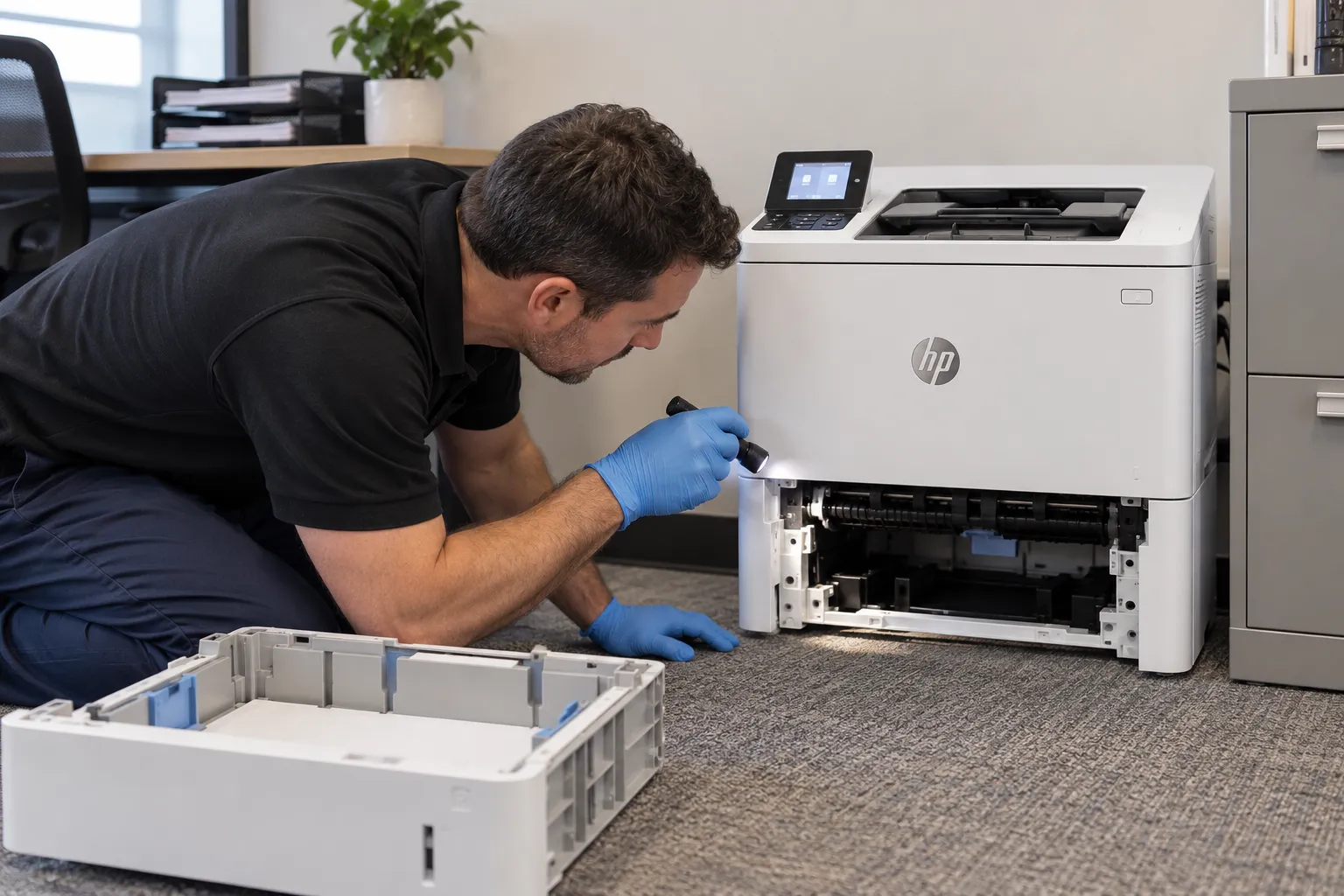
A roller inspection is quick and says more than the counter does. Pull Tray 2 out, look at the rubber surfaces with a flashlight, and note whether they read as textured or polished. A fingertip drawn across the face tells you most of what you need.
Decide from what the surfaces show rather than from the page count:
- Textured, tacky, clean. Leave them in service and look again at the next scheduled visit.
- Dusty or streaked but still textured. Clean with a damp, lint-free cloth, allow them to dry, and watch that tray for a week.
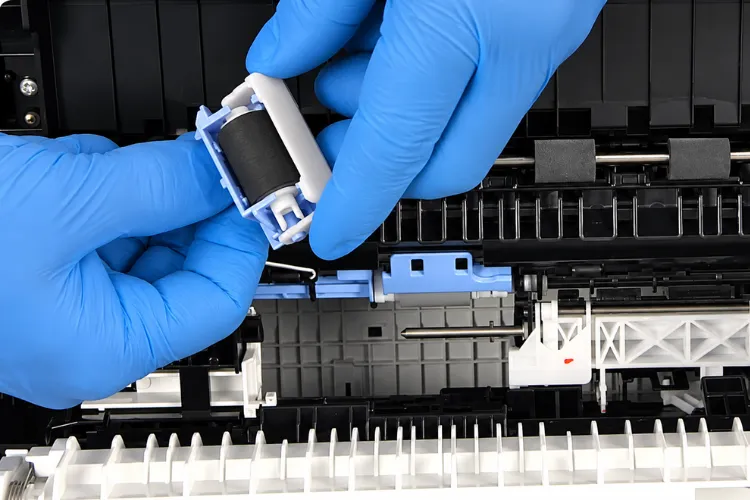
- Shiny, hardened, or flat-spotted. Replace the kit. HP LaserJet M608 pickup roller replacement and HP LaserJet M608 separation roller replacement are performed together on Tray 2 because one kit supplies both.
- Cracked, torn, or missing rubber. Replace without delay and inspect the paper path for debris that has already broken loose.
Timing the roller work alongside the maintenance kit saves a second visit. When a printer sits close to its interval and the rollers are marginal, handling both at once returns the paper path and the fusing section to service together.
Repair economics stay favorable on this platform. A 65 ppm HP LaserJet Enterprise M608 that jams twice an hour costs a department more in interrupted work than the parts and labor required to make it feed correctly, and roller kits are inexpensive relative to the printer.
We install HP Parts and High Quality Parts for this work, and our 6-month / 180-day warranty covers service and installed parts. Customer-supplied rollers are not installed. Feed complaints that outlive cleaning are a reasonable point to book HP LaserJet M607 M608 M609 printer repair rather than rotating parts by guess.
9. Planning Roller Service on Your Own M608
Three numbers and one look settle this question on any individual printer: the page count, the engine cycle count, the media the tray actually sees, and the condition of the rubber. Printers running long jobs on clean stock in a stable room tend to reach the maintenance interval intact. Printers running short jobs on dusty or heavy media often do not.
Set a reminder at roughly 200,000 pages, inspect, and write down what you saw. One line per inspection turns roller service from a surprise into a schedule, and it gives whoever orders parts a reason to stock the right kit.
When a tray still misfeeds after the paper, the guides, and a cleaning have been ruled out, onsite diagnosis is the efficient next step. We service HP LaserJet Enterprise equipment throughout Orange County, including Anaheim, Irvine, Santa Ana, Fullerton, and Huntington Beach, along with approved portions of Los Angeles County. Same-day service may be available.
Our HP LaserJet printer repair visits begin with diagnosis rather than a parts list, because the tray that misfeeds is not always the part that failed. Call (888) 657-0021 or email info@printer-repair-experts.net when your M608 starts hesitating at the tray. Ten minutes spent on three rubber surfaces usually settles the question for good.
FAQ's - Frequently Asked Questions - HP LaserJet M608 Feed and Separation Rollers
They are ordered separately. The maintenance kit for the M607, M608, and M609 is built around the fuser and transfer roller, while the tray rollers ship as their own kits: J8J70-67903 for the multipurpose tray and J8J70-67904 for Tray 2 and the optional feeders. Ordering both at the same time avoids a second visit when the printer is near its interval.
Not usually. Each tray has its own rollers and its own wear history, so a tray that rarely runs paper can stay serviceable long after a heavily used one gives up. Replace the kit for the tray that is actually failing, then inspect the other while the printer is open.
Both appear on the printer’s configuration and usage pages, which can be printed from the control panel Reports menu or viewed through the embedded web server. Record them at each service visit. A rising gap between sheets handled and pages printed usually means short jobs or duplex work are driving more mechanical wear than the page count suggests.
It adds handling. A duplex sheet increments the engine cycle count twice because the printer moves it through the path more than once, and each pass involves rollers gripping and releasing paper. Heavy duplex use is one reason two printers with identical page counts can need roller attention at different times.
Something outside the tray, most likely. Sensors, registration components, a damaged door, debris left from an earlier jam, or media outside the supported weight range all cause jams that new rollers cannot fix. The jam code and the location where the sheet stops narrow it quickly.
Tray roller work is a short visit in most cases, and the printer goes back into service the same day it is completed. We run paper through the affected tray under load before leaving so the repair is verified rather than assumed, and the work carries our 6-month / 180-day warranty.
Usually yes. These are 65 ppm enterprise printers built for sustained volume, and the combined cost of a maintenance kit and a roller kit stays well below replacement for most offices. Replacement makes more sense when the printer has multiple unrelated failures or no longer suits the department’s volume.
Yes, and it is one of the cheapest improvements available. Leave reams sealed until they are loaded, keep them off concrete floors and away from vents and loading-dock doors, and let cold paper reach room temperature before use. Conditioned paper separates more predictably, which reduces the load on the separation roller.
