
HP Laserjet M604 M605 M606 Perform Printer Maintenance:
Kits, Counters, and Reset Procedures
HP Laserjet M604 M605 M606 Perform Printer Maintenance is a scheduled service prompt, not a failure alarm. It appears once the printer’s internal page counter reaches the interval HP assigns to the fuser and paper-path wear components. Offices that understand that difference stop treating the message as an emergency and start planning around it.
The M604, M605, and M606 share a chassis, a paper path, and a service kit. That shared engineering is convenient for a mixed fleet, because one part number and one procedure usually cover every unit on the floor.
Preview Snapshot — what this HP Laserjet M604 M605 M606 Perform Printer Maintenance guide covers:
- Why HP triggers the message at roughly 225,000 pages, and what the counter is actually tracking
- The practical difference between the 10.23.60 and 10.23.70 control panel messages
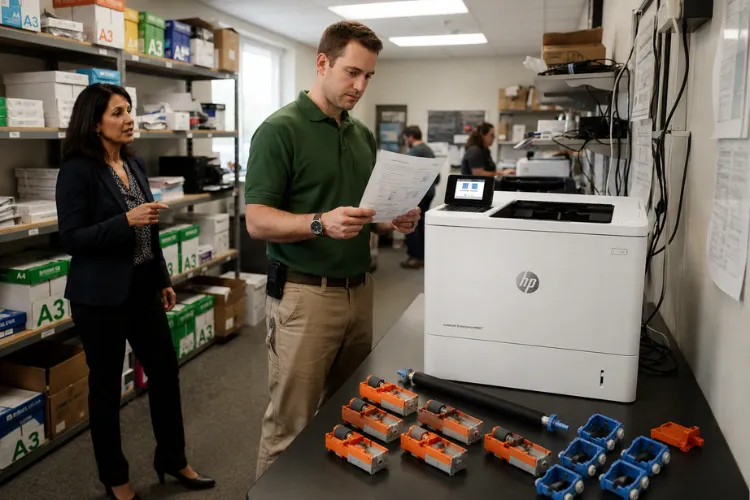
- Every wear component supplied inside the F2G76A and F2G77A kits
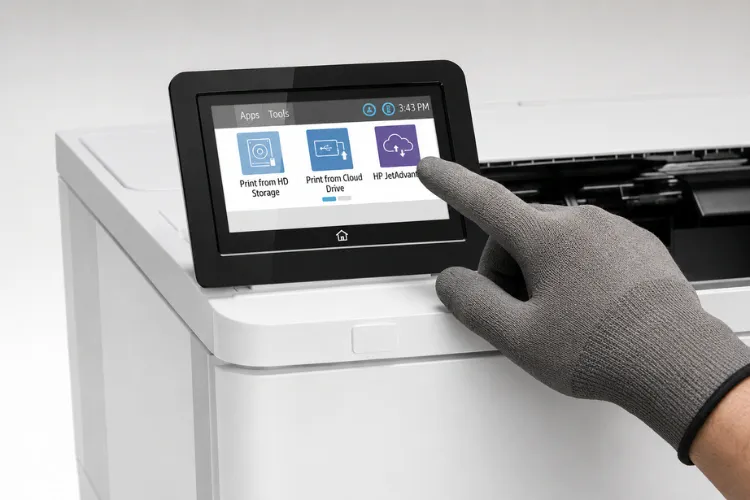
- The exact control panel path that clears the maintenance counter after installation
- Why feed, duplex, and print-speed complaints sometimes survive a kit installation
- How to weigh continued service against replacing an aging fleet
$69.99 Onsite Printer Repair Promotion
Take advantage of our $69.99 Onsite Printer Repair Promotion for professional diagnosis and service. Maintenance kits and other parts are additional if needed. Other limitations may apply.
What Is the Printer Telling You When the Perform Maintenance Message Appears?
The printer is reporting that its page counter has reached the preventive maintenance interval HP publishes for this family. Nothing has necessarily failed. HP’s preventive maintenance documentation for the M601 through M606 series sets that interval at 225,000 prints.
That number is a wear estimate, not a countdown to breakdown. It reflects how long the fuser film, transfer roller, and rubber feed components typically hold their tolerances under normal paper and duty cycle.
Duty cycle matters more than the calendar. A legal department pushing 18,000 pages a month will see the prompt inside a year, while a small satellite office may run the same unit for four years before it appears.
We treat HP Perform Printer Maintenance as an inventory event rather than a service call. The message gives an office weeks of runway, which is exactly enough time to order parts and pick a low-volume morning for the work.
Ignoring it does not damage the printer immediately. What it does is shift the failure from a scheduled visit to an unscheduled one, usually on a deadline day. Routine HP LaserJet Printer Maintenance exists specifically to prevent that swap.
Which Wear Components Are Bundled Together, and Why Do They Share One Kit?
HP bundles the fuser with the paper-path rollers because they wear on the same page count. Replacing one without the others leaves half the paper path aged and the maintenance counter meaningless.
The HP LaserJet M604 Maintenance Kit, HP LaserJet M605 Maintenance Kit, and HP LaserJet M606 Maintenance Kit are the same assembly under one part number, ordered by voltage.
| Item | Common Part Reference | Function |
|---|---|---|
| Fuser assembly | E6B67-67901 / RM2-6308 (110V) | Bonds toner to the sheet with heat and pressure |
| Transfer roller | E6B67-67904 | Moves toner from the drum to the page |
| Pickup rollers | RM1-0036 | Lifts the top sheet from the tray stack |
| Feed and separation rollers | RM1-0037 | Advances one sheet and holds the rest back |
| Transfer roller tool | Included | Removes the old roller without touching its surface |
Kit ordering is voltage-specific. F2G76A covers 110V installations across North America, and F2G77A is the 220V equivalent, so confirm the label on the unit before ordering any HP LaserJet Maintenance Kit.
A caution our technicians repeat on every visit: never touch the transfer roller surface with bare skin. Finger oils transfer to the page as repeating light or dark marks that look convincingly like a drum defect.
Optional 500-sheet feeders add their own roller sets. A four-tray M606 configuration needs enough rollers for every installed tray, which is why the HP Laserjet Printer Maintenance Kit ships with multiple sets rather than a single pair.
When Should You Schedule HP Laserjet M604 M605 M606 Perform Printer Maintenance?
Schedule it when the supplies status page crosses roughly 90 percent of the interval, not when the panel starts nagging. That leaves purchasing time to source parts and gives us a window to book the visit around your workload.
Print the supplies status page monthly from the Reports menu. It reports remaining maintenance kit life as a percentage, which turns a vague warning into a real planning number.
HP LaserJet M604 Perform Printer Maintenance intervals arrive fastest in the lightest-duty model of the three, simply because M604 units often end up in departments that outgrew them. Volume, not model designation, drives the counter.
HP LaserJet M605 Perform Printer Maintenance timing tends to be the most predictable, since the M605 usually sits in a stable workgroup role with consistent monthly output.
HP LaserJet M606 Perform Printer Maintenance work is the one worth scheduling earliest. M606 units carry the heaviest duty cycles, and a fleet that runs multiple trays wears feed components faster than the fuser.
One practical scheduling note from the field: pair the kit installation with a firmware check and a full paper path cleaning. A technician already has the machine open, and the marginal time cost is small.
Need to Clear the Perform Printer Maintenance Message?
Our experienced technicians provide onsite HP LaserJet maintenance kit installation, reset the maintenance message, and verify your printer is ready for reliable operation. Call (888) 657-0021 to schedule service.
How Do the 10.23.60 and 10.23.70 Control Panel Messages Differ?
The two codes mark different points on the same wear curve. One is advisory and one is a replacement instruction, and neither stops the printer from working immediately.
| Control Panel Message | What It Indicates | Recommended Action |
|---|---|---|
| 10.23.60 Fuser Kit Low | The printer is approaching its scheduled maintenance interval | Order parts and schedule service |
| 10.23.70 Replace Fuser Kit | The fuser has reached its expected service life and should be replaced | Install the kit and reset the counter |
Treat 10.23.60 as your purchasing trigger. It is the difference between a planned installation and a same-day scramble when print quality drops mid-project.
Other codes appear alongside these on an aging paper path. The 13.xx.yy family reports jams, with the middle characters identifying the location, and the 50.x family reports fuser conditions such as warm-up failure or a temperature reading outside tolerance.
Do not clear 50.x errors by resetting counters. Those codes describe an electrical or thermal condition and need real HP LaserJet Troubleshooting, starting with fuser seating and connector inspection.
What Should a Technician Verify Before Any Parts Go Into the Machine?
Verification comes before installation, because a worn kit and a failing component can produce identical symptoms. Before we open a kit, we print the configuration page, pull the event log, and read the actual page count.
The event log matters more than most offices realize. A cluster of jam codes concentrated in one tray points to that tray’s rollers, while jams distributed across every tray point to registration or the transfer area.
Repetitive defects get measured, not guessed. Spacing between marks on a test page identifies which rotating component is responsible, which prevents an unnecessary HP LaserJet Fuser Replacement when a drum or transfer roller is the real cause.
Before replacing expensive components, Printer Repair Experts performs a complete diagnosis to verify the actual cause of the failure. That practice came out of years of finding good fusers pulled for problems that lived elsewhere in the path.
Legacy models in the same fleet get the same treatment. An HP Laserjet M601 Fuser Error on a neighboring unit deserves its own diagnosis rather than an assumption that both machines share one root cause.
Safety is not optional here. The fuser holds enough heat to burn, so the printer must be powered down and left to cool for at least 30 minutes before anyone reaches into the rear of the chassis.
How Is the Maintenance Counter Cleared After the Kit Is Installed?
The counter does not clear itself. HP requires a manual reset from the control panel, and skipping it leaves the printer reporting the old page count against brand new parts.
The reset path on the M604, M605, and M606 is:
- Power the printer on and wait for the Ready state
- Press the Home button
- Select Administration
- Select Manage Supplies
- Select Reset Supplies
- Select New Maintenance Kit
- Select Yes to confirm
Perform this only after parts are actually installed. Using the reset to silence a message on worn components hides the wear and guarantees a jam problem later.
Firmware revisions change menu labels. If your panel does not match the sequence above, confirm the current path in HP’s documentation for your installed firmware rather than hunting through service menus.
HP Maintenance Kit Installation and the reset belong to the same visit, not to two separate appointments. A completed HP Perform Printer Maintenance Reset is what restores accurate supply reporting to your fleet management tools.
Fleet-wide reporting depends on this step. When one unit carries a stale counter, HP Web Jetadmin and similar tools report the wrong service position for that machine, and a proper HP Maintenance Kit Reset is the only fix.
How Is the Maintenance Counter Cleared After the Kit Is Installed?”
Professional HP LaserJet Maintenance Service
We stock many HP maintenance kits and fusers for same-day installation on the M604, M605, and M606. Contact us at (888) 657-0021 or info@printer-repair-experts.net to schedule onsite service.
Why Do Feed and Duplex Faults Sometimes Survive a Kit Installation?
Because the kit covers wear parts, not every component in the paper path. A printer that still misfeeds after new rollers usually has a problem the kit was never designed to address.
Tray misfeeds commonly trace to worn tray separation pads, a damaged tray lift mechanism, or paper that has absorbed humidity. HP LaserJet Pickup Roller Replacement solves the first sheet failing to lift, but it does nothing for a cracked tray.
Multi-feeds are a separation problem, not a pickup problem. HP LaserJet Separation Roller Replacement addresses sheets traveling together, while HP LaserJet Feed Roller Replacement addresses sheets that stall partway through the path.
Duplex faults have their own pattern. Jams that appear only on two-sided jobs usually involve the duplex accessory, the reverse guides, or paper too heavy for the duplex specification.
Media is the quiet culprit in a surprising number of cases. Recycled stock with heavy dust content polishes rollers early and pulls a fleet toward its next kit ahead of schedule.
We see the same behavior on older units, where an HP Laserjet M603 Paper Jam complaint turns out to be a paper storage issue rather than a mechanical one. Humidity control fixes more jams than parts do.
What Does Firmware Have to Do With Maintenance Messages and Print Speed?
Firmware controls how the printer counts pages, reports supplies, and handles network jobs. Outdated firmware produces supply reporting quirks and slowdowns that look mechanical but are not.
Slow printing is the clearest example. When a queue crawls but the engine runs at rated speed once a page starts, the cause is almost always driver, spooler, or network related rather than a worn fuser.
Update through the Embedded Web Server or a USB firmware file rather than piecemeal driver installs. Consistent firmware across a fleet also makes remote monitoring and supply alerts trustworthy.
The Preboot menu exists for administrator-level recovery work, including firmware repair on units that will not boot normally. Access sequences vary by model and revision, so confirm the correct procedure in HP’s documentation before attempting it.
Print the configuration page after any firmware change. It confirms the installed revision, the installed accessories, and the network settings in one document you can file with the service record.
Does Continued Maintenance Still Make Sense, or Is It Time to Replace the Fleet?
For most offices, maintaining these units still wins on cost. A kit installation runs a fraction of a replacement printer, and the M604 through M606 platform prints at speeds that remain competitive.
The math shifts when a single unit needs a kit, a formatter, and a tray assembly in the same quarter. At that point replacement usually costs less than stacking repairs onto a machine with an unclear remaining life.
Downtime carries its own price. A workgroup printer serving 25 people that sits idle for two days costs far more in lost throughput than the parts and labor on a scheduled visit.
Consumables factor into the decision too. Toner reliability on this platform is strong, and we back the high-quality toner we supply with a 1-year warranty, which keeps ongoing operating costs predictable.
We use HP Parts for repairs on these models, and we stock many fusers and maintenance kits for same-day installation. That combination of HP Parts, High Quality Parts, and Premium Parts availability is what makes scheduled service practical instead of aspirational.
Our Onsite Printer Repair coverage spans Orange County and parts of Los Angeles County, so most Onsite HP Printer Repair requests are handled without shipping equipment anywhere. Same Day HP Printer Repair is available for many issues on this family.
Service calls reach offices requesting Printer Repair Anaheim CA and Printer Repair Brea CA support, along with Printer Repair La Mirada CA, Printer Repair Commerce CA, and Printer Repair City of Industry CA locations on the Los Angeles County side.
Older equipment stays in scope as well. An HP Laserjet M602 Printer Repair request gets the same diagnostic process and the same 6-month warranty on service and installed parts as current models, and general HP LaserJet Printer Repair work carries identical coverage.
Conclusion: Treat the Maintenance Message as a Scheduling Tool
The perform maintenance prompt is the most useful message these printers produce. It converts unpredictable wear into a dated task you can budget for, staff around, and complete before anything actually fails.
Watch the supplies status page, order the correct voltage kit, install every component in the box, and reset the counter. Those four habits keep an M604, M605, or M606 fleet running predictably for years past its first kit.
Our technicians frequently encounter this issue during onsite service calls, and the offices that handle it best are simply the ones that watch the counter. Call (888) 657-0021 or email info@printer-repair-experts.net when your fleet reaches its interval, and we will schedule the work around your print volume rather than against i
FAQ's - Frequently Asked Questions - HP Laserjet M604 M605 M606 Perform Printer Maintenance
Yes. The message is advisory, and the printer continues to operate normally. What changes is your risk profile — every page past the interval runs on components HP already considers end-of-life, so jams and print quality complaints become progressively more likely.
No. The maintenance counter is separate from the parts themselves and has to be reset manually through the Administration menu. If the message persists after installation, the reset step was missed rather than the kit being defective.
Generally no. HP classifies the maintenance kit as a consumable, which places it outside the original product warranty and most extended warranty agreements. Our own 6-month warranty covers the service work and the parts we install.
Check the rating label on the printer, usually located at the rear of the chassis near the power inlet. Standard North American office installations take the 110V kit. Installing the wrong voltage fuser will cause fusing failures and can damage the assembly.
The supplies status page reports remaining maintenance kit life as a percentage well before any panel message appears, so you can plan months ahead. Printing that page monthly is the simplest way to avoid being surprised.
Usually nothing went wrong with the kit. The kit does not include tray separation pads, tray lift components, registration assemblies, or the duplex unit, so a persistent jam after installation typically points at one of those. Paper that has absorbed humidity is another frequent cause worth ruling out first.
