
HP LaserJet P3015 Printer Repair Onsite Service, Diagnostics & Maintenance
HP LaserJet P3015 Printer Repair is one of the most frequent service requests our technicians handle in Orange County and Los Angeles County offices. The P3015 earned its reputation as a workhorse, but after years of heavy duty cycles, jams, fuser errors, and feed failures begin interrupting the workday at the worst possible moments.
Printer Repair Experts provides Onsite Printer Repair for the HP LaserJet P3015 series, backed by more than 20 years in the office equipment industry. We stock most P3015 parts, carry a 6-month warranty on service and installed parts, and can usually receive any part not in stock by the next business day.
review Snapshot
- Why worn rollers cause most HP LaserJet P3015 Paper Jam calls, and how we fix them onsite
- What a 50.x fuser error means and when HP LaserJet P3015 Fuser Replacement is the right call
- When the HP LaserJet P3015 Maintenance Kit should be installed, and what is inside it
- How we resolve streaks, splotches, faded pages, and HP LaserJet P3015 Toner Smearing
- Repair-versus-replace guidance for aging P3015 fleets, with honest cost reasoning
- Our $69.99 onsite labor promotion for new customers (limitations apply)
Get Your HP LaserJet P3015 Back to Work Today
What Causes HP LaserJet P3015 Paper Jams and Feed Problems?
The short answer: worn rubber. Nearly every HP LaserJet P3015 Paper Jam we diagnose traces back to aging pickup, feed, or separation rollers, or to a fuser that has reached the end of its service life. Rubber hardens and glazes with age, loses grip, and the printer starts grabbing paper late, crooked, or not at all.
Most HP LaserJet P3015 Printer Repair calls begin with a jam message in the 13.xx family on the control panel. The subcode tells a trained technician where the sheet stalled, which points directly at the failing component. A jam at the tray is a feed issue; a sheet accordion-folded at the back of the machine usually implicates the fuser or the delivery rollers.
Before assuming hardware failure, we still rule out the basics. Incorrect tray guide settings, overfilled cassettes, moisture-swollen paper, and mixed media in one tray all produce a convincing HP LaserJet P3015 Paper Feed Problem without a single worn part. Our technicians check media and tray adjustment first because it takes two minutes and occasionally saves a customer the cost of parts.
When the jams persist on good paper with correct settings, structured HP LaserJet P3015 Troubleshooting moves to the feed components and the fuser. That is where the real wear lives on this model.
Why Is Your HP LaserJet P3015 Not Picking Up Paper?
A P3015 that spins its motors but feeds nothing almost always has a glazed or worn tray 2 pickup roller. If you have been searching for HP LaserJet P3015 Not Picking Up Paper, that single rubber roller is the most likely culprit, and it is a fast onsite fix. HP’s own troubleshooting documentation for tray 2 jams points to the same component.
The feed system works as a team. The HP LaserJet P3015 Pickup Roller lifts the top sheet, the HP LaserJet P3015 Feed Roller drives it forward, and the HP LaserJet P3015 Separation Roller and separation pad hold back the sheets underneath. When any one of them wears, you see misfeeds, double-feeds, or the dreaded grinding clatter from tray 2.
Cleaning a lightly glazed roller with a lint-free cloth sometimes buys a few weeks. In our field experience, though, a roller that has started slipping will slip again. On machines with the mileage most P3015 units carry today, we recommend replacing the full roller set rather than chasing one roller at a time.
What Does an HP LaserJet P3015 Fuser Error Mean?
A 50.x code is the printer reporting that the fuser is not reaching or holding its target temperature. An HP LaserJet P3015 Fuser Error should be taken seriously: power-cycling may clear the message temporarily, but a fuser with a failing heating element or thermistor will keep tripping the error and can strand the printer mid-job.
The fuser is also a consumable, not a lifetime part. It bonds toner to paper with heat and pressure, and after hundreds of thousands of pages the film sleeve, pressure roller, and gears simply wear out. Warning signs include smearing toner, wrinkled output, repeating gloss marks, and jams concentrated at the rear of the machine.
Printer Repair Experts stocks fusers for the P3015 series, so HP LaserJet P3015 Fuser Replacement is typically a same-day, single-visit repair. We install HP Parts, verify temperature behavior after the swap, and back the work with our 6-month warranty on service and installed parts.
When Should the HP LaserJet P3015 Maintenance Kit Be Installed?
Install the kit when wear symptoms cluster: jams from multiple locations, feed failures, and fuser-related print defects appearing together. The HP LaserJet P3015 Maintenance Kit (HP part CE525-67901 for 110V machines) bundles the high-wear components into one service event, which is far more economical than replacing parts one at a time across repeated failures.
Inside the kit you get a new fuser, transfer roller, tray 1 pickup roller and separation pad, and the pickup and feed rollers plus separation pad for the 500-sheet cassette. In other words, everything discussed in the two sections above, replaced in a single visit.
An HP LaserJet Maintenance Kit is rated for a published page interval, roughly 225,000 pages on this series, but calendar age matters too. Rubber degrades even on low-volume machines, so a ten-year-old P3015 with modest page counts can still need the kit.
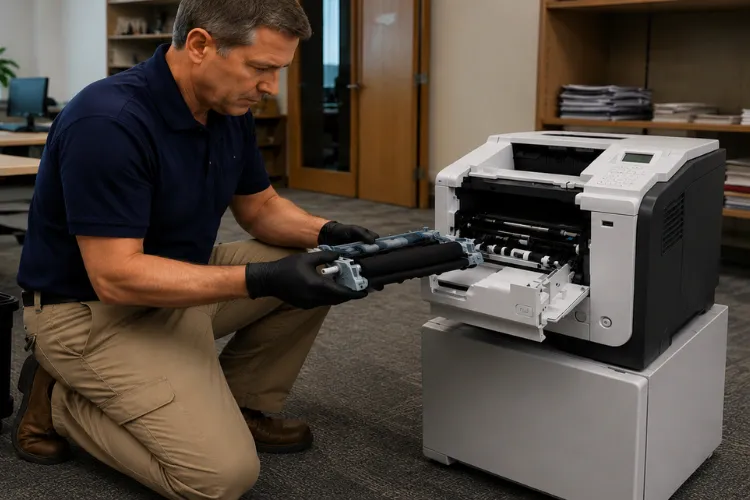
Parts quality decides how long the repair lasts. We install HP Parts and other high-quality, premium parts rather than the bargain fusers that fail within months, because a kit that has to be replaced twice is not a savings. Every kit we install is covered by the same 6-month warranty as the rest of our work.
Professional HP Maintenance Kit Installation matters more than most owners expect. Seating the fuser correctly, replacing the cassette rollers without damaging the lifter mechanism, and resetting the maintenance count afterward are exactly the steps we see botched on do-it-yourself attempts.
Don't Let Printer Problems Slow Down Your Business
How Do You Fix HP LaserJet P3015 Poor Print Quality and Toner Smearing?
Start by identifying which component owns the defect. HP LaserJet P3015 Poor Print Quality splits into a few recognizable families: toner that rubs off the page, light or faded print, vertical lines, splotches, and defects that repeat at a fixed interval down the page.
HP LaserJet P3015 Toner Smearing that wipes off with a finger is a fusing failure; the toner was never properly bonded, and the fuser is the fix. Vertical lines and splotches usually implicate the toner cartridge or a contaminated transfer roller. Repeating defects are the giveaway of a damaged roller surface, because the flaw reappears every rotation.
Because the P3015 puts the drum inside the cartridge, a fresh HP 55A or 55X cartridge resolves many image defects outright. We carry high-quality third-party toner backed by a 1-year warranty for offices that want to control supply costs without gambling on bargain-bin cartridges that leak and streak.
Our technicians frequently encounter machines where two problems overlap, such as a tired fuser plus a defective cartridge. That is why HP LaserJet P3015 Diagnostics on our service calls always includes test pages before and after each corrective step, so you only pay for the parts the printer actually needs.
How Does Onsite HP LaserJet P3015 Printer Repair Work?
One phone call to (888) 657-0021 puts a technician at your Orange County or Los Angeles County office, usually the same day. Our HP LaserJet P3015 Printer Repair visits follow a fixed discipline: complete diagnosis first, a clear quote second, and repair only after you approve it. Before replacing expensive components, Printer Repair Experts performs a full diagnosis to verify the actual cause of the failure.
Same Day Printer Repair is realistic on this model because we stock the parts that actually fail: fusers, maintenance kits, and roller sets. Anything we do not have on the truck usually arrives the next business day, so even uncommon failures rarely mean a long outage.
We handle more than mechanical faults during Onsite Printer Repair visits. Driver updates, firmware updates, network connectivity problems, and printer setup on company networks are all part of the service, along with every error code the P3015 can display.
New customers may be able to take advantage of our $69.99 Onsite Printer Repair Promotion. Promotion limitations may apply. We stand behind every repair with our 6-month warranty for added peace of mind. To schedule service or request additional information, contact us anytime at info@printer-repair-experts.net.
Should You Repair or Replace an Aging HP LaserJet P3015?
Repair usually wins on this model, and the math is simple. A P3015 in decent mechanical condition prints at over 40 pages per minute with cheap, high-yield toner, and a maintenance kit effectively renews the entire paper path. Replacing the printer means new drivers, new supplies contracts, staff retraining, and downtime, often for marginal capability gains.
Downtime belongs in the calculation, too. A printer that handles invoices, pick tickets, or patient forms does not just cost parts money when it fails; it stalls the people waiting on those pages. A same-day repair that restores a known machine is usually cheaper, in real terms, than the week of procurement and setup a replacement demands.
Replacement makes sense when the formatter or laser scanner fails on a very high-mileage unit, or when an office needs features the P3015 never had. In those cases we give you a straight answer instead of selling a repair that will not hold.
Offices that do migrate typically land on the HP LaserJet M607, M608, and M609 series or the newer M610, M611, and M612 line. We support those fleets with the same onsite model, from HP Laserjet M608 Printer Repair and HP Laserjet M610 Printer Repair to diagnosing an HP Laserjet M607 Fuser Error or an HP Laserjet M611 Fuser Error.
The successor models inherit familiar mechanical faults, too. Clearing an HP Laserjet M609 Paper Jam or an HP Laserjet M612 Paper Jam comes down to the same roller wear that ages every LaserJet, so a repair partner who knows the P3015 already knows its replacements.
Reliable HP LaserJet P3015 Repair When You Need It Most
How Does Preventative Maintenance Keep an HP LaserJet Fleet Reliable?
Scheduled care converts surprise breakdowns into planned, short service windows. For offices running multiple machines, one jammed unit reroutes print volume, slows invoicing and shipping paperwork, and quietly drains productivity. IT managers responsible for a fleet rarely get budget credit for preventing failures, but they always hear about the failures themselves.
A typical example: a Cerritos logistics office we service runs three P3015 units printing shipping labels and packing slips all day. When one machine started double-feeding, the volume shifted to the other two, and within a week all three were jamming. One scheduled visit with roller kits ended a problem that had been costing the shipping team an hour a day.
A sensible program is not complicated. Track page counts, install maintenance kits before hard failure, keep trays properly adjusted, use paper stored in a dry area, and replace rollers on the units that feed the most volume. Based on our field experience, fleets maintained this way generate a fraction of the emergency calls that reactive fleets do.
This is the core of professional HP LaserJet Printer Repair service, and it is what separates a repair partner from a parts installer. Whether you found us searching for HP Printer Repair, Commercial Printer Repair, or Office Printer Repair, the goal is the same: maximum uptime for the HP LaserJet and HP Color LaserJet machines your business depends on.
Where Does Printer Repair Experts Provide Onsite P3015 Service?
We dispatch technicians throughout Orange County and much of Los Angeles County. That includes Printer Repair Anaheim CA, Printer Repair Brea CA, Printer Repair Commerce CA, and Printer Repair City of Industry CA, along with Fullerton, Irvine, Santa Ana, Long Beach, Whittier, Downey, and the surrounding communities in our service area.
Because travel time is short anywhere in this footprint, same-day response is the norm rather than the exception. A technician arriving with the right fuser or roller kit on the first visit is what keeps a P3015 outage measured in hours instead of days.
Conclusion
The P3015 remains one of the most repair-worthy monochrome printers HP ever built, and virtually every common failure, jams, feed problems, fuser errors, and print defects, is a known, fixable wear pattern. Professional HP LaserJet P3015 Printer Repair with HP Parts, honest diagnostics, and a 6-month warranty will keep these machines earning their keep for years.
When your P3015 starts jamming or throwing fuser errors, call Printer Repair Experts at (888) 657-0021 or email info@printer-repair-experts.net. Ask about the $69.99 new-customer onsite labor promotion, subject to limitations, and let us put your printer back to work.
FAQ's - Frequently Asked Questions - HP Laserjet P3015 Printer Repair
Labor for new customers starts at our $69.99 flat onsite rate for one qualifying HP LaserJet or HP Color LaserJet repair visit, subject to limitations. Parts are quoted after diagnosis, before any work begins, so you approve the full cost up front. Because we diagnose first, you never pay for parts the printer did not need.
Yes. Fusers, maintenance kits, rollers, and toner for the P3015 series remain widely available, and we keep the most commonly needed items in stock. Anything we do not have on hand usually arrives the next business day.
Most single-fault repairs, a fuser swap, a roller kit, or a maintenance kit installation, are completed in one visit, often within an hour or two onsite. Same-day appointments are available for many issues throughout our Orange County and Los Angeles County service area.
Every repair is backed by a 6-month (180-day) warranty covering both the service and the installed parts. Toner we supply carries its own 1-year (365-day) warranty.
Both. Our technicians handle network connectivity issues, printer setup on company or home networks, driver installation, firmware upgrades, and software updates in addition to mechanical repairs, and we support every error code the P3015 can display.
The P3015 uses the HP 55A standard-yield or 55X high-yield cartridge. If you want to lower supply costs, we offer high-quality third-party toner backed by a 1-year warranty; we advise against unbranded bargain cartridges, which are a frequent cause of streaks, splotches, and leaks.
