
HP Laserjet P4014 P4015 P4515 Printer Repair:
Reading the Machine Before Replacing the Part)
HP Laserjet P4014 P4015 P4515 Printer Repair almost always traces back to one of four systems: the tray pickup train, the fusing assembly, the transfer and registration path, or the sensors that watch paper move between them. Identify which system is complaining and the repair path gets short. This page walks through the control-panel messages HP documents for these models and how our technicians confirm a cause before anything gets replaced.
These three printers share a chassis, a maintenance kit, and a service philosophy. That shared design is why HP LaserJet P4014 Printer Repair, HP LaserJet P4015 Printer Repair, and HP LaserJet P4515 Printer Repair follow nearly identical diagnostic logic. Speed, memory, and input capacity differ; HP Laserjet P4014 P4015 P4515 Printer Repair strategy does not.
Preview Snapshot
Here is what HP Laserjet P4014 P4015 P4515 Printer Repair covers on this page:
- 13.xx jam messages, including tray solenoid and feed roller clutch failures
- 13.20.00 location jams and the specific sensors HP names for each location
- The full 50.1 through 50.9 fuser error range and HP’s documented diagnostic order
- Maintenance kit scope, contents, and the page interval HP publishes
- Roller wear symptoms, print quality faults, and honest repair-versus-replace math
$69.99 Onsite Printer Repair
Need HP LaserJet P4014, P4015, or P4515 service? Our $69.99 Onsite Printer Repair Promotion includes no travel charge, a flat labor rate, and professional onsite printer repair. Parts are additional if needed. Other limitations may apply. Refer to our promotion policy page for complete terms.
What Does HP Laserjet P4014 P4015 P4515 Printer Repair Actually Involve?
It involves reading the machine first. Every service call starts with the control panel message, the configuration page, and the pages-since-last-maintenance count. Those three data points narrow most faults before a cover comes off, which is why HP Laserjet P4014 P4015 P4515 Printer Repair rarely needs to begin with disassembly.
The P4010 and P4510 series firmware exposes a genuinely useful DIAGNOSTICS menu. Component tests and manual sensor tests let a technician energize a solenoid or toggle a sensor flag and watch the result. That is the backbone of HP LaserJet P4014 P4015 P4515 Printer Diagnostics and the reason guesswork is unnecessary on this platform.
Printer Repair Experts treats HP LaserJet P4014 P4015 P4515 Error Codes as pointers, not verdicts. A 13.03.00 message names a location; it does not name a part. Confirming the part is where HP LaserJet P4014 P4015 P4515 Troubleshooting either saves a customer money or costs them a needless component.
Twenty years of HP LaserJet Printer Repair across Orange County offices has taught us one habit worth stealing. Print the configuration page before touching anything. It reports page count, maintenance interval status, installed accessories, and firmware revision on a single sheet, and it shapes every HP Laserjet P4014 P4015 P4515 Printer Repair decision that follows.
That habit matters most on a fleet. When six of these printers sit across three floors, HP Laserjet P4014 P4015 P4515 Printer Repair becomes an inventory question as much as a technical one. Knowing which units are past interval turns reactive HP Laserjet P4014 P4015 P4515 Printer Repair into planned service.
Why Does a P4014, P4015, or P4515 Stop Pulling Paper From the Tray?
Because the pickup mechanism has either lost grip or lost drive. HP documents both causes separately, and the control panel usually names the tray involved. A HP LaserJet P4014 P4015 P4515 Paper Feed Problem stops being mysterious once the correct component test is run.
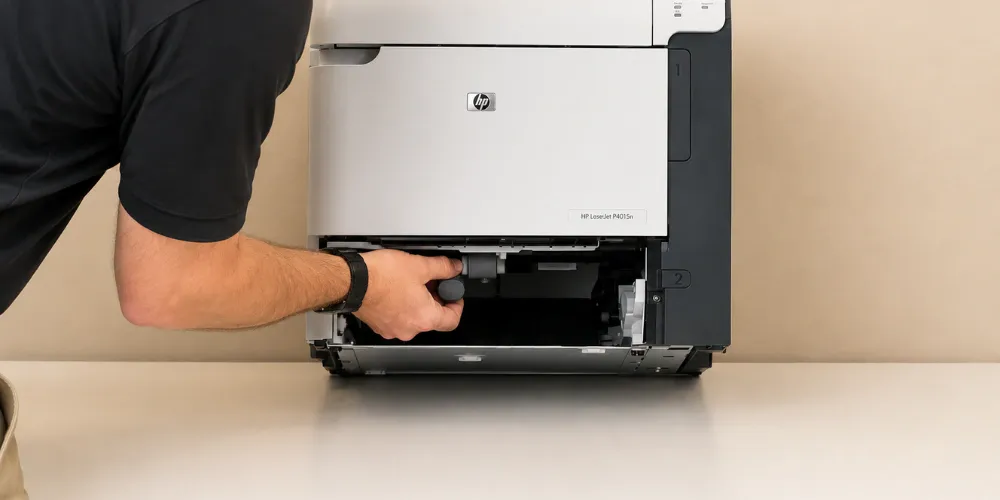
For 13.01.00 Jam in Tray 1, HP identifies the Tray 1 pickup roller or the solenoid as the likely cause. The documented sequence is to load Tray 1, run the paper path test, and verify the roller actually rotates. If maintenance was performed recently, HP directs you to confirm the Tray 1 pickup, feed, and separation rollers were installed correctly.
Next comes the multipurpose tray solenoid component test from the DIAGNOSTICS menu. Listen for an audible click when the test fires. If the solenoid is not energizing, HP says to verify the solenoid connector is attached to connector J71 on the DC controller PCA, and if the error persists, replace the Tray 1 solenoid (SL102).
Same-Day HP LaserJet Service
Need HP LaserJet P4014, P4015, or P4515 service? Our $69.99 Onsite Printer Repair Promotion includes no travel charge, a flat labor rate, and professional onsite printer repair. Parts are additional if needed. Other limitations may apply. Refer to our promotion policy page for complete terms.
How Should a 50.X Fuser Error Be Diagnosed Before Ordering a Part?
By working HP’s documented order rather than jumping to the assembly. A HP LaserJet P4014 P4015 P4515 Fuser Error displays as 50.X FUSER ERROR, and the digit after the decimal carries the actual diagnostic content. HP defines the range clearly. official HP LaserJet P4015 series manuals and user guides
| Code | HP Description |
|---|---|
| 50.1 | Low fuser temperature |
| 50.2 | Fuser warm-up service |
| 50.3 | High fuser temperature |
| 50.4 | Faulty fuser |
| 50.5 | Inconsistent fuser (verify voltage model) |
| 50.6 | Open fuser |
| 50.7 | Pressure release mechanism failure |
| 50.8 | Lower fuser temperature |
| 50.9 | High fuser temperature |
A HP LaserJet P4014 P4015 P4515 50.1 Fuser Error means low fuser temperature, and it is the code we see most often on units approaching their maintenance interval. It is also the code most frequently misread as a guaranteed fuser failure. HP’s own sequence puts four verification steps ahead of any replacement, and skipping them is the single most expensive mistake in HP Laserjet P4014 P4015 P4515 Printer Repair.
Step one is a power cycle to determine whether the error is persistent or transient. Steps two and three are verification questions: is the correct fuser model installed, and is the correct voltage fuser installed. That second question catches more HP LaserJet P4014 Fuser Error reports than most people expect, particularly on machines that have had prior third-party service.
Step four is seating. HP says to verify the fusing assembly is firmly seated in the chassis, reseat it, and listen for a click at the end of the assembly as it goes in. An unseated fuser produces real errors from a perfectly good part. Reseating costs nothing, so HP Laserjet P4014 P4015 P4515 Printer Repair should always try it first.
From there the check moves electrical. Verify the connection to connector J82 on the DC controller PCA is firmly seated. Inspect the fusing assembly connectors at the front of the assembly and the connectors on the high-voltage power supply PCA for bent pins or debris, then clean or straighten pins as needed.
Only after all of that does HP call for replacement. If the error persists, replace the fusing assembly. If it still persists, replace the high-voltage power supply, which is the step that separates real HP LaserJet P4015 Fuser Error diagnosis from a HP LaserJet P4515 Fuser Error guess.
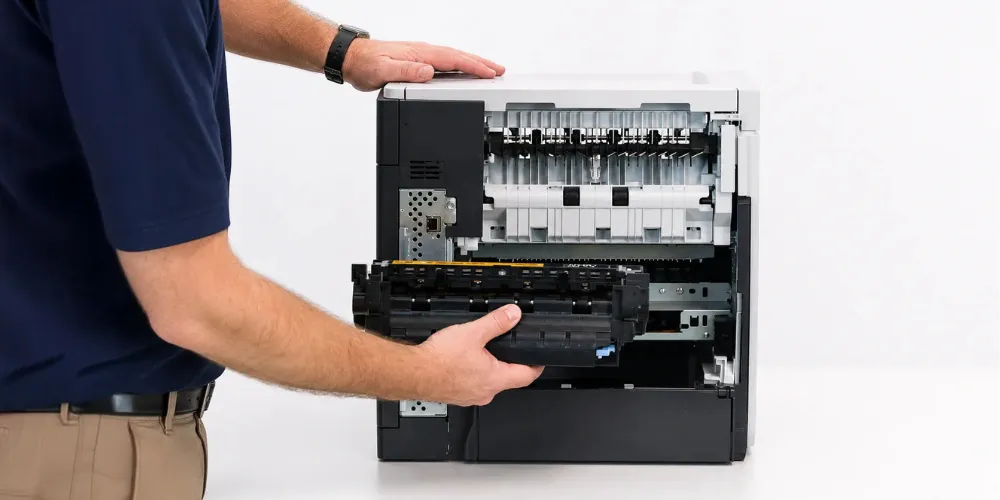
A genuine HP LaserJet P4014 P4015 P4515 Fuser Replacement is straightforward once it is justified. Power the printer off and let the assembly cool before removal. Both sides must lock in fully on reinstallation, and the audible click is the confirmation.
Downtime is the real cost in fuser-related HP Laserjet P4014 P4015 P4515 Printer Repair. A department printing payroll, invoices, or shipping documents cannot wait a week. We stock fusers and maintenance kits for these models specifically so diagnosis and repair can happen in the same visit.
When Is a Maintenance Kit the Right Answer Instead of a Single Part?
When the pages-since-last-maintenance count says so. The HP LaserJet P4014 P4015 P4515 Maintenance Kit carries HP part number CB388A in 110-volt form and CB389A in 220-volt form, with a published service interval of 225,000 pages. That interval is a design target, not a suggestion.
The kit consolidates the parts that wear together. It contains the fusing assembly, the transfer roller, and the tray pickup, feed, and separation rollers. Replacing them as a set is why one visit of HP Laserjet P4014 P4015 P4515 Printer Repair can resolve jamming, smearing, and fuser errors simultaneously.
Choosing a HP LaserJet P4014 Maintenance Kit over a single roller is usually an economics decision rather than a technical one. If a printer sits at 210,000 pages and throws feed errors, a single roller buys weeks. The kit buys years, and it resets the wear clock on every component that would have failed next.
The same reasoning applies to a HP LaserJet P4015 Maintenance Kit on a busier unit and a HP LaserJet P4515 Maintenance Kit on the fastest model in the family. Higher rated speed means the interval arrives sooner in calendar time. Fleet managers who track pages rather than months schedule far fewer emergency calls. Interval tracking is the cheapest form of HP Laserjet P4014 P4015 P4515 Printer Repair available.
HP LaserJet P4014 P4015 P4515 Maintenance Kit Installation is not finished when the covers close. The maintenance count has to be reset, or the printer keeps reporting a service interval it has already passed. On these models the reset is reached during startup by holding OK through the memory count until the ready, attention, and data lights are solid, then selecting NEW MAINTENANCE KIT.
Verification is one more step, and it is the step that separates complete HP Laserjet P4014 P4015 P4515 Printer Repair from a partial job. Print a configuration page from the Information menu and confirm the pages-since-last-maintenance entry reads zero. If it does not, repeat the sequence rather than assuming it took.
To HP LaserJet P4014 P4015 P4515 Perform Printer Maintenance properly also means addressing what the kit does not include. Clean paper dust from the tray cavities, check the registration area, and inspect the rear door and duplexer path. Ten minutes of cleaning protects a kit meant to last a quarter of a million pages.
Toner belongs in this conversation too. Poor-quality cartridges shed loose toner that coats sensors and accelerates roller glazing, turning a 225,000-page interval into a 150,000-page one. We use HP Parts for repairs and offer high-quality third-party toner backed by a one-year warranty for customers managing supply costs.
Which Rollers Fail First, and What Do Their Symptoms Look Like?
The ones that touch paper first. The HP LaserJet P4014 P4015 P4515 Pickup Roller takes the initial load on every sheet, so it glazes and hardens before anything downstream does. Multi-sheet feeds and blank misfeeds from a full tray usually start here.
Behind it, the HP LaserJet P4014 P4015 P4515 Feed Roller moves the sheet into the registration area once pickup succeeds. When it wears, sheets arrive late and skewed rather than not at all. That timing shift is what trips the pre-feed and top-of-page sensors HP names in the 13.20.00 message set. Catching it early keeps HP Laserjet P4014 P4015 P4515 Printer Repair limited to a roller set.
The HP LaserJet P4014 P4015 P4515 Separation Roller does the opposite job, holding back the sheets underneath. A worn separation roller produces the classic three-sheets-at-once jam that users mistake for a paper quality problem. HP’s jam procedures repeatedly ask you to confirm these three rollers were reinstalled correctly, because incorrect reinstallation mimics failure exactly.
Further along, the HP LaserJet P4014 P4015 P4515 Transfer Roller carries the charge that moves toner from the drum to the page. Its wear signature is print quality, not paper movement. Light, patchy, or uneven density across the full page often traces back here rather than to the cartridge.
HP LaserJet P4014 P4015 P4515 Roller Replacement is where a technician’s judgment earns its keep during HP Laserjet P4014 P4015 P4515 Printer Repair. Replacing one roller in a set of three worn ones creates a mismatch that jams differently the following week. Our technicians replace them as a group and document the page count so the next interval is predictable.
Handling matters as much as timing. Skin oil on a new roller surface measurably shortens its life, which is why HP includes gloves in the maintenance kit. Small discipline, real difference in how long HP Laserjet P4014 P4015 P4515 Printer Repair work holds up.
Same-Day HP LaserJet Service
Printer problems can quickly interrupt an office. We offer same-day onsite HP LaserJet service when available and stock many commonly needed fusers, maintenance kits, and rollers for faster repairs.
What Should a Business Expect From an Onsite Service Call?
A technician who arrives with the likely parts already on the truck. HP LaserJet Printer Repair Onsite only works when diagnosis and repair happen in one visit, which requires stocking fusers, maintenance kits, and roller sets for the models being serviced. We stock these specifically for the P4014, P4015, and P4515 family.
For businesses throughout our service area, including those needing Printer Repair Anaheim CA or Printer Repair Brea CA, HP LaserJet Printer Repair Same Day service is available for many issues. Availability depends on the fault, the parts required, and the route schedule. We say so honestly rather than promising what a schedule cannot deliver.
Our current $69.99 Onsite Printer Repair Promotion includes no travel charge, a flat labor rate, and professional onsite service, with parts additional if needed. Other limitations may apply; the promotion policy page carries the complete terms. Service and installed parts on HP Laserjet P4014 P4015 P4515 Printer Repair are covered by a six-month, 180-day warranty.
A useful service call also leaves documentation behind. Page count at time of service, what was replaced, what was reset, and when the next interval is due. That record turns HP Laserjet P4014 P4015 P4515 Printer Repair from a recurring emergency into a scheduled line item.
To schedule HP Laserjet P4014 P4015 P4515 Printer Repair or ask about a specific error code, call (888) 657-0021 or email info@printer-repair-experts.net. Describe the exact control-panel message if you have it. On this platform, that one detail frequently determines whether the repair can be diagnosed efficiently and the correct components brought to the service call.
Conclusion
These three printers are among the more serviceable HP LaserJet models because their diagnostic capabilities provide useful information for identifying faults. Component tests, manual sensor tests, and control-panel jam messages can help isolate paper-path and component problems before parts are replaced.
For office managers and IT staff responsible for commercial printers, the takeaway is simpler still. Track page counts, follow appropriate maintenance intervals, and treat repeated paper jams as a sign that the printer should be properly diagnosed rather than repeatedly clearing the same jam.
We provide onsite service throughout Orange County and portions of Los Angeles County, including Printer Repair Commerce CA and Printer Repair City of Industry CA. With more than 20 years in the office equipment industry, we diagnose and repair HP LaserJet printers with an emphasis on identifying the root cause and replacing the appropriate component when necessary.
For businesses relying on the HP LaserJet P4014, P4015, or P4515 every day, timely maintenance and proper diagnosis can help prevent recurring paper-feed, fuser, and print-quality problems from turning into unnecessary downtime.
FAQ's - Frequently Asked Questions -
Most single-fault calls finish in one visit. A fuser swap or roller set typically runs under an hour once the machine is diagnosed, and a full maintenance kit with cleaning and count reset usually runs a little longer. Calls that stretch out are almost always the ones where the original error message was never recorded.
Often, yes, and you should try. Clearing the visible jam and completing the full recovery sequence resolves a good share of one-off events. It is repetition that matters — if the same tray jams more than a few times a week, something mechanical is worn and clearing paper is only postponing the fix.
No. The kit replaces wear components and has no effect on cartridge compatibility. Toner quality does affect how long the kit lasts, though, because loose or poorly formulated toner accelerates roller glazing and coats sensors. Our third-party toner carries a one-year warranty for customers who want a lower supply cost without that risk.
Treat it as urgent enough to schedule, not urgent enough to panic. Intermittent 50.X messages that clear on a power cycle often trace to a seating or connector issue rather than a failed assembly, and those are cheap to correct early. Left alone, the same condition usually progresses to a hard stop at an inconvenient moment.
We stock fusers, maintenance kits, and roller sets for this family specifically because it is still common in offices we serve. Same-day service depends on the fault and the route, and we will tell you honestly on the phone whether the part is likely on hand before we schedule.
Frequently, yes. These are high-duty-cycle machines with serviceable subassemblies, and a serviced unit will often outlast a new entry-level replacement. The point where we advise replacement is when multiple major subassemblies need attention at once or the frame itself is damaged — and we will say so rather than sell a repair that will not hold.
Onsite service runs throughout Orange County and parts of Los Angeles County, including Anaheim, Fullerton, Irvine, Santa Ana, and Huntington Beach, along with Cerritos, Long Beach, Norwalk, Whittier, and surrounding areas. Call (888) 657-0021 to confirm coverage for your address.
