
HP LaserJet M601 M602 M603 Perform Maintenance:
The Message, the Kit, and What Actually Gets Replaced
An HP LaserJet M601 M602 M603 Perform Maintenance message is the printer telling you that its service-life components have reached the end of their rated interval. The HP LaserJet M601 M602 M603 Perform Maintenance requirement is scheduled work rather than a fault, and it is resolved by installing a maintenance kit instead of chasing an error condition.
We work on HP LaserJet Enterprise 600 printers across Orange County every week, and this prompt is one of the most common reasons an office calls us. What follows covers what the message measures, which components are actually replaced, how the counter is reset, and how to tell when the symptom in front of you is something other than routine service.
Preview Snapshot
- The HP LaserJet M601 M602 M603 Perform Maintenance interval is driven by an internal page counter rated at approximately 225,000 pages.
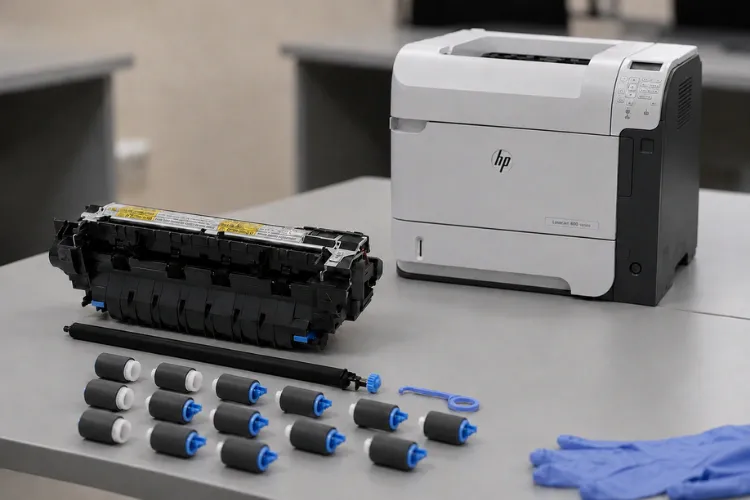
- HP’s CF064A 110V kit supplies a fuser assembly, a transfer roller, and pickup and feed rollers.
- Worn paper-handling rollers usually announce themselves through misfeeds well before the prompt appears.
- The maintenance counter is reset only after the kit has been physically installed and verified.
- Recurring jams, fuser errors, and print defects are separate conditions that deserve their own diagnosis.
- HP LaserJet M601 M602 M603 Perform Maintenance work is planned service, and planning it beats reacting to a stopped printer.
1. What the HP LaserJet M601 M602 M603 Perform Maintenance Message Actually Means
The message means the printer’s maintenance counter has reached the threshold HP set for the LaserJet Enterprise 600 family. It is a scheduling prompt generated by page count, not a sensor reporting a broken part. The printer does not know whether your fuser is failing. It knows how many sheets have passed through it.
That distinction shapes everything else. An HP LaserJet M601 M602 M603 Perform Maintenance prompt on a machine that still prints cleanly is completely normal. The same prompt on a machine that jams three times a day is telling you two different things at once.
The wording you may see on the control panel
Depending on firmware and supply-threshold settings, the display may show a Perform Maintenance Message, a maintenance-kit low or very low supply warning, or a Replace Maintenance Kit Message. All of them point at the same HP LaserJet M601 M602 M603 Perform Maintenance counter.
HP LaserJet M601 Perform Maintenance, HP LaserJet M602 Perform Maintenance, and HP LaserJet M603 Perform Maintenance conditions are handled identically, because all three models share one kit. Service tickets sometimes label the same prompt an HP LaserJet M601 Perform Maintenance Message, an HP LaserJet M602 Perform Maintenance Message, or an HP LaserJet M603 Perform Maintenance Message.
You may also see the job written up as HP LaserJet M601 M602 M603 Replace Maintenance Kit. HP’s Manage Supplies menu lets you decide whether the printer stops, prompts to continue, or simply continues once the kit reaches very low, with a default low threshold of ten percent. That setting is why two identical printers can behave differently at the same page count.
2. Why the 225,000-Page Interval Drives HP LaserJet M601 M602 M603 Preventive Maintenance
HP rates the CF064A 110V kit at approximately 225,000 pages for the LaserJet Enterprise 600 M601, M602, and M603. That number is a planning figure built on expected duty. It is not a promise that every roller gives out on the same sheet.
Treat HP LaserJet M601 M602 M603 225,000 Page Maintenance as a window rather than a deadline. Heavy recycled stock, dusty warehouse air, label runs, and constant duplexing all age paper-handling components faster than clean letter stock in a climate-controlled office.
Rated speed matters too. These models run up to 45, 52, and 62 pages per minute respectively, so a busy M603 reaches the HP LaserJet M601 M602 M603 Perform Maintenance threshold far sooner than an M601 doing light administrative work. Two printers bought the same day rarely reach HP LaserJet M601 M602 M603 Perform Maintenance at the same time.
Preventive maintenance kits exist so that predictable wear gets replaced on a schedule instead of discovered during a deadline. Treating HP LaserJet M601 M602 M603 Perform Maintenance as planned work is what keeps a print room predictable. Our overview of the HP LaserJet printer maintenance kit explains why high-volume HP LaserJet printers are designed around scheduled replacement of service-life components in the first place.

Maintenance Message on Your M601, M602, or M603?
Our $69.99 Onsite Printer Repair Promotion covers the onsite visit and diagnosis for one printer, so a technician looks at the machine before parts are ordered. Call (888) 657-0021 or email info@printer-repair-experts.net to get on the schedule. Limitations may apply.
3. What Is Actually Inside the HP LaserJet M601 M602 M603 Maintenance Kit
HP lists the CF064A 110V kit as containing a 110V fuser assembly, a transfer roller, pickup and feed rollers, and an installation guide. Those groups cover the parts that physically move paper or bond toner to it. Nothing in the kit touches formatter, network, or firmware behavior, which is why HP LaserJet M601 M602 M603 Perform Maintenance has clearly defined boundaries.
| Component | What it does | What wear looks like |
|---|---|---|
| 110V fuser assembly | Bonds toner to the sheet with heat and pressure | Smearing, poor adhesion, repeating defects, exit-area jams |
| Transfer roller | Moves toner from the cartridge drum onto the page | Light, washed-out, or mottled output |
| Pickup rollers | Lift the top sheet out of the tray | Missed pickups and load-tray prompts with a full tray |
| Feed and separation rollers | Advance one sheet and hold the rest back | Multifeeds, skew, and jams that repeat in the same spot |
Ordered as separate jobs, this same work is described as HP LaserJet M601 M602 M603 Fuser Replacement, HP LaserJet M601 M602 M603 Transfer Roller Replacement, HP LaserJet M601 M602 M603 Pickup Roller Replacement, and HP LaserJet M601 M602 M603 Feed Roller Replacement. The kit bundles all four into one planned visit, which is why HP LaserJet M601 M602 M603 Perform Maintenance service is cheaper than four separate calls.
One kit, three models
Because a single HP LaserJet Enterprise 600 Maintenance Kit covers the whole family, an HP LaserJet M601 Maintenance Kit Replacement, an HP LaserJet M602 Maintenance Kit Replacement, and an HP LaserJet M603 Maintenance Kit Replacement all consume the same part number. Offices running a mixed fleet can stock one kit instead of three.
Voltage is the detail worth confirming before anything is ordered. The CF064A is the 110V kit for North American installations, and matching voltage is a basic step in any Printer Maintenance Kit Replacement. Sourcing the wrong kit turns routine HP LaserJet M601 M602 M603 Perform Maintenance into a return trip.
4. HP LaserJet M601 M602 M603 Paper Feed Problems That Show Up First
Paper handling almost always degrades before the counter says anything, so plenty of HP LaserJet M601 M602 M603 Perform Maintenance calls begin life as a jam complaint. This is the progression we work through on site.
Symptom. Trays that used to feed silently begin producing skew, double feeds, or a load-tray prompt while the tray is visibly full. Jams start clustering at the same point in the path.
Root cause. Pickup, feed, and separation rollers glaze and lose diameter with use. A glazed roller slips instead of gripping, so the sheet arrives late, crooked, or with a friend attached.
Diagnosis. We compare failure rates tray by tray, inspect roller surfaces for shine and flat spots, run HP’s paper-path test from the Troubleshooting menu, and read the page count against the HP LaserJet M601 M602 M603 Perform Maintenance interval.
Remedy. Replace the worn paper-handling components rather than cleaning them. Cleaning a glazed roller buys days, not months, and it hides the problem long enough to be inconvenient.
Repair component. The pickup, feed, and separation rollers supplied in the kit, plus the transfer roller when output quality has drifted alongside the feeding trouble.
When we recommend service. If misfeeds continue after new rollers are in, the condition has moved past maintenance. That is HP LaserJet M601 M602 M603 paper jam repair territory, where registration components, sensors, and the paper path itself need to be tested rather than replaced on schedule.
A Due Counter and a Failing Part Look Identical From the Control Panel
Glazed rollers, a worn fuser, and a maintenance counter at its limit all produce the same prompt. We diagnose which one you actually have before a kit is opened, so HP LaserJet M601 M602 M603 Perform Maintenance work fixes the complaint instead of resetting it.
5. Fuser Wear and the Print-Quality Symptoms It Produces
Symptom. Toner that rubs off under a thumb, gloss banding, marks that repeat at a fixed interval down the page, or sheets that curl and stall as they exit.
Root cause. The fuser’s sleeve and pressure roller lose surface condition over hundreds of thousands of pages and stop applying heat and pressure evenly across the sheet.
Diagnosis. We measure the repeat distance of the defect, print HP’s fuser test page, confirm whether the defect survives a cartridge swap, and review the event log for fuser-related history before condemning the assembly.
Remedy. Replace the fuser assembly. We do not rebuild fusers on site; the applicable assembly is replaced with an HP part or a high quality part.
Repair component. The 110V fuser assembly supplied in the maintenance kit.
When we recommend service. A fuser throwing temperature or hardware errors is a different problem from a fuser that is simply old. That belongs with HP LaserJet M601 M602 M603 fuser error repair and not with a scheduled kit, even when the page count happens to be due for HP LaserJet M601 M602 M603 Perform Maintenance.
6. Telling Scheduled HP LaserJet M601 M602 M603 Perform Maintenance Apart From an Actual Failure
This is where maintenance calls most often go sideways. An office sees the prompt, installs a kit, resets the counter, and the original complaint is still waiting the next morning. The kit was never the answer to that complaint.
We separate the two by asking what the printer was doing before the message arrived. Wear builds gradually and tends to affect a whole tray or the whole page. Faults arrive suddenly, repeat in a recognizable pattern, and frequently log an error. HP LaserJet M601 M602 M603 Perform Maintenance answers the first pattern and not the second.
A practical test: if the printer would still be working acceptably with the prompt dismissed, you are looking at maintenance. If it would not, something else needs diagnosis before any kit is opened.
When symptoms outlive a completed kit, the next step is HP LaserJet M601 M602 M603 printer repair by a technician who can test components instead of replacing them on a schedule. Broader model coverage across the line lives on our HP LaserJet printer repair page.
7. How HP LaserJet M601 M602 M603 Maintenance Kit Installation Works On Site
HP LaserJet M601 M602 M603 Perform Maintenance follows the same order on every planned visit. We read the page count and supplies status page, record the symptoms the office has been living with, then power the printer down and let the fuser cool before anything is opened.
The fuser is accessed from the rear of the printer, the transfer roller from the cartridge area, and the pickup and feed rollers from the trays and the manual feed. HP supplies an installation guide in the kit, and we follow the documented sequence rather than improvising around it.
Once the parts are in, we print, feed from every installed tray, and confirm output quality before the counter is touched. That verification step is what separates a finished HP LaserJet M601 M602 M603 Maintenance Kit Replacement from a parts swap that nobody checked.
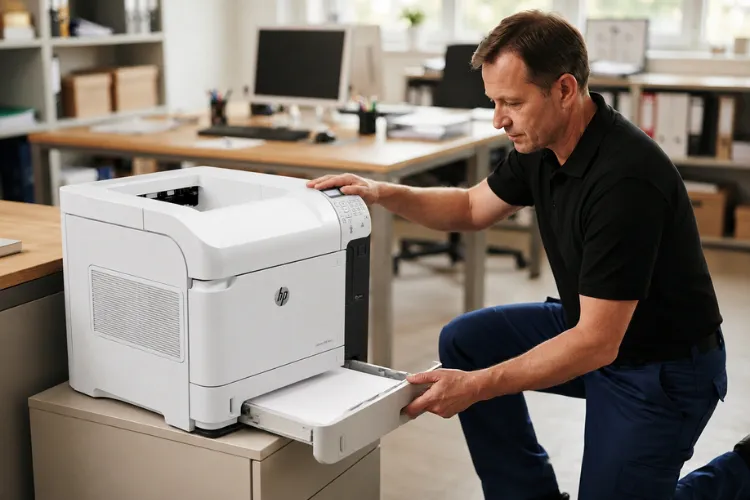
We do not encourage customer disassembly for this work. Our onsite printer repair service handles Printer Maintenance Kit Installation at your location, and a technician already inside the machine can identify the wear a kit does not cover while the covers are off.
Twenty Years of HP LaserJet Work Behind Every Kit We Install
We install HP Parts and Premium Parts, feed-test every tray before we leave, and back service and installed parts with a 6-month / 180-day warranty. Same-day service may be available. Call (888) 657-0021 or email info@printer-repair-experts.net.
8. HP LaserJet M601 M602 M603 Maintenance Counter Reset Comes Last
The counter is a page tally and nothing more. Resetting it only tells the printer to begin counting again, which is useful after new components go in and misleading before they do.
HP documents the control-panel path: press Home, then open Administration, Manage Supplies, Reset Supplies, New Maintenance Kit, and confirm Yes. The same reset is reachable through the Supplies menu on these models.
An HP LaserJet M601 M602 M603 Reset Maintenance Message request that arrives with no kit installation behind it is the one we push back on. Clearing a prompt does not replace a roller. HP LaserJet M601 M602 M603 Perform Maintenance is the work; the reset is only the receipt.
For the manufacturer’s own wording on both the preventive maintenance procedure and the counter reset, HP publishes the LaserJet Enterprise 600 M601, M602, and M603 user guide. Reset after installation, verify feeding, and the next HP LaserJet M601 M602 M603 Perform Maintenance interval starts from an honest number.
9. Scheduling HP LaserJet M601 M602 M603 Perform Maintenance With Our Technicians
Most offices we work with plan this around their own calendar rather than waiting for the printer to force the decision. A machine at 200,000 pages is a scheduling conversation. A machine that has stopped mid-run is something else entirely.
We have worked in the office equipment industry for more than twenty years, and we install HP Parts and Premium Parts backed by a 6-month / 180-day warranty on service and installed parts. Our technicians cover Orange County and approved portions of Los Angeles County, including Anaheim, Fullerton, Irvine, Santa Ana, and Tustin.
If the prompt is on your screen right now, we can review the page count and the symptoms with you before a technician is dispatched. That conversation often decides whether you need HP LaserJet M601 M602 M603 Perform Maintenance service, a repair, or both on the same visit.
Same-day service may be available. Call (888) 657-0021 or email info@printer-repair-experts.net to schedule HP LaserJet M601 M602 M603 Perform Maintenance work for your M601, M602, or M603.
FAQ's - Frequently Asked Questions - HP LaserJet M601 M602 M603 Perform Maintenance
Print the supplies status page and read the maintenance-kit percentage against the printer’s page count. A machine approaching the 225,000-page interval that is also misfeeding or smearing is a clear candidate. A low-count machine with a sudden fault usually needs diagnosis rather than HP LaserJet M601 M602 M603 Perform Maintenance.
Usually yes. HP’s supply settings let you choose whether the printer stops, prompts to continue, or continues at the very-low threshold, and continue is the factory default. Running far past the interval is what turns a planned visit into a jam problem and a rush call.
It will when the jams come from worn pickup, feed, and separation rollers, which is common at high page counts. It will not when the cause is a sensor, a damaged guide, a registration fault, or paper outside specification. That is why we diagnose before committing to HP LaserJet M601 M602 M603 Perform Maintenance work.
The printer stops warning you and begins a fresh count against components that are already worn. Nothing fails immediately, but you lose the only maintenance signal the machine produces. We reset only after HP LaserJet M601 M602 M603 Perform Maintenance has been completed and verified.
Yes. HP lists the CF064A 110V kit as compatible with the LaserJet Enterprise 600 M601, M602, and M603, so one part number covers a mixed fleet. Confirm voltage before ordering, since the 110V kit is the North American version.
We install on site. The fuser, transfer roller, and tray rollers are all reachable in place, so there is no reason to crate a working printer for scheduled HP LaserJet M601 M602 M603 Perform Maintenance service. A technician brings the kit to you.
Yes. Service and the parts we install carry a 6-month / 180-day warranty. Parts supplied by a customer are not installed and are not covered, because we cannot verify where they came from or how they were stored.
Probably not. Low-count machines with quality complaints are usually cartridge, media, or component issues, and a kit will not address any of them. We would rather diagnose the real cause than sell you HP LaserJet M601 M602 M603 Perform Maintenance service you do not need.
