
HP LaserJet P4014 P4015 P4515 Perform Printer Maintenance
The HP LaserJet P4014 P4015 P4515 Perform Printer Maintenance message is a scheduled-service notice, not a breakdown. HP documentation for the P4010 and P4510 series states that this message appears after 225,000 pages have printed.
That page count is the point where HP expects the fuser, transfer roller, and paper-feed rollers to be replaced together. The printer normally keeps working after the message appears. What changes is risk. Worn rollers begin to misfeed, and a fuser near the end of its service life eventually produces poor fusing or a 50.x fuser error.
We service these printers onsite for businesses across Orange County, and the pattern rarely varies. The message appears, someone clears it, and several months later the jams start. Treating HP LaserJet P4014 P4015 P4515 Perform Printer Maintenance as a service appointment rather than a notification is what prevents the paper-feed and print-quality problems that follow.
Preview Snapshot
- The message reports a 225,000-page preventive-maintenance interval. It is a counter threshold, not a detected component failure.
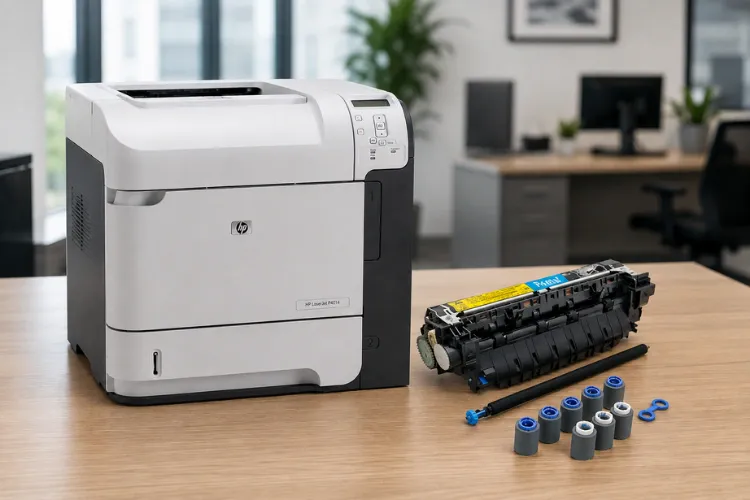
- The HP LaserJet P4014 P4015 P4515 maintenance kit contains the fusing assembly, transfer roller, transfer-roller tool, tray pickup rollers, and feed rollers.
- HP lists CB388A as the 110-volt kit and CB389A as the 220-volt kit for this printer family.
- Clearing the message at the control panel is temporary and replaces nothing.
- The maintenance count must be reset after installation, or the printer keeps reporting stale service information.
- Jams and fusing defects that continue after a kit goes in usually point to a component the kit does not include.
1. Why Your HP LaserJet Is Asking You to Perform Printer Maintenance
The HP LaserJet Perform Printer Maintenance message means the print engine has reached the page count HP assigns to its preventive-maintenance interval. A counter crossed a threshold. No sensor detected a fault, and nothing has necessarily failed on the day the message appears.
That distinction changes who needs to act and how fast. An error message stops production. A maintenance message hands an office a scheduling window, which is a far better position to be in than waiting for a technician while a department cannot print.
Where the printer keeps this information
HP directs users to print either a configuration page or a supplies status page to see how many pages have printed since new maintenance-kit components were installed. Both pages print from the Information menu on the control panel. That number is the single most useful thing to have in hand before calling for service.
We ask for it on nearly every call. A printer sitting at 230,000 pages is a routine kit installation. A printer at 310,000 pages has been running past its interval long enough that we expect wear in places the kit does not reach, and we plan the visit differently.
2. What HP’s 225,000-Page Interval Is Actually Measuring
The 225,000-page figure is a wear estimate for a specific group of parts, not a life expectancy for the printer. Three things wear on a predictable curve in this engine: the fuser, the transfer roller, and the rubber that moves paper.
The fuser sleeve and pressure roller run hot under constant pressure. The transfer roller carries a charge and collects stray toner and paper dust across hundreds of thousands of sheets. Pickup and feed rollers lose their surface texture and stop gripping the top sheet cleanly.
Why the page count is only half the picture
Two HP LaserJet P4015 printers can reach 225,000 pages in very different condition. A machine running clean 20 lb bond in a climate-controlled accounting office is not the same machine as one pulling recycled stock in a warehouse with open dock doors.
Monthly volume matters as much as the total. HP publishes a recommended monthly page range for this series, and printers pushed well above it arrive at the interval carrying more wear than the counter alone suggests. That is the practical argument for HP LaserJet P4014 P4015 P4515 preventive maintenance on schedule rather than on failure.
It also answers a question office managers ask us often: Do HP printers need regular maintenance? On this family, the answer is plainly yes. The parts HP schedules for replacement are the same parts we find worn when a jam call finally comes in on a machine that never had its kit installed.
Maintenance Message Showing? Get It Scheduled
Our $69.99 Onsite Printer Repair Promotion covers the onsite diagnosis of one HP LaserJet P4014, P4015, or P4515 displaying PERFORM PRINTER MAINTENANCE. Parts are quoted separately after diagnosis. Call (888) 657-0021 or email info@printer-repair-experts.net. Limitations may apply.
3. What Is Inside the Maintenance Kit for This Printer Family
HP’s parts description for the 110-volt CB388A kit lists a fusing assembly, a transfer roller, a transfer-roller tool, tray pickup rollers, eight feed rollers, and gloves. CB389A is the 220-volt version of the same kit. Both cover the HP LaserJet P4014, P4015, and P4515 printers.
Sold individually, the same components are the HP LaserJet P4014 maintenance kit, the HP LaserJet P4015 maintenance kit, and the HP LaserJet P4515 maintenance kit. They are the same platform, so the parts carry across the family.
The fusing assembly
The fuser bonds toner to the sheet with heat and pressure. It is a plug-in module on this engine, which is why HP LaserJet fuser replacement is practical here rather than a reason to retire the printer. A worn fuser shows itself as toner that smudges under a fingernail, repeating defects down the page, or a 50.x message.
The transfer roller
The transfer roller pulls toner from the drum onto the paper. It is a consumable surface, and it is also the part most often damaged during a rushed installation. HP includes a transfer-roller tool and gloves in the kit for a reason: skin oil on the roller surface causes print defects, so HP LaserJet transfer roller replacement is done without touching the roller itself.
The feed and pickup rollers
Pickup rollers lift the top sheet. Feed and separation rollers keep exactly one sheet moving. When they glaze over, the printer either pulls nothing or pulls two sheets at once. HP LaserJet pickup roller replacement and HP LaserJet feed roller replacement are what actually resolve most jam complaints on a high-mileage machine.
Tray 1 uses its own set. A standard kit covers the cassette trays, and Tray 1 roller replacement is handled with the separate Tray 1 roller kit when that tray is the one misfeeding. We stock both approaches because we do not know which tray is failing until we look. If you are comparing options across models, our page on the HP LaserJet printer maintenance kit covers how these kits differ between HP LaserJet families.
4. Symptoms That Follow When HP LaserJet P4014 P4015 P4515 Perform Printer Maintenance Is Deferred
Nothing dramatic happens the week the message appears. The problems arrive gradually, and they arrive in a recognizable order.
Paper-feed symptoms come first
The earliest sign is usually a tray that needs a second attempt. Then multi-feeds. Then a jam every few hundred pages, then a jam every few dozen. An HP LaserJet P4014 P4015 P4515 paper jam that started as an occasional annoyance and became a daily one is a rubber problem far more often than a paper problem.
Print-quality symptoms come next
A tired transfer roller produces light or mottled output that does not improve with a new cartridge. A tired fuser produces toner that will not stay on the sheet, or a repeating mark at a fixed interval down the page. Both are wear patterns, not settings problems.
Hard stops come last
An HP LaserJet P4014 P4015 P4515 fuser error in the 50.x range takes the printer out of service entirely. By that point the maintenance kit that would have prevented it has usually been overdue for tens of thousands of pages, and the department has already absorbed weeks of jam clearing.
5. How We Diagnose Worn Maintenance Components Before Replacing Them
Replacing parts because a counter says so is not diagnosis. On a machine well past its interval, we work through the same sequence every time so that the customer pays for the components that are actually worn.
Symptom, cause, and isolation
We start with what the customer sees and where. A jam that only happens from Tray 2 is a different problem from a jam that happens from every tray. Print defects get measured: a mark repeating at a consistent interval down the page identifies which rotating component is producing it.
Then we read the machine. The configuration page and supplies status page give us the page count since the last kit. The event log gives us the recent error history, which tells us whether 50.x messages have been appearing intermittently before anyone reported them.
Physical inspection
Rollers get inspected, not guessed at. Glazed or flattened rubber is visible and can be felt. The transfer roller gets checked for contamination and surface damage. The fuser gets checked for sleeve wear, and the paper path gets checked for accumulated dust and debris that no kit will fix on its own.
Remedy and component
The remedy follows the finding. Feed problems isolated to the cassette trays call for pickup and separation roller replacement. Poor fusing or a 50.x history calls for the fusing assembly. A machine at or past 225,000 pages with problems in more than one area gets the full HP LaserJet maintenance kit replacement, because replacing one worn part next to another worn part buys very little time.
When we recommend onsite service
We recommend a professional visit when the printer is past its interval and already jamming, when print defects continue after a new cartridge, when a 50.x message has appeared even once, or when a kit was installed and the problems did not stop. That last case is the one that most often turns into an HP LaserJet P4014 P4015 P4515 printer repair rather than a maintenance call, because something outside the kit is involved.
A New Kit Did Not Stop the Jams?
When jams, misfeeds, or fusing defects continue after a maintenance kit goes in, the worn component is outside the kit. We diagnose the actual failure onsite instead of replacing parts on guesswork. Call (888) 657-0021.
6. Clearing the Message Is Not the Same as Doing the Maintenance
HP documentation for this series states that the maintenance message can be temporarily cleared for approximately 10,000 pages using the CLEAR MAINTENANCE MESSAGE item on the Resets submenu. That option exists so an office can finish a deadline without a persistent message on the display.
It is a snooze button. Using HP LaserJet clear maintenance message does not replace a single component, and it does not reset the maintenance count. The counter keeps climbing behind the message.
What deferring actually costs
Ten thousand pages is a few weeks in a busy department. Cleared repeatedly, the printer ends up 40,000 or 60,000 pages past the interval with nobody tracking it. The staff stop reading the display, and the first real signal becomes a jam rate that makes the printer unusable.
We are not arguing that every printer must have its kit installed the day the message appears. We are arguing that clearing the message should be a deliberate scheduling decision with a date attached, not a reflex.
Where the HP documentation lives
The maintenance interval, the temporary-clear behavior, and the reset requirement are all documented by the manufacturer. The HP LaserJet P4010 and P4510 Series Printers User Guide is the primary reference for this printer family and is worth keeping with the machine.
7. Resetting the Maintenance Count After the Kit Goes In
HP documentation is explicit that the maintenance-kit counter must be reset after a maintenance kit is installed. Skipping it leaves the printer reporting information that no longer matches its hardware.
What goes wrong without the reset
The message either stays on the display or returns almost immediately, which makes it look like the installation failed. Worse, the page count since last service is now wrong, so the next maintenance interval cannot be planned from the printer’s own reporting. We have been called out to machines where three separate kits went in and none of the counts were reset.
How the reset works
The HP LaserJet maintenance count reset is performed at the control panel. The exact key sequence depends on the firmware revision installed on the printer, which is why the procedure that works on one HP LaserJet P4015 does not always match the one next to it.
We perform the HP LaserJet P4014 P4015 P4515 maintenance message reset as part of the installation and confirm it by printing a configuration page before we leave. Seeing the count return to zero is the only proof that the job was finished properly.
Model-specific behavior
The HP LaserJet P4014 Perform Printer Maintenance message, the HP LaserJet P4015 Perform Printer Maintenance message, and the HP LaserJet P4515 Perform Printer Maintenance message behave the same way, because all three share the P4010/P4510 platform. Firmware revision, not model number, is what changes the reset path.
20+ Years on HP LaserJet Paper Paths
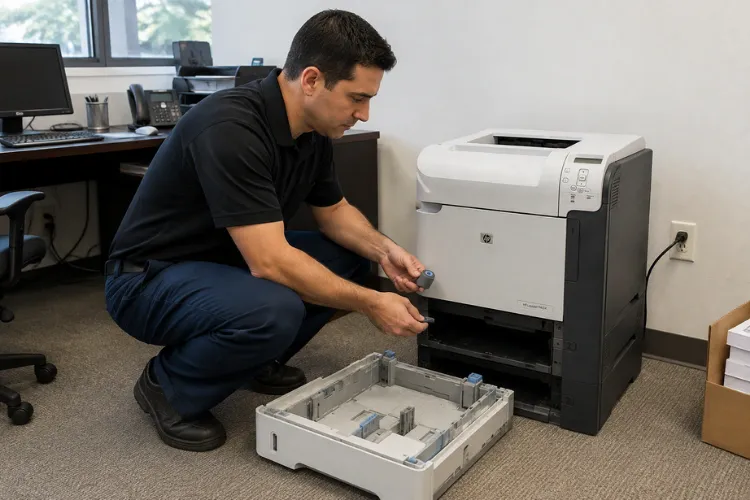
We have installed maintenance kits, fusing assemblies, transfer rollers, and feed rollers on HP LaserJet P4014, P4015, and P4515 printers across Orange County and approved portions of Los Angeles County. Service and installed parts carry our 6-month / 180-day warranty, and same-day service may be available. Email info@printer-repair-experts.net to request a visit.
8. What a Professional Maintenance Visit Covers
An HP LaserJet printer maintenance service call on this family is more than swapping a kit into a machine. The kit is the parts. The visit is the work around them.
The sequence we follow onsite
- Read the configuration page and supplies status page, and record the page count since last service.
- Review the event log for 50.x, jam, and sensor history that has not been reported.
- Inspect Tray 1, Tray 2, and any installed 500-sheet or 1,500-sheet trays for the actual source of misfeeds.
- Install the fusing assembly, transfer roller, and applicable pickup and feed rollers using the transfer-roller tool.
- Clean the paper path and remove accumulated paper dust and loose toner.
- Reset the maintenance count and verify it on a fresh configuration page.
- Run test pages from each installed tray to confirm feeding and fusing before the visit ends.
An HP LaserJet P4014 P4015 P4515 maintenance kit replacement handled this way ends with a printer that has been proven to work, not one that has been assumed to work. HP LaserJet P4014 P4015 P4515 pickup roller replacement in particular is easy to do badly, because the tray that is failing is not always the tray the customer reports.
When maintenance turns into repair
Sometimes the kit is not the answer. Registration components, paper-path sensors, drive assemblies, and formatter-level problems all produce symptoms that resemble worn rollers. When the diagnosis points there, the visit becomes HP LaserJet printer repair and we quote the actual failed assembly rather than selling a kit that will not fix anything.
We use HP Parts and high quality parts, and we do not rebuild fuser assemblies onsite. Applicable fusers are replaced. Service and installed parts carry our 6-month, 180-day warranty.
9. Scheduling Maintenance Around Your Print Volume
The businesses that get the most out of these printers treat maintenance as a calendar item. Once you know your monthly volume, the 225,000-page interval becomes a date you can plan for instead of an interruption that arrives on its own schedule.
Estimating your own interval
Divide 225,000 by your average monthly pages and you have the rough number of months between kits. A law office running 4,000 pages a month is on a multi-year cycle. A distribution center running 25,000 pages a month is on a nine-month cycle and should be budgeting accordingly.
Print a configuration page twice, thirty days apart, and the difference is your real monthly volume. It is usually higher than people expect, and it is the number that makes HP LaserJet P4014 maintenance, HP LaserJet P4015 maintenance, and HP LaserJet P4515 maintenance predictable instead of reactive.
Fleet considerations
Offices running several of these printers rarely have them wearing evenly. One machine absorbs most of the volume while the others idle. Pulling page counts across the fleet once a year identifies which unit is due next and prevents the surprise of two printers reaching their interval in the same week.
Getting the work scheduled
We have spent more than 20 years working on HP LaserJet printers, and we perform onsite printer repair and maintenance throughout Orange County, California and approved portions of Los Angeles County. That covers Anaheim, Irvine, Santa Ana, Fullerton, Huntington Beach, Tustin, Orange, and the surrounding cities.
If a printer in your office is showing the maintenance message, the useful next step is a page count and a phone call. We will tell you whether you are looking at a scheduled kit installation or something that needs diagnosis first, and same-day service may be available. Call (888) 657-0021 or email info@printer-repair-experts.net to get it on the calendar.
FAQ's - Frequently Asked Questions - HP LaserJet P4014 P4015 P4515 Maintenance
Usually, yes. The message reports that the 225,000-page preventive-maintenance interval has been reached, not that the printer has failed. What you are accepting is rising risk: worn rollers cause more jams over time, and a fuser at end of life eventually produces a 50.x error that stops the printer entirely.
No. It is a scheduled-service notice generated by a page counter, not a fault detected by a sensor. That is why it appears on a printer that is still producing acceptable output. It is a signal to schedule work while you still control the timing.
HP documentation identifies maintenance-kit installation as the customer’s responsibility, and the kit is not covered under the standard product warranty. Most offices hand the work to a service provider rather than an internal staff member, because the transfer roller and fuser are easy to damage during installation.
Often, since the fusing assembly is the part the 50.x family of messages points to and the kit includes it. It is not automatic, though. Power delivery and control problems can produce the same message, so we diagnose before quoting a fuser rather than assuming the kit resolves it.
Not necessarily. Tray 1 uses its own roller set and is handled with a separate Tray 1 roller kit. If Tray 1 feeds cleanly and shows no glazing, we leave it alone and replace the cassette-tray pickup and separation rollers that are actually failing.
Print a configuration page or a supplies status page from the Information menu on the control panel. Both show the page count since the maintenance components were last installed. Having that number ready shortens the service call considerably.
The message returns or never clears, which makes a correct installation look like a failure. It also leaves the printer reporting a page count that no longer matches its hardware, so the next maintenance interval cannot be planned from the machine’s own reporting.
Yes. Service and the parts we install carry a 6-month, 180-day warranty. We use HP Parts and high quality parts, and we do not install or guarantee customer-supplied components.
