
How to Fix HP LaserJet M607, M608 & M609 50.7F Fuser Error
How to Fix HP LaserJet M607, M608 & M609 50.7F Fuser Error is a question we get from offices whose printer went dark mid-morning with a 50.7F.00 message sitting on the control panel. The short answer is that this particular code reports a mechanical pressure-release problem inside the fuser rather than a heating problem, and that distinction changes what gets inspected and what eventually gets replaced.
Below is a practical walkthrough for the people who actually have to deal with the downtime: the office manager fielding complaints, the IT lead deciding whether to call anyone, and the business owner weighing a repair against a new machine.
- What HP’s 50.7F.00 code reports, and why it is not a warm-up or temperature fault
- Which HP LaserJet Enterprise and Managed models display this exact message
- What the fuser pressure-release mechanism does between print jobs
- The safe steps an office can take before a technician is called
- The four things we inspect when the code keeps coming back
- Which assembly is documented as the repair component, and when replacement makes better sense than another visit
1. How to Fix HP LaserJet M607, M608 & M609 50.7F Fuser Error Starts With Reading the Code Correctly
Most 50-series messages get filed mentally under “the fuser is cooked.” That instinct is usually right, but it is misleading here. The 7 in 50.7F.00 points at the fuser’s pressure-release operation, so the printer is reporting that a mechanism did not move the way it was supposed to move.
The symptom an office sees is simple enough. Printing halts, the panel shows the fuser message, and the job queue stacks up behind it. Sometimes the code appears at power-on, sometimes when the printer wakes from sleep, and sometimes in the middle of a long run.
What it does not tell you is which part failed. A 50.7F.00 fuser pressure-release mechanism failure can originate in the fuser itself, in the drive components that operate it, or in the sensing that confirms the movement happened. Treating the code as a diagnosis instead of a starting point is how offices end up paying for a part that was never the problem.
So the honest answer to the question in the heading is a two-stage one. There are safe, documented steps an office can perform, and there is a technician-level inspection that follows when those steps do not hold.
2. Which HP LaserJet Models Actually Display the 50.7F.00 Message
HP publishes a support document specifically for this code, and the model list on it is worth reading before assuming your printer is an outlier. The HP support document for the 50.7F.00 fuser error message covers the HP LaserJet Enterprise M607, M608, and M609 alongside the Managed E60055, E60065, and E60075 and the E60155, E60165, and E60175.
The same document extends to the HP LaserJet Enterprise MFP M631, M632, and M633 and their Managed counterparts. That is not a coincidence. These printers share an engine platform, which is why an HP LaserJet M607 M608 M609 50.7F.00 error and the same code on a matching MFP follow comparable diagnostic reasoning.
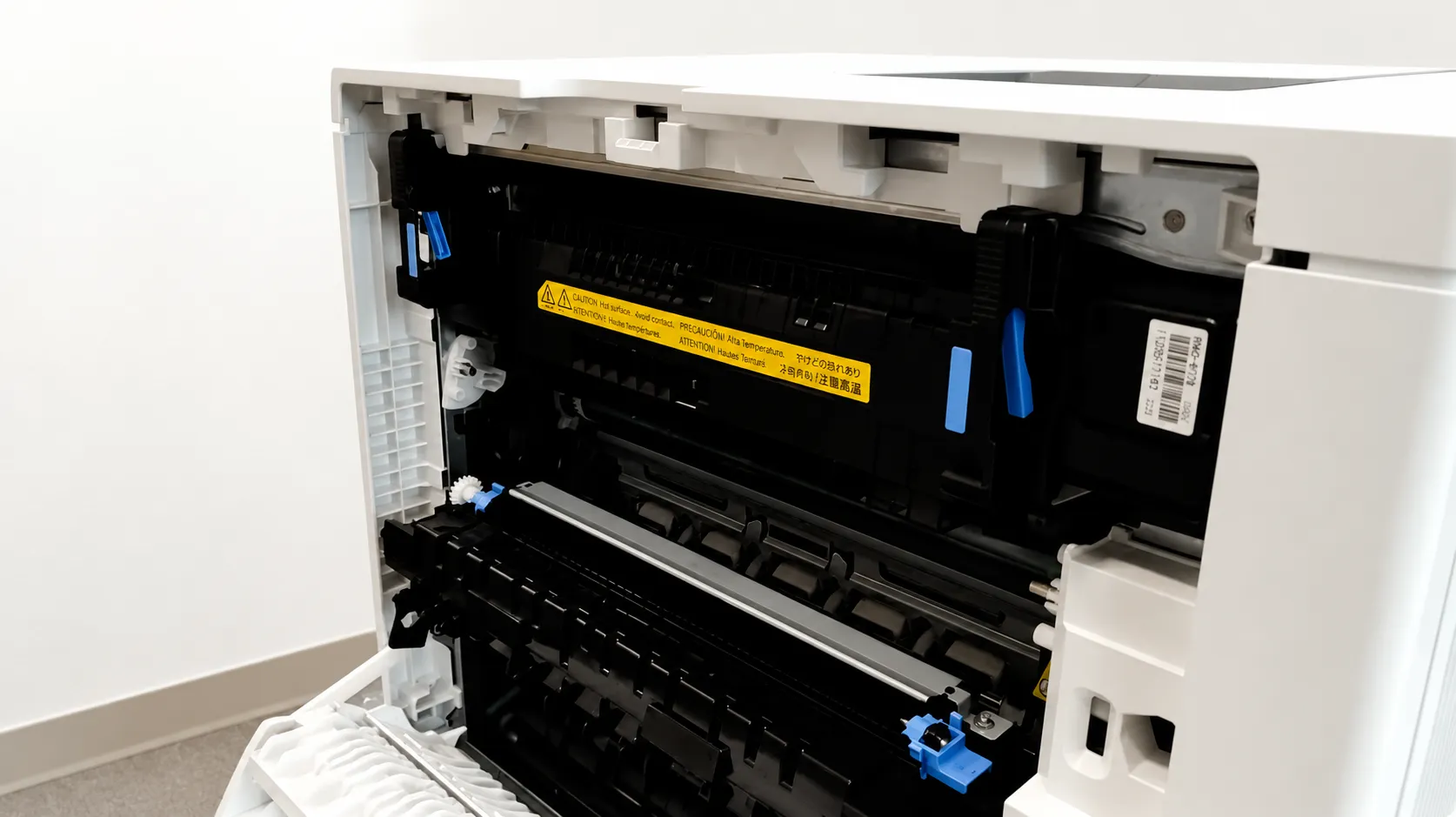
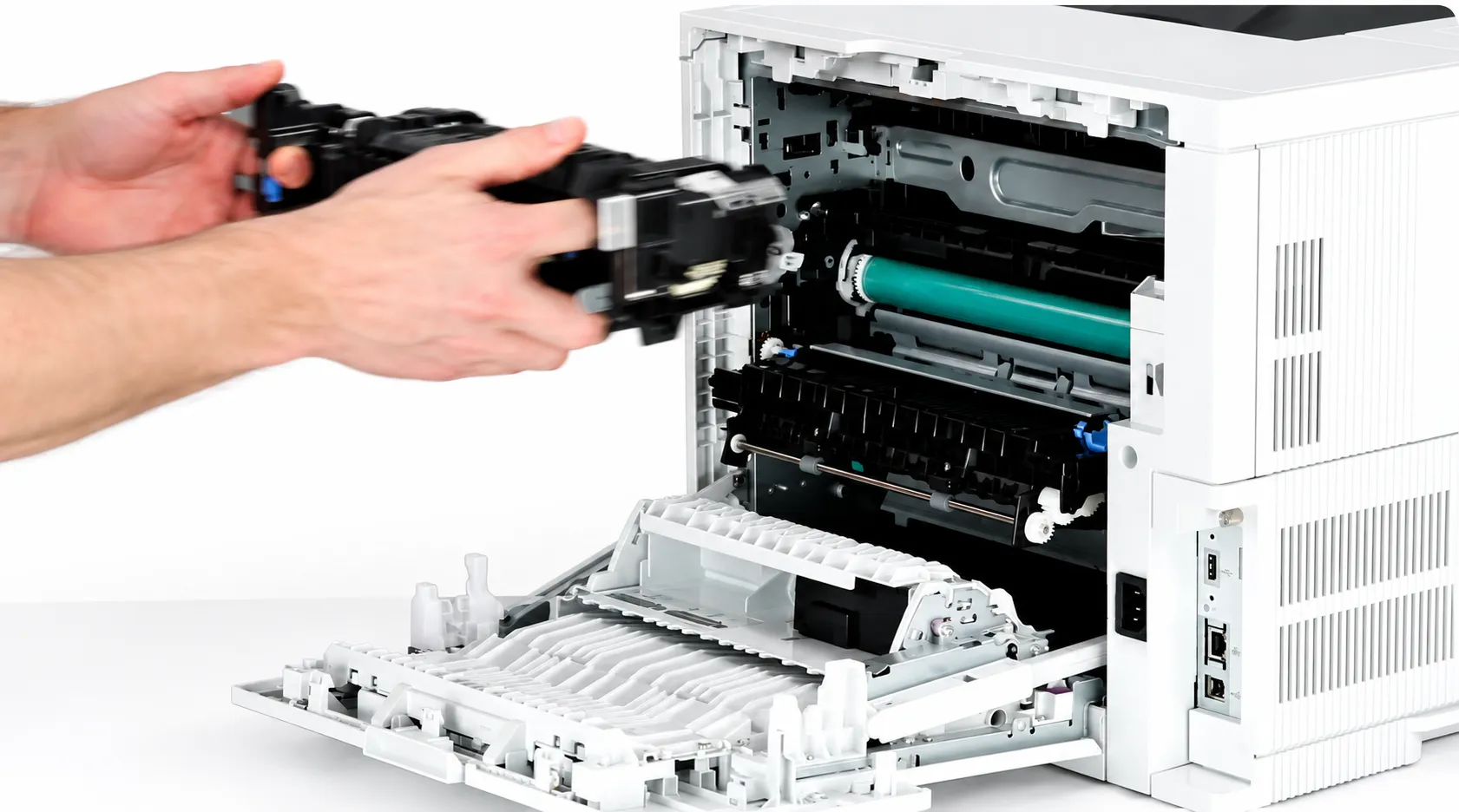
For a single-function M607, M608, or M609, one detail matters more than the model badge: the fuser is reached through the rear door, and HP’s own service documentation warns that it may be hot. Anyone whose experience is with a front-loading or side-loading machine should not assume the access point.
If your fleet mixes several generations, the broader picture of HP LaserJet M607 M608 M609 fuser error repair across the whole 50-series family is a useful companion to this page. This one stays on 50.7F.00 because the pressure-release path deserves its own treatment.

Put a Technician in Front of That 50.7F.00 Code
Our $69.99 Onsite Printer Repair Promotion covers the onsite visit and diagnosis for one HP LaserJet M607, M608, or M609 per visit. Limitations may apply. Call (888) 657-0021 or email info@printer-repair-experts.net and tell us what the control panel is showing.
3. What the Fuser Pressure-Release Mechanism Does Between Print Jobs
Fusing works by squeezing a sheet between a heated film sleeve and a pressure roller. Heat softens the toner, pressure drives it into the paper fibers, and the page comes out permanent instead of smudging under a thumb.
That squeeze cannot stay engaged permanently. Leaving the roller pressed hard against the sleeve while the printer idles would deform the contact surfaces over time, so the design includes a mechanism that separates the two and re-engages them when a job starts.
Some HP service literature calls this alienation rather than pressure release. Both names describe the same motion, and both appear in technician discussions of this code, which is worth knowing if you are reading forum threads written by people who work on several HP generations.
The printer does not simply command that motion and hope. It expects confirmation that the mechanism reached its expected position within an expected time. When that confirmation does not arrive, the control board raises the fault and stops the machine rather than running a job through a fuser that may be in the wrong state.
4. Symptoms Offices Report Before the Code Appears
The message rarely arrives with no warning at all. Looking back, most offices can identify something that had been slightly off for a week or two.
- An unusual clunk or grinding sound from the rear of the printer as a job begins
- A noticeably longer pause between sending a job and hearing the first sheet feed
- The error appearing once, clearing after a restart, then returning days later
- The code showing up more often on heavy stock, labels, or envelope runs
- Recurrence shortly after a fuser or maintenance kit was installed
That last pattern is the one we would flag hardest. A fuser message that begins immediately after a replacement usually points at how the assembly was seated or at a connector, not at a part that failed within a week of installation.
The intermittent pattern deserves attention too. An error that clears on restart and comes back is not a resolved error; it is a fault that has not yet become permanent. Offices that wait for it to become permanent tend to lose the printer on a deadline day rather than a quiet one.
There is a real cost to that timing. When a shared HP LaserJet Enterprise M608 goes down in an accounting office during a filing week, or an M609 stops in a medical office that prints patient paperwork all afternoon, the lost hours usually outweigh the repair invoice well before the day ends.
5. The Safe First Response Before Anyone Calls a Technician
HP’s documented starting point for this code is deliberately conservative, and we would not tell an office to do more than it covers.
Power the printer off at the front power button, wait, then power it back on. If the machine has been running hard, let it cool first — the fuser sits directly behind the rear door and holds heat long after the job stops.
Then check how the printer is powered. HP specifically directs that the power cord connect to a wall outlet rather than a power strip or surge protector, because a starved or unstable supply can affect the way the engine completes its startup sequence. Offices with a printer sharing a strip with three space heaters should fix that before anything else.
After the restart, watch what the printer does. A code that clears and stays gone through a normal day’s work may well have been a one-time event. A code that returns is telling you the underlying condition is still there.
What we ask offices not to do
Do not pull the fuser apart, and do not attempt service-menu diagnostics found in a forum post. The fuser is a hot assembly, the diagnostic menus on these printers are technician tools, and a mis-run test can cost more time than it saves.
Removing and reinstalling the fuser is documented for some conditions, but it is a cooled-printer, careful-hands job. If nobody in the office is comfortable doing it exactly as HP describes, leaving it seated and calling us is the better call. The same principle applies to any how to fix a fuser error on an HP printer discussion you find online — the safe steps are short, and the rest belongs to a technician.
Four Parts Trigger This Code. We Find Which One.
Fuser seating, the pressure relief sensor, the fuser flag, and the fuser drive each produce the same 50.7F.00 message. We work through all four onsite before recommending that anything be replaced, so you are not paying for a part that was never the fault. Reach our technicians at (888) 657-0021.
6. The Four Things We Inspect When 50.7F.00 Keeps Returning
A persistent code moves the work from the office to a technician. Four areas produce this fault, and checking them in order is what keeps a visit from turning into a parts-swapping exercise.
Fuser seating and connector condition
An assembly that is nearly seated behaves differently from one that is fully seated. We confirm the fuser is home in its cradle, that the handles engaged, and that nothing — a scrap of paper from an earlier jam, a shipping tab, a bent guide — is holding it a few millimetres out of position.
Connectors get the same attention. HP’s control panel messages documentation for this platform points technicians at the fuser connection and at the J401 and J402 connections on the DC controller PCA before any assembly is condemned. Burned, spread, or contaminated pins tell their own story.
The pressure relief sensor and the fuser flag
Confirmation that the mechanism moved has to come from somewhere. The HP LaserJet fuser pressure relief sensor is the piece that reports position, and a sensor that is dirty, displaced, or damaged can report a failure while the mechanism itself is moving perfectly well.
Alongside it sits the flag — the small physical actuator the sensor reads. Technicians working across HP platforms know this part as a common failure point, because a flag that has snapped or bent no longer interrupts the sensor when it should. We check its condition and its position rather than assuming the sensor is at fault.
Related technician-level work such as an HP LaserJet fuser output sensor SR5 diagnosis belongs to the same category of checks, though sensor designations vary between HP’s service, repair, and control-panel documents for this platform. We work from the documentation that matches the printer in front of us rather than from a designation remembered off another model.
Fuser drive movement and the pressure relief motor
If seating, connections, sensor, and flag all check out, the question becomes whether the motion is happening at all. The fuser pressure relief motor and the fuser drive components that transmit that motion are the next thing examined, and HP documents a fuser motor test within the printer’s component test diagnostics for exactly this kind of question.
Drive assemblies fail in an unglamorous way: a gear tooth shears, and everything downstream stops moving on command. A proper HP LaserJet fuser pressure relief motor test and a physical inspection of the drive train separate a motor problem from a broken gear from a fuser that simply will not release.
What the event log adds
We also read the printer’s history rather than only its current screen. A machine logging repeated HP LaserJet 50.7F.00 fuser error entries over several weeks is telling a different story than one showing a single event after a power interruption, and that history shapes what we recommend.
7. Which Component Gets Replaced — and Why We Do Not Rebuild Fusers Onsite
Once the inspection narrows the fault, the repair follows the component rather than the code. HP’s documentation for this platform identifies the fuser assembly by part number, listing a 110-volt assembly and a separate 220-volt assembly, so an HP LaserJet M607 M608 M609 fuser replacement has to match both the platform and the printer’s voltage.
When the fault sits in the drive rather than the fuser, the fuser drive assembly is the documented replacement, and it carries its own part number. When a documented sequence of checks and replacements does not clear the fault, HP’s escalation path for this platform reaches the DC controller PCA.
That ordering matters commercially. Replacing a fuser on a printer whose drive assembly is the actual failure means the office pays for a part and still owns the same error, which is precisely the outcome an accurate diagnosis is meant to prevent.
Printer Repair Experts does not perform onsite fuser rebuilding. Applicable fuser assemblies are replaced as complete units, using HP Parts, High Quality Parts, or Premium Parts as appropriate for the printer and the customer’s preference.
What an HP LaserJet M607 M608 M609 fuser repair visit looks like
A technician arrives, confirms the code and the printer’s history, and works the inspection sequence above before recommending anything. Where a part is required and available, the work is generally completed in the same visit.
Where a part has to be ordered, the return visit to install approved parts does not carry a second labor charge. Service and installed parts are covered by our 6-month, 180-day warranty, and same-day service may be available depending on the schedule and the printer’s location.
If the inspection turns up damage beyond the fusing system — a cracked frame, liquid intrusion, or a machine that has failed several unrelated assemblies in a short period — that is a conversation about HP LaserJet M607 M608 M609 printer repair in the broader sense rather than a single component swap.
Installed Correctly, Warranted for 180 Days
More than 20 years of HP LaserJet Enterprise work stands behind every fuser and fuser drive assembly we install, using HP Parts, High Quality Parts, or Premium Parts as appropriate. Service and installed parts carry our 6-month, 180-day warranty, and same-day service may be available. Call (888) 657-0021 or email info@printer-repair-experts.net to schedule.
8. Where 50.7F.00 Sits Inside the Wider 50-Series Family
Understanding the neighbours helps. Any HP LaserJet 50.xx error concerns the fusing system, but the second digit separates conditions that look identical from the front of the printer and behave nothing alike inside it.
Codes tied to temperature describe a fuser that did not reach, held, or exceeded an expected reading. Those are thermal stories, and they usually end at the heating elements, the thermistors, or the power reaching them. Pressure-release codes are mechanical stories about movement that did not happen.
Practically, that means a diagnostic path built for a warm-up failure will not find this fault. A technician who begins at the heaters on a 50.7F.00 machine spends the visit in the wrong half of the assembly.
Repair, replace, or plan ahead
These are durable printers, and a fuser is a wear item rather than a terminal diagnosis. HP treats the fuser kit as a maintenance component with its own supply messaging, which means a machine approaching its interval on an otherwise healthy chassis is a repair candidate, not a replacement candidate.
The calculation shifts when a printer has already consumed several major assemblies, when downtime has become routine, or when the model no longer suits the volume the office actually prints. We would rather say that plainly than sell a part into a machine that is finished.
Offices running several of these printers often ask whether to hold a spare fuser. For a fleet of four or more identical HP LaserJet Enterprise M607, M608, or M609 units running heavy volume, keeping one correct-voltage assembly on the shelf turns a multi-day outage into an afternoon.
9. Getting a Persistent 50.7F.00 Error Diagnosed and Repaired Onsite
When the restart does not hold and the code returns, the printer has told you what it can. The rest requires hands on the machine, and that is the work we do.
Printer Repair Experts has spent more than 20 years in the office equipment industry, and HP LaserJet printer repair is the centre of what we service — single-function LaserJets, Color LaserJets, and their MFP counterparts. A visit for onsite HP LaserJet repair means the technician comes to the printer, so nobody in your office is disconnecting a heavy machine and putting it in a car.
We provide onsite printer repair throughout Orange County, California and approved portions of Los Angeles County. Businesses in Anaheim, Irvine, Santa Ana, Fullerton, Huntington Beach, Garden Grove, and the surrounding cities are within our regular service territory.
Before you call, it helps to have the exact code from the panel, the printer’s model and serial number, and a short account of what changed recently — a fuser installed, a jam cleared, an office move, a power event. That handful of details often shortens the visit considerably.
A 50.7F.00 message is a specific, diagnosable condition with a documented repair path, not a mystery and not automatically the end of the printer. Tell us what your control panel is showing and we will get a technician to it.
FAQ's - Frequently Asked Questions - HP LaserJet M607, M608 & M609 50.7F Fuser Error
No. The printer stops the job rather than running paper through a fuser whose pressure-release state it cannot confirm, and that stop is a protective behaviour rather than a defect. Forcing repeated restarts to squeeze out a few more pages tends to make the underlying mechanical fault worse.
A toner cartridge has no bearing on it, because this code concerns the fuser’s pressure-release operation rather than imaging. A maintenance kit can be relevant, since the fuser is part of that kit, but installing one on the assumption that it will clear the message is an expensive guess when the drive or a sensor is the actual fault.
No. HP lists separate 110-volt and 220-volt fuser assemblies for this platform, and the replacement has to match the printer’s voltage. Fitting the wrong one does not resolve the original fault and introduces a new problem on top of it.
For several identical units under heavy volume, one correct-voltage assembly in the supply closet can turn a multi-day outage into an afternoon. For one or two lightly used printers, the shelf cost usually is not justified, and scheduling a visit when the code appears is the more sensible approach.
Most visits of this type are completed in a single trip when the required part is available, since the inspection sequence is short and the fuser is reached through the rear door. Service and installed parts are covered by our 6-month, 180-day warranty, and a return visit to install approved parts does not carry a second labor charge.
It helps, but it is not the whole picture. HP tracks the fuser kit as a maintenance supply with its own control-panel messaging, and offices printing heavy stock, labels, or envelopes generally reach practical end of life sooner than a page count alone suggests.
Yes. Those Managed models appear on the same HP support documentation as the M607, M608, and M609 for this code, and they share the same engine platform. The inspection sequence and the components involved are comparable.
The exact code from the control panel, the model and serial number, and a short note on anything that changed recently — a fuser installed, a jam cleared, an office move, or a power event. Access to the rear of the printer and a few feet of clearance also saves time on arrival.