
Printer Repair Santa Fe Springs CA:
Onsite HP LaserJet Service for a City That Runs on Paper
Printer Repair Santa Fe Springs CA means one thing at our company: a technician in a stocked van, headed to your building, with fuser assemblies and roller kits already on board. We service HP LaserJet and HP Color LaserJet equipment onsite throughout 90670, so nothing gets dropped off and nothing gets shipped out. In a city built on distribution, manufacturing, and freight-forwarding operations, a dead printer stops shipping labels and packing slips within minutes.
Preview Snapshot
- Onsite-only model — printer repair in Santa Fe Springs happens at your location, never at a depot.
- Same-day availability on most jam, fuser, print quality, and connectivity calls.
- Fusers, maintenance kits, and paper jam roller kits stocked for first-visit completion.
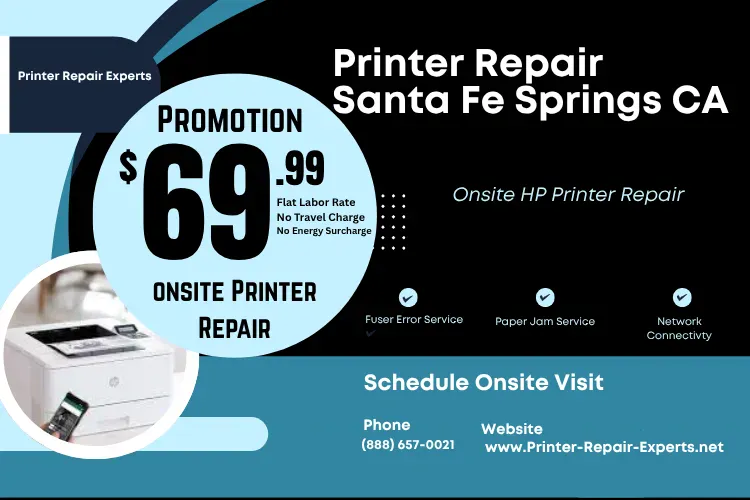
- $69.99 flat labor rate for qualifying new-customer visits; limitations apply.
- 6-month warranty on service and installed parts, 1-year warranty on toner.
- Coverage extends to the neighboring Gateway Cities within short drive time of the 5 and 605.
Get Your HP LaserJet Running Again - $69.99 Onsite Printer Repair Promotion
What Does Printer Repair Santa Fe Springs CA Actually Cover?
Printer repair in Santa Fe Springs, as we practice it, covers diagnosis, component replacement, calibration, and testing performed at your desk or in your print room — not at a depot. Our scope is deliberately narrow: HP Laserjet Printer Repair and HP Color Laserjet Printer Repair, including the multifunction versions of both. That focus is why HP Printer Repair Santa Fe Springs calls tend to close on the first visit rather than the third.
A typical Santa Fe Springs printer repair call runs in a fixed order. We confirm the reported symptom, pull the configuration and event log, check page count against the last maintenance interval, and only then open the machine.
- Paper feed and jam faults across every tray and the duplexer
- Fuser and image-transfer failures
- Print quality defects: streaking, banding, smearing, ghosting, fading
- Network, driver, and firmware issues
- Maintenance kit installation and preventive service
- Toner supply problems and false supply-status readings
What we do not do is guess. HP LaserJet Printer Repair Santa Fe Springs work is documentation-driven, and when a control panel code points somewhere unexpected, we follow the code rather than the assumption.
Printer Repair Experts has handled HP Printer Service in this region for over twenty years. Across that span, the biggest cost saver in printer repair services in Santa Fe Springs has been correct diagnosis before any part gets ordered.
How Fast Can Printer Repair in Santa Fe Springs Actually Reach You?
For most calls placed before midday, same day. Santa Fe Springs printer repair benefits from geography more than from scheduling software. The city sits at the junction of the I-5 and I-605, which is the practical reason Onsite Printer Repair here moves faster than it does in more congested parts of the county. A van already headed toward the Slauson Avenue industrial stretch can absorb a second stop on Los Nietos Road without adding an hour to the route.
Same Day Printer Repair Santa Fe Springs is realistic because of what rides in the van, not because of optimistic scheduling. We stock most common HP LaserJet fuser assemblies, maintenance kits, and paper jam roller kits.
Onsite Printer Repair Santa Fe Springs also removes the hidden cost nobody quotes you: packing, freight, and the two weeks a machine spends in someone else’s queue. Your equipment never leaves the building. For a shipping office running one high-volume unit, that difference is the whole decision.
Here is the honest version of how we schedule printer repair in Santa Fe Springs. We provide onsite service for businesses located along the city’s main commercial corridors, and we will tell you the realistic arrival window when you call rather than after you have waited for it.
Which ZIP Codes and Corridors Does Our Santa Fe Springs Printer Repair Coverage Include?
The whole city, which for Santa Fe Springs means a single ZIP code: 90670. That simplicity is useful — printer repair in Santa Fe Springs involves no coverage-boundary conversation, no partial service area, and no surcharge zone inside city limits.
Santa Fe Springs is unusually dense with industrial and distribution employers for its size, and printer fleets follow employment. These are the corridors our routing covers most often:
| Commercial Corridor | Typical Business Profile |
|---|---|
| 12039–12001 Slauson Ave | Industrial and manufacturing facilities |
| 12100–12130 Los Nietos Rd | Warehouse and light industrial |
| 9661–9799 Norwalk Blvd | Mixed commercial and professional suites |
| 9336–9300 Santa Fe Springs Rd | Industrial park and service businesses |
| 12759–12701 Telegraph Rd | Distribution and logistics offices |
| 12545 E Florence Ave | Commercial and retail-adjacent offices |
| 12886–12926 Imperial Hwy | Professional and medical offices |
| 13623–13699 Carmenita Rd | Warehouse and distribution facilities |
| 15207–15213 Marquardt Ave | Industrial and manufacturing |
Businesses operating within any of these areas can request printer repair services in Santa Fe Springs on the same dispatch schedule as the rest of the city.
Our coverage does not stop at the city line, and neither does the average Santa Fe Springs company’s footprint. Many clients keep satellite offices or second warehouses in Whittier, Pico Rivera, Norwalk, La Mirada, and Cerritos, and one technician can often cover two sites in a single afternoon. Downey sits inside the same routing radius. For companies with facilities further inland, Printer Repair City of Industry CA falls within the same Los Angeles County service territory.
Why Do HP LaserJet Printers Jam So Often in Warehouse Offices?
Because warehouse air is full of the two things a paper path hates: dust and humidity swings. Printer Paper Jam Repair is the single most common printer repair call in Santa Fe Springs, and in the majority of cases the machine is not broken — it is worn and dirty in a predictable pattern.
Rubber rollers glaze over as paper dust bakes onto them. A glazed roller stops gripping, so the sheet arrives late at the next sensor and the printer declares a jam it did not physically have. That is why a Printer Not Picking Up Paper complaint and an HP LaserJet Paper Jam complaint are frequently the same underlying failure
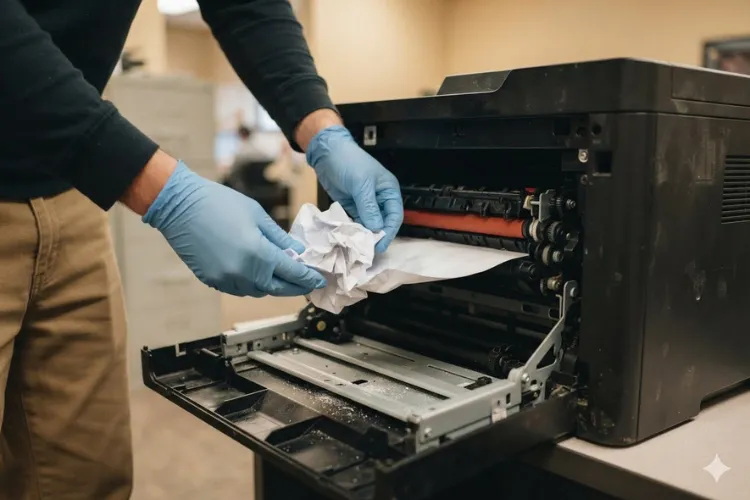
Our technicians work the paper path in sequence rather than replacing parts at random:
- Pickup Roller Replacement — first point of contact with the stack, first to glaze
- Feed Roller Replacement — drives the sheet toward registration
- Separation Roller Replacement — prevents multi-feeds and double-pulls
- Registration Roller Replacement — squares the page before it enters the transfer zone
Printer Error Codes narrow this quickly. A 13.B2 code points at a different segment of the path than a 13.FF, and reading the code before opening the machine is the difference between a thirty-minute visit and a two-hour one. That habit is why printer repair in Santa Fe Springs seldom turns into a second appointment for us.
Three habits cut jam rates in these buildings without any parts at all. Keep reams sealed until use, keep them off the floor and away from roll-up doors, and fan the stack before loading. Tray guides that have drifted a few millimeters cause more repeat calls than most managers expect.
Professional Printer Repair Santa Fe Springs CA
What Does a Fuser Error Mean, and Can It Be Fixed Onsite?
A Printer Fuser Error means the printer could not hold the fuser at the temperature it needs to bond toner to the page, and yes, it is an onsite repair in nearly every case. The fuser is a consumable assembly, not a permanent component, and on the high-volume models common in this city it is simply reaching the end of its rated life.
An HP LaserJet Fuser Error usually announces itself before it becomes a hard stop. Pages come out with toner that smudges under a thumb. The machine takes longer to warm up. Then a 50-series code appears and the printer stops entirely.
We keep fuser assemblies on the van for the models we see most, which is why an HP Laserjet M609 Fuser Error or HP LaserJet M608 Printer Repair call usually finishes the same day it is opened. Before replacing an expensive assembly, though, we verify the actual cause — a fuser code can occasionally trace back to a power delivery or sensor fault instead.
One field note worth passing on: heavy card stock, labels, and pressure-seal forms run hot and shorten fuser life considerably. Shipping-heavy operations book more fuser-related printer repair in Santa Fe Springs than any other category, often well ahead of the page count on the spec sheet. Planning for that is cheaper than reacting to it.
When Should You Install a Maintenance Kit Instead of Booking Another Repair?
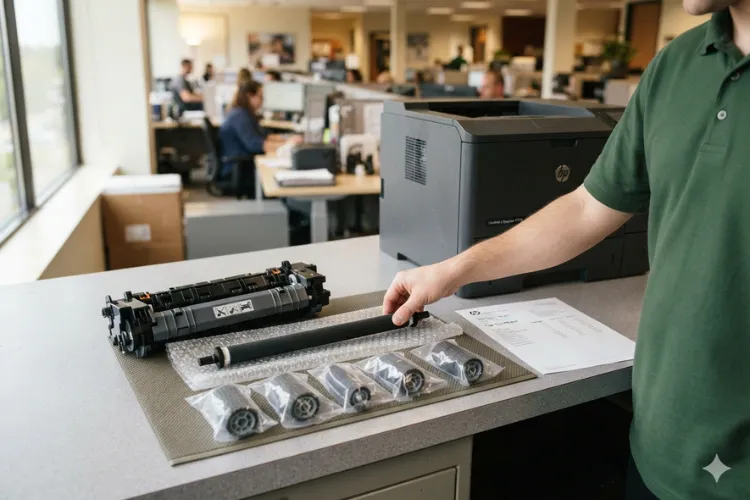
When the page count says so, or when you have called us twice in one quarter for feed faults. A Printer Maintenance Kit bundles the fuser, transfer roller, and the full roller set into one scheduled service, and installing it proactively is consistently less expensive than three reactive visits.
HP builds the reminder into the firmware. When the Perform Maintenance printer message appears on the control panel, the machine has crossed its rated interval — on the M607 through M609 family that threshold sits around 225,000 pages. An HP Laserjet M607 Perform Maintenance alert is a scheduling prompt, not an emergency, and it is the ideal moment to book a planned visit instead of waiting for a breakdown mid-shift.
We install a genuine HP maintenance kit whenever the model and availability allow, and Premium Parts or High Quality Parts where they meet the same service life standard. Every HP Laserjet Printer Maintenance Kit we install carries our 6-month warranty on both the parts and the labor.
For fleets running several machines, the math behind scheduled printer repair in Santa Fe Springs is straightforward:
- Batch the kits across machines that are near interval together
- Schedule outside your shipping window
- Reset the counter correctly so the next interval is accurate
- Log the page count so the following kit can be forecast, not discovered
What Is Behind Streaks, Faded Pages, and Other Print Quality Problems?
Almost always one of four things: a cartridge at end of life, a contaminated transfer roller, a worn fuser sleeve, or toner that was never built to the right specification. Print Quality Problems are the printer repair calls in Santa Fe Springs where guessing costs the most, because every one of those causes looks similar on a single test page.
A repetitive defect ruler settles it fast. Marks that repeat at a fixed interval down the page identify which rotating component is responsible by circumference alone. That measurement takes two minutes and routinely saves a client the cost of a part they did not need.
Toner quality is the variable most offices underestimate. Cheap third-party cartridges leak, dust the transfer area, and leave residue that shows up as background haze weeks later. We supply high-quality third-party toner backed by a one-year warranty, and we will tell you plainly when a print defect traces back to the cartridge rather than the printer.
Color work adds a step. HP Color LaserJet Printer Repair for registration drift or hue shift usually starts with a full calibration and a check of each imaging drum before any component is condemned.
Before You Replace Your Printer, Let Us Take a Look
Why Won't the Printer Print After a Network Change or Firmware Update?
Because the workstation is still pointing at an address the printer no longer holds. A Printer Not Printing complaint following an office move, a router swap, or a firmware push is a connectivity problem far more often than a hardware one — and it is one of the fastest fixes we perform.
Printer Troubleshooting for network faults follows a short, reliable sequence:
- Print a configuration page and confirm the current IP address
- Verify the printer holds a reserved or static address rather than a rotating DHCP lease
- Confirm the driver on the workstation matches the model and firmware level
- Check that the print queue is not holding a stalled job
- Test from a second machine to isolate workstation versus printer
HP LaserJet MFP Repair adds scan-to-email and scan-to-folder into the same picture, and those break for their own reasons — expired credentials, changed SMTP settings, or a mail server that started requiring authentication it did not require last year. Multifunction units in professional offices along the city’s commercial corridors account for a steady share of these calls.
Our Printer Diagnostic Service exists for exactly this ambiguity. When a business cannot tell whether the fault sits in the printer, the network, or the workstation, one onsite visit answers the question definitively instead of bouncing the issue between vendors. It is also the fastest printer repair in Santa Fe Springs we perform, because nothing usually needs replacing.
Should You Repair or Replace an Aging HP LaserJet Fleet?
Repair, in most cases, and the reason is unglamorous: enterprise-class HP LaserJet hardware is engineered for a duty cycle that consumer equipment cannot approach. A well-maintained M600-series unit will often outlast the replacement being proposed for it.
We apply a simple test on every Santa Fe Springs printer repair quote. If the cost of the needed repair approaches roughly half the replacement cost of an equivalent machine, replacement deserves a look. Below that line, repair almost always wins on total cost per page.
Three factors shift the answer:
- Parts availability — when assemblies for a model become scarce, future repairs get slower and costlier
- Volume mismatch — a machine consistently running above its rated monthly duty cycle will keep failing regardless of repair quality
- Fleet consistency — standardizing on fewer models simplifies parts stocking, driver management, and training
Downtime is the number most fleet decisions ignore. When a single unit handles the shipping paperwork for a distribution operation, an idle afternoon costs more than the repair did. That is the calculation behind keeping printer repair services in Santa Fe Springs on a scheduled maintenance footing rather than a break-fix one.
Conclusion
Santa Fe Springs businesses do not have the luxury of waiting a week for equipment to come back from a depot. Trucks load on a schedule, invoices go out on a schedule, and the printer has to keep up with both. Our onsite model, stocked vans, and single-ZIP coverage area exist to match that reality, which is why printer repair in Santa Fe Springs looks different when we do it.
If a machine is jamming, throwing a fuser code, printing poorly, or refusing to talk to the network, we can usually be there the same day. Call us and we will tell you honestly what it needs before we touch it.
Commercial Areas We Provide Onsite Printer Repair Services - Santa Fe Springs CA
Slauson Avenue Area
12039-12001 Slauson Ave
Santa Fe Springs, CA 90670
Los Nietos Road Vicinity
12100-12130 Los Nietos Rd
Santa Fe Springs, CA 90670
Norwalk Blvd. Area
9661-9799 Norwalk Blvd
Santa Fe Springs, CA 90670
Santa Fe Springs Rd Area
9336-9300 Santa Fe Springs Rd
Santa Fe Springs, CA 90670
Telegraph Road Corridor
12759-12701 Telegraph Rd
Santa Fe Springs, CA 90670
Florence Avenue Area
12545 E Florence Ave
Santa Fe Springs, CA 90670
Imperial Highway Area
12886-12926 Imperial Hwy.
Santa Fe Springs, CA 90670
Camernita Vicinity
13623-13699 Carmenita Rd
Santa Fe Springs, CA 90670
Marquardt Commercial Area
15207-15213 Marquardt Ave
Santa Fe Springs, CA 90670
FAQ's - Frequently Asked Questions - Printer Repair Santa Fe Springs CA
Yes, for most calls placed earlier in the day. Same-day completion depends on the part required, and because we stock common fuser assemblies, maintenance kits, and roller kits, the majority of jam, fuser, and print quality calls finish on the first visit.
Santa Fe Springs is served by ZIP code 90670, and we cover all of it with no partial-area restrictions or in-city travel surcharge. We also service the surrounding Gateway Cities on the same routing schedule.
No. We are an onsite service company, and our technicians travel to your business location. Your equipment stays where it is, which is the main reason our turnaround is measured in hours rather than weeks.
It applies to one qualifying HP LaserJet or HP Color LaserJet service visit for new customers, and it is subject to limitations. HP OfficeJet, DeskJet, Envy, Smart Tank, DesignJet, and non-HP LaserJet models are excluded. Tell us your model when you call and we will confirm eligibility before dispatch.
Service and installed parts are covered for six months, which is 180 days. Toner purchased through us carries a separate one-year warranty. If a covered issue returns inside that window, the return visit is on us.
Yes. Many of our clients run a main office in Santa Fe Springs with a second site nearby, and a technician can frequently cover both in one dispatch. That includes locations across our wider Los Angeles County and Orange County service area.
As a rule of thumb, when the repair cost approaches roughly half the price of an equivalent replacement, replacement is worth evaluating. Parts availability and whether the machine is running above its rated monthly volume matter just as much as the quote. We will give you the honest read, including when replacement is the better call.
Yes. We service HP LaserJet and HP Color LaserJet printers along with the multifunction versions of both, including scan-to-email and scan-to-folder configuration. We do not service inkjet families such as OfficeJet, DeskJet, Envy, or Smart Tank.
