
Printer Repair Commerce CA — Onsite HP LaserJet Service for Working Offices
When the main printer in a shipping office off Washington Boulevard stops feeding at 9 a.m., printer repair in Commerce, CA becomes the only item on the schedule that matters. Printer Repair Experts sends technicians directly to businesses throughout the City of Commerce including ZIP 90040, and same-day onsite service is available for many common HP LaserJet failures. We have spent more than 20 years inside the machines Commerce offices run hardest.
There is no mail-in program here and no guessing over the phone. A technician arrives with a stocked vehicle, diagnoses the actual fault, and puts the printer back to work — usually in a single visit.
What you’ll find on this page:
- Same-day onsite printer repair in Commerce for HP LaserJet and HP Color LaserJet models
- Full ZIP 90040 coverage, including the industrial corridors along Washington Boulevard and Telegraph Road
- The paper jams, fuser errors, and print-quality defects we repair most often
- Maintenance kit installation, HP Parts, and toner backed by written warranties
- A $69.99 new-customer labor special for qualifying HP LaserJet repairs (limitations apply)
- Straight talk on repairing versus replacing an aging printer fleet
Why Commerce Businesses Keep Their Printers Onsite — and Call Us
Commerce is a working city. Distribution centers, freight brokers, food processors, and back-of-house offices along the I-5 and 710 corridors print bills of lading, pick tickets, and compliance paperwork all day long. When a printer stops, trucks wait. That is real money, not an inconvenience.
Shipping a 50-pound HP LaserJet Enterprise unit to a depot never made sense for these operations. Onsite HP LaserJet Printer Repair is the practical answer: the machine stays racked, networked, and loaded with its trays while we work on it. Our technicians handle HP LaserJet repair in Commerce facilities where the printer cannot leave the building for security or workflow reasons.
We also service color fleets. HP Color LaserJet Printer Repair calls in Commerce tend to come from front offices at the Citadel Outlets business park and hospitality operations near Commerce Casino, where customer-facing documents have to look right the first time.
The productivity math is blunt. A dispatch office that prints 400 pick tickets a shift cannot absorb a dead printer for two days while a unit sits in transit. Local printer repair services in Commerce exist because this city’s paperwork moves at freight speed, and the equipment has to keep up. Fast, competent printer repair in Commerce is infrastructure here, not a luxury.
Printer Repair Commerce CA: How an Onsite Visit Actually Works
Every visit starts with a real diagnosis, not a parts cannon. Before replacing expensive components, Printer Repair Experts performs a complete diagnosis to verify the actual cause of the failure. We pull the event log, run test pages, and inspect the paper path before recommending anything.
Once we confirm the fault, we quote the repair on the spot. Most of the fusers, maintenance kits, and rollers for common HP LaserJet and HP Color LaserJet models ride in the vehicle, which is what makes same day printer repair in Commerce realistic rather than a marketing line.
Repairs are backed by a 6-month (180-day) warranty on service and installed parts. If a fix does not hold, that is our problem to solve — not a new invoice.
You will also get honest advice. If a machine is not worth the repair, we say so and show the math. Office managers remember that, and it is why so much of our printer repair in Commerce comes from referrals between neighboring businesses.
Expect a technician who respects your floor. We check in with the front desk, work from a mat, keep toner contained, and leave test pages proving the fix. Commerce printer repair visits should end with your staff printing normally — not with a mess and a maybe.
Paper Jams: The Number-One Complaint in Commerce Warehouses
Dust, cardboard fiber, and heavy tray usage make jams the most common reason for printer paper jam repair in Commerce. Loading-dock offices are hard on paper handling. Feed rollers glaze over, separation pads wear smooth, and the printer starts double-feeding or stalling mid-sheet.
On the monochrome Enterprise line, a recurring HP LaserJet M607 M608 M609 Paper Jam usually traces back to worn tray 2 pickup and separation rollers or a tired transfer roller — the same components the maintenance kit is designed to refresh. Our technicians frequently encounter this issue during onsite service calls, often on machines that blew past their kit interval long ago.
The newer series behaves the same way under Commerce workloads. A repeating HP LaserJet M610 M611 M612 Paper Jam with a 13-series code pointing at tray 2 or the registration area almost always means worn rubber, contaminated sensors, or a label that peeled off inside the paper path. We clear the jam, then fix the reason it happened, because clearing alone is a one-week repair at best.
Environment plays a bigger role here than in most cities. Warehouse-adjacent offices pull in fine dust that coats rollers and sensors, so we wipe down the paper path on every Commerce printer repair call and flag machines that would benefit from relocation or more frequent cleaning.
Fuser Errors on the M607–M612 Series
Few messages stop an office faster than a 50-series error on the control panel. A persistent HP LaserJet M607 M608 M609 Fuser Error — commonly a warm-up or temperature fault — typically means the fuser assembly has reached the end of its life and needs replacement rather than another power cycle.
The same holds on the follow-on series. An HP LaserJet M610 M611 M612 Fuser Error that returns after a restart is the printer telling you the fusing unit can no longer hold temperature reliably. Continuing to run it risks wrinkled output, toner that rubs off the page, and eventually a hard stop.
This is where stocking parts pays off for our customers. Many HP LaserJet and HP Color LaserJet fusers are on the truck, so printer fuser repair in Commerce is frequently completed the same day the error appears. We install HP Parts, Premium Parts, or High Quality Parts, test a full duplex run, and leave the old assembly with you if you want it.
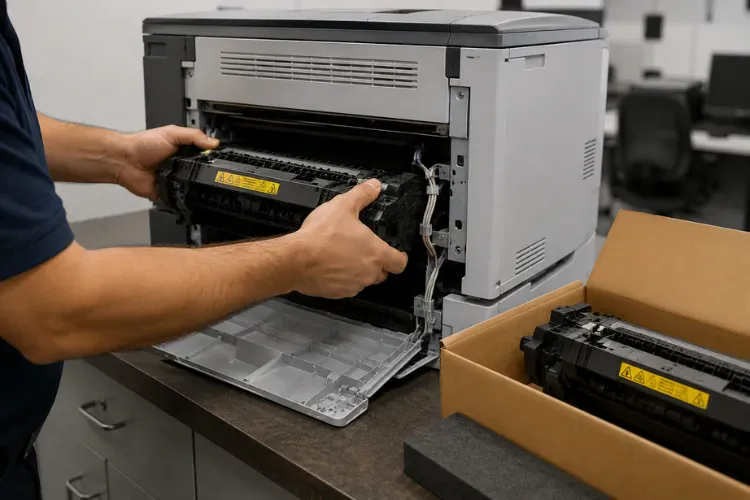
Because fusers and maintenance kits overlap, we check kit status on every fuser call. Complete HP LaserJet M607 M608 M609 Printer Repair often means installing the full kit — fuser plus rollers — so the machine resets to a known-good baseline instead of failing piecemeal over the next quarter.
Lines, Streaks, Smearing: Print Quality Problems We Solve
Print defects are diagnostic gold if you read them correctly. Vertical lines, gray backgrounds, repeating marks at fixed intervals, faded zones, and toner smearing each point to different components — cartridge, transfer roller, or fuser. Guessing gets expensive; measuring does not.
Our approach to printer print quality repair in Commerce starts with internal test pages and a repetitive-defect check. A mark that repeats down the page at a consistent interval identifies the rotating component responsible, which keeps us from replacing three parts to fix one problem.
Toner quality matters more than most offices realize. Bargain cartridges cause backgrounding, leaks, and drum scratches that mimic hardware failure. We supply high-quality third-party toner backed by a 1-year (365-day) warranty, and on HP LaserJet M610 M611 M612 Printer Repair visits we routinely trace stubborn defects back to the cartridge a supplier swore was fine.
Color adds its own layer. Registration shift, color banding, and density drift on HP Color LaserJet MFPs call for calibration and a hard look at the transfer belt before anyone talks about replacing the machine.
Bring us the ugly pages. Actual defective output shortens the diagnosis, and it is the fastest way for printer repair in Commerce offices to turn into a one-visit fix instead of a return trip.
Maintenance Kits, Parts, and Toner That Keep a Fleet Honest
Preventative maintenance is the cheapest repair you will ever buy. HP builds a maintenance interval into these printers for a reason: rollers and fusers are consumables, and running them to failure converts a planned 30-minute service into an unplanned outage.
Printer maintenance kit installation in Commerce is one of our most requested services for exactly that reason. We install the kit, reset the maintenance count, clean the paper path, and update anything else that is due while the machine is open. One visit, one known-good baseline. Every kit we install matches the genuine HP LaserJet M607 M608 M609 parts specification published in HP’s official supplies and parts documentation.
For IT professionals managing mixed fleets — M604 through M612 mono units, M631–M636 MFPs, and E62555 or E62655 managed devices — we track intervals across the whole inventory. Fleet reliability improves fast when maintenance stops being reactive — and so do emergency calls for printer repair in Commerce.
Every repair uses HP Parts, Premium Parts, or High Quality Parts, never pulls from unknown gray stock. Parts and labor carry the 6-month warranty; toner carries a full year.
Scheduling is flexible on purpose. Many Commerce operations run second shifts, so we time maintenance around your quiet hours where possible. Repairing printers in Commerce facilities that never fully close takes coordination, and we have done it long enough to plan around your calendar instead of ours.
Same-Day Coverage Across ZIP 90040
We cover the entire 90040 ZIP code — effectively the whole City of Commerce. That includes the office parks around Citadel Outlets, the hospitality and administrative operations tied to Commerce Casino, and the industrial blocks between Bandini Park and the rail corridor, where printer density per building runs high and downtime tolerance runs low.
Freeway access is the quiet advantage here. With the 5, 710, and 60 boxing in the city, a dispatched technician is rarely more than a short drive from any Commerce address, which is what makes same-day onsite printer repair in Commerce a standing offer instead of a lucky break.
Call before mid-morning and, for many common HP LaserJet failures, the machine is running again before the afternoon shipping cutoff. That timing is deliberate — it is the deadline that matters most to the businesses we serve here.
When you call, tell us the model and the symptom. That one detail lets us load the right fuser or kit before the truck rolls, which is the difference between a repair and a diagnosis-only visit for printer repair in Commerce, CA operations on a deadline.
Nearby Cities We Also Serve
Commerce sits in the middle of our Los Angeles County service area, so the same trucks that handle printer service in Commerce, CA also run daily routes into Montebello, Maywood, Bell Gardens, Downey, Pico Rivera, and Vernon. If your company operates satellite offices in any of these cities, one call covers the whole footprint.
That matters for multi-site fleets. An office manager in Commerce can schedule the Downey branch and the Vernon warehouse on the same ticket, with consistent parts, consistent pricing, and one warranty covering all of it — the same Commerce printer repair team on every visit.
Repair or Replace? Honest Numbers for an Aging HP Fleet
Not every printer deserves saving, and we will tell you which is which. The math is straightforward: a fuser or maintenance kit on a structurally sound HP LaserJet Enterprise unit typically costs a fraction of a comparable replacement — and avoids re-cabling, driver redeployment, and retraining.
Business printer repair in Commerce only makes sense when the platform has life left, which is why we anchor the decision to the HP LaserJet model itself. A P4015 with a cracked frame is a replacement conversation; an M608 with a tired fuser is an easy repair. Laser printer repair in Commerce offices should extend the machines worth keeping, not prop up the ones that are done.
When replacement is the right call, we will say so plainly and help you plan it — including which trays, memory, and accessories carry forward. For fleets, we can stage the transition so no department loses its printer on a working day.
One more field observation: the machines worth keeping are almost always the ones that got their maintenance kits on time. Discipline on the cheap parts is what postpones the expensive conversation.
Conclusion
Printer downtime in a logistics town is not a nuisance — it is freight sitting on a dock. Whether it is a jam that keeps coming back, a fuser error that survived three restarts, or print quality that finally crossed the line, HP printer repair in Commerce is one call and often one same-day visit away.
Printer Repair Experts brings 20+ years of field experience, stocked parts, and a written 6-month warranty to every printer repair in Commerce job across ZIP 90040. When you are ready, we are close.
FAQ's - Frequently Asked Questons - Printer Repair Commerce CA
We cover the entire 90040 ZIP code, which encompasses the city of Commerce, including the industrial areas along Washington Boulevard and Telegraph Road and the business parks near Citadel Outlets and Commerce Casino.
Yes. New customers in Commerce qualify for the $69.99 flat labor rate on one qualifying HP LaserJet or HP Color LaserJet repair visit. The promotion is subject to limitations and excludes OfficeJet, DeskJet, Envy, Smart Tank, DesignJet, and non-HP LaserJet models.
Yes, in many cases. Same-day onsite service is available for many common HP LaserJet and HP Color LaserJet issues, and our vehicles stock the fusers, maintenance kits, and rollers these models use most. Calling earlier in the day gives us the best chance of completing the repair before your shipping cutoff.
No. Leave it racked, networked, and plugged in — we prefer to see the machine exactly as it fails. Just clear a little working space around it and have a recent example of the problem output handy if the issue is print quality.
Service and installed parts carry a 6-month (180-day) warranty. Toner we supply is separately backed for a full year (365 days). If a covered repair fails within the warranty period, we return and make it right.
Yes. For offices running multiple HP LaserJet or HP Color LaserJet devices, we track maintenance intervals across the fleet, install kits before failures happen, and consolidate multi-site work — including nearby cities — under one account.
