
HP Laserjet M527MFP M528MFP Perform Maintenance
Document Feeder and Tray Roller Service Guide
HP Laserjet M527MFP M528MFP Perform Maintenance requests on these MFPs usually trace back to one of two wear points: the automatic document feeder that pulls originals across the scanner, or the tray rollers that feed paper into the print engine. The quickest route to the right fix is to read the exact control-panel message, then test which paper path is actually misbehaving before anyone orders a kit.
This guide is for office managers and IT staff who look after shared HP LaserJet Enterprise MFP M527 and M528 units. It explains how to read the alert, isolate the affected path with three short tests, choose the HP maintenance parts that apply and clear the counter afterward. The HP Laserjet M527MFP M528MFP Perform Maintenance process described here keeps feeder service separate from fuser and print-path faults, which need their own diagnosis.
Preview Snapshot
- “Perform Maintenance” is a common search phrase, but HP’s documentation for these MFPs refers to maintenance items by name, such as the document feeder kit, so record the exact wording on your screen.
- A tray print, a flatbed copy and a multi-page ADF copy show whether the trouble sits in the document feeder, a paper tray or the print path.
- HP lists the HP 200 ADF Roller Replacement Kit, W5U23A, for document feeder service; it replaces the pickup and feed roller assembly and the separation roller.
- After installation, the New Document Feeder Kit counter must be reset or the reminder can return.
- Tray pickup and separation rollers are a separate kit, and fuser or toner-adhesion problems follow a different diagnostic path.
HP Laserjet M527MFP M528MFP Perform Maintenance: Reading the Alert Correctly
Many people search for “Perform Maintenance” because older HP LaserJet printers showed a generic maintenance reminder. On the HP LaserJet Enterprise MFP M527 and M528, HP ties maintenance to named supplies instead. The document feeder kit is the item most offices meet first, because every multi-page scan, copy and fax sent through the feeder adds wear to its rollers.
Before acting, confirm whether the message is a supply-status reminder or an active fault. A supply reminder typically lets the MFP keep working while it warns that a kit is nearing its rated life. An active fault stops a function and normally carries a numeric event code; document feeder jams, for example, fall in the 31.13 code range in the M528 user guide.
Supply reminder or print-path symptom?
A message naming the document feeder kit points to the scanner side of the machine. Problems that appear when printing from a computer, such as jams inside the printer, wrinkled sheets or smeared toner, point to the print engine. Both areas share one cabinet but not their feed rollers, so one kit will not fix the other.
An HP LaserJet M528 document feeder kit low warning is a scheduling prompt, not an emergency. It is the right moment to order the kit and plan installation before the feeder starts misfeeding halfway through a large batch.
What to Write Down Before Anyone Opens a Cover
Three details save time for whoever handles the HP Laserjet M527MFP M528MFP Perform Maintenance work, whether that is your IT team or our technician.
- The full model. The model name is printed on the front, and the product number is on the label at the rear. The M527dn, M527f, M527c Flow, M528dn, M528f and Flow versions share a platform but differ in features such as the stapler and pull-out keyboard.
- The exact message. Photograph the control panel or copy the wording exactly, including whether it says low or very low.
- Any displayed code. Note the numeric event code and when it appeared. The event log, available at the control panel or in the Embedded Web Server, shows whether the same code keeps repeating.
It also helps to note which operation triggered the problem. “Jams only when we scan 40-page contracts” tells a technician something very different from “jams on every print job from Tray 2.”
The supplies status report, available from the control panel or the Supplies tab of the Embedded Web Server, shows the remaining life the firmware estimates for each tracked item. Print or save a copy before service so you can compare it afterward.
M527 or M528 Feeder Alert? Book a Visit
Our $69.99 Onsite Printer Repair Promotion covers an onsite visit to diagnose one HP LaserJet M527 or M528 MFP showing a maintenance or document feeder alert. Parts are additional. Call (888) 657-0021 or email info@printer-repair-experts.net. Limitations may apply.
Three Tests That Show Which Paper Path Needs Attention
Run these tests with the same stack of clean, standard letter paper. Each one exercises a different set of rollers, and comparing the three results is far more reliable than guessing from the warning alone.
| Test | What it exercises | What a failure suggests |
|---|---|---|
| Print a 10-page job from Tray 2 | Tray pickup, feed and separation rollers, print path and fuser | Tray roller wear or a print-path problem |
| Copy one page from the flatbed glass | Scanner optics with no feeder rollers involved | A scanner or print issue, not ADF roller wear |
| Copy a 20-page stack through the document feeder | ADF pickup, feed and separation rollers | Document feeder wear, when the first two tests were clean |
If only the third test fails, with skewed pages, two sheets pulled together or originals stalling at the entrance, the document feeder is the likely source. If the first test fails while the third runs cleanly, the problem lives in the tray or print path. Failures in both usually mean two separate issues rather than one shared cause.
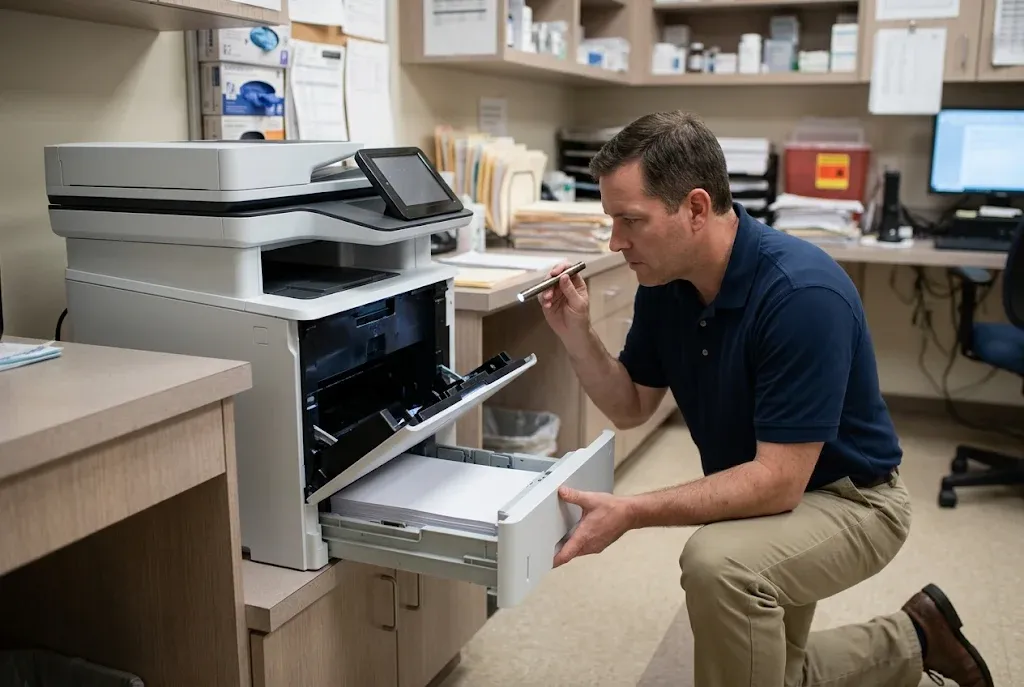
Repeat a failing print test from a second tray when one is installed. If Tray 3 feeds cleanly while Tray 2 misfeeds, the rollers serving Tray 2 become the prime suspect. That distinction matters because HP supplies tray rollers as their own kit, apart from the feeder parts.
Document Feeder Wear and the HP W5U23A Kit
The HP W5U23A document feeder maintenance kit, which HP sells as the HP 200 ADF Roller Replacement Kit, is the part HP currently lists for M528 document feeder service, and HP also lists it for the M527 series. Earlier M527 and M528 documentation shows the same kit name under part number B5L52A, so read the label of any kit already on the shelf before assuming it fits.
Symptom
Originals feed crooked, two pages pull through together, the feeder hesitates before grabbing the top sheet, or it reports jams on stacks that used to scan without trouble. Single-page jobs often still work, which is why feeder wear tends to go unnoticed until a large batch fails.
Root cause
The pickup and feed rollers grip each original by friction, while the separation roller holds back the sheets beneath the top one. As the rubber glazes and wears, grip drops. Weak pickup causes stalls and skew, and a worn separation roller lets extra sheets slip through, producing multiple-sheet feeds and jams.
Diagnosis
Confirm the three-test result, then open the document feeder cover and inspect the rollers. Shiny, smooth or cracked rubber and heavy paper dust support a wear diagnosis. Rule out the originals too: staples, curled sheets and mixed paper weights cause misfeeds even on new rollers.
Remedy and repair component
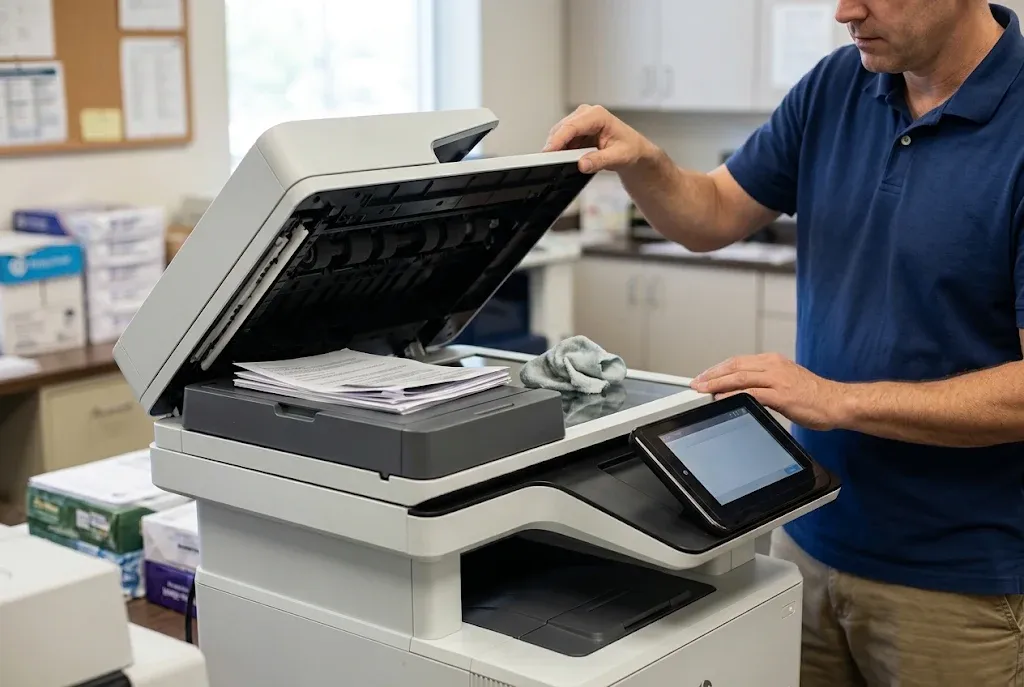
HP’s ADF maintenance kit procedure for this platform replaces two parts: the pickup and feed roller assembly and the separation roller. HP’s listing for the W5U23A kit describes a pick assembly, a separation roller and a separation cover. The work involves opening the feeder’s jam-access door, releasing a locking arm and sliding each assembly out and back in.
HP LaserJet M527 M528 ADF maintenance kit replacement is treated by HP as a customer-replaceable maintenance task, but the new roller surfaces should not be touched with bare fingers, because skin oil reduces grip. For the step-by-step photos, see HP’s instructions for installing the ADF maintenance kit on the LaserJet Enterprise MFP M527.
When we recommend service
We recommend an onsite visit when misfeeds continue after new rollers are installed, when the feeder grinds or clicks, or when you cannot confirm which kit matches your model. Those situations point to drive, sensor or alignment problems that a roller swap will not resolve. Getting HP LaserJet M527 document feeder maintenance right the first time avoids repeated rescans of failed batches.
A related symptom rollers will not fix
Streaks that appear only on feeder scans are a different issue. If you are researching HP LaserJet M527 M528 vertical lines when scanning through the document feeder, start with the narrow scanner glass strip and the white backing rather than the rollers. HP publishes a white-backing replacement procedure for these MFPs, which confirms the backing is a recognized wear point.
Feeder Rollers or Tray Rollers?
Misfeeds from a worn ADF separation roller and from a worn Tray 2 pickup roller can look identical at the panel. We run the tray, flatbed and feeder comparison onsite, then recommend only the kit your M527 or M528 actually needs. Call (888) 657-0021 to book the diagnosis.
Resetting the Document Feeder Kit Counter After Installation
The firmware tracks feeder use with a page counter rather than by sensing roller wear. That means the reminder does not clear by itself when new rollers go in. The HP LaserJet M527 M528 document feeder kit counter reset is the step that tells the MFP a fresh kit has been installed, and it completes the HP Laserjet M527MFP M528MFP Perform Maintenance routine.
In HP’s ADF kit procedure for the M527 platform, the path is Administration, then Manage Supplies, then Reset Supplies, then New Document Feeder Kit, and then select Reset. On the M528, the user guide places Manage Supplies under the Settings application. Menu labels can shift between firmware releases, so confirm the path on your installed firmware before deciding a menu is missing.
- Reset only after the new rollers are in place, never as a way to silence the warning on worn parts.
- Confirm the warning has cleared and check the supplies status report for the updated status.
- Run a 20-page copy job of mixed originals through the feeder to confirm clean, single-sheet feeding.
Resetting without replacing the rollers hides the reminder while the wear continues. The next sign is often a jam partway through an important batch, so the reset has only postponed the work.
Tray Rollers Follow Their Own Maintenance Schedule
When the tray print test is the one that fails, the document feeder kit is the wrong part. Tray 2 and each optional 550-sheet feeder (Trays 3, 4 and 5) use their own pickup and separation rollers, which HP services as a Tray 2-X roller kit. Tray 1, the 100-sheet multipurpose tray, uses separate pickup and separation parts.
Symptom and cause
Worn tray rollers produce no-pick events, where the MFP reports a jam although the sheet never left the tray, along with skewed pages and occasional double feeds from one specific tray. As with the feeder, the rubber glazes with use, and paper dust speeds up the loss of grip.
Diagnosis and remedy
Isolate the problem by tray, as described earlier, then remove the tray and inspect its rollers. HP LaserJet M527 M528 paper feed roller replacement should match the tray that failed. If only Tray 2 misfeeds, there is little reason to replace rollers serving optional trays that feed correctly.
Tray roller kit part numbers for this platform have been superseded over time, so verify the exact tray and the current kit number for your configuration before ordering. Jams that continue after new tray rollers are installed are covered on our HP LaserJet M527 and M528 paper jams page, which deals with the print path in depth.
A note on look-alike model numbers
Some offices run single-function printers beside their MFPs. HP groups the M501, M506 and M507 with the M527 and M528 in its tray-roller guidance, but those models have no scanner or document feeder. If your device label shows one of them, our HP LaserJet M501, M506 and M507 printer repair page is the better starting point.
When the Problem Is Not Scheduled Maintenance
Some symptoms resemble wear but call for repair diagnosis. Treat them as separate paths rather than folding them into a maintenance visit by default.
- Fuser alerts with event codes. A fuser message carrying a code signals an active fault, not a reminder. Our page on HP LaserJet M527 and M528 fuser errors explains how those differ from scheduled maintenance.
- Toner that rubs off or smears. Poor toner adhesion points to fusing or media problems, not feed rollers, and it belongs on the same fuser diagnostic path.
- Jams deep in the print path. Paper stopping near the fuser at the rear door, rather than at the tray, suggests a print-path component instead of pickup wear.
When a symptom fits none of these patterns, or several overlap, our HP LaserJet M527 and M528 MFP repair page outlines model-specific diagnosis. The fuser area runs hot, so let the printer cool before opening the rear door.
Building Preventive Maintenance Into a Shared MFP Schedule
The most useful habit is treating the first low warning as an order trigger. Keeping one feeder kit on hand for each heavily used MFP lets installation happen during a quiet afternoon instead of on a deadline. For background on routine service, see Why HP printers need regular maintenance.
Scan volume, not print volume, drives document feeder wear. A legal or accounting office that digitizes client files through the ADF can reach the kit’s rated life far sooner than a reception unit that mostly prints. The M528 user guide lists an estimated 50,000-page life for the HP 200 ADF Roller Replacement Kit, so the warning frequency follows your scanning workload.
Maintenance kits differ from model to model, even within one HP LaserJet generation. Our overview of HP LaserJet printer maintenance kits explains why the exact printer and alert should guide parts selection, and the same principle applies when planning HP Laserjet M527MFP M528MFP Perform Maintenance for several units at once.
Related model lookup
Offices with mixed fleets often need maintenance guidance for more than one platform. If your building also runs larger HP LaserJet Enterprise printers, these pages cover their alerts:
- HP LaserJet M607, M608 and M609 maintenance alerts
- HP LaserJet M610, M611 and M612 maintenance alerts
If you are also looking into HP LaserJet M631 M632 M633 Perform Maintenance or HP LaserJet M634 M635 M636 Perform Maintenance, remember that those are separate HP LaserJet Enterprise platforms; check their parts against their own HP documentation rather than the M527 and M528 kits described here. For needs beyond maintenance, our HP LaserJet printer repair services cover the wider HP LaserJet range.
One Visit, Both Feed Paths Checked
With more than 20 years in the office equipment industry, we install HP Parts or High Quality Parts on M527 and M528 MFPs across Orange County and approved areas of Los Angeles County. Service and installed parts carry a 6-month / 180-day warranty, and same-day service may be available. Call (888) 657-0021 or email info@printer-repair-experts.net.
Onsite HP LaserJet M527 M528 Preventive Maintenance in Orange County
Onsite HP LaserJet M527 M528 preventive maintenance works best when the visit starts with facts rather than assumptions. Sending the full model, the exact message and your three-test results lets us plan for the document feeder, the trays or both before we arrive. Our Onsite printer repair page explains what to include when you request a visit.
We service HP LaserJet Enterprise MFPs throughout Orange County, including Irvine, Santa Ana, Anaheim, Huntington Beach and Tustin, along with approved portions of Los Angeles County. Same-day service may be available depending on the schedule. We install HP Parts or High Quality Parts, and our service and installed parts carry a 6-month / 180-day warranty.
An HP Laserjet M527MFP M528MFP Perform Maintenance request is finished when originals feed one sheet at a time, every tray picks cleanly and the counter reflects the parts actually installed. Call (888) 657-0021 or email info@printer-repair-experts.net to schedule that work for your M527 or M528.
FAQ's - Frequently Asked Questions - HP LaserJet M527 and M528 Maintenance
Usually, yes. A low-kit warning is a reminder that the rollers are nearing their rated life, not a stop condition. Watch for skewed or doubled pages, and order the kit so installation happens before misfeeds interrupt large scan jobs.
HP’s compatibility listing for the HP 200 ADF Roller Replacement Kit includes the M527c and M527z Flow models along with the M527dn and M527f. For M528 Flow units, compare the product number on the rear label with HP’s current parts listing before ordering.
The counter was most likely not reset. The MFP counts pages through the feeder rather than measuring roller wear, so the New Document Feeder Kit reset has to be completed after installation for the warning to clear.
Usually not. Rollers control how originals move, not image quality. Lines that appear only on feeder scans more often trace to debris on the scanner glass strip or a worn white backing.
Yes. Our onsite service and the parts we install for HP Laserjet M527MFP M528MFP Perform Maintenance work carry a 6-month / 180-day warranty. Keep the service record with the MFP so the date is easy to confirm if a symptom returns.
We install HP Parts and High Quality Parts that we supply, which allows us to stand behind the work. Customer-supplied parts are not installed or covered by our warranty.
Only when the trays show symptoms. The document feeder and the paper trays wear independently, so replace tray rollers when a specific tray fails the print test rather than as an automatic add-on.
We also serve approved portions of Los Angeles County. Share your address when you call (888) 657-0021 so we can confirm coverage before scheduling.