
HP Laserjet M601 M602 M603 Fuser Error:
The Complete 50.X Troubleshooting Guide
An HP Laserjet M601 M602 M603 Fuser Error shuts down printing the moment it appears, and it will not clear until the underlying fuser condition is resolved. Every HP Laserjet M601 M602 M603 Fuser Error includes a numeric code — 50.1 through 50.7 — and that code tells you exactly which fuser subsystem failed. This guide explains each code, what causes it, and the step-by-step remedy that actually works on the LaserJet Enterprise 600 platform.
Printer Repair Experts has serviced this printer family for years across commercial offices, and the 50-series remains one of the most common service calls we receive for these machines. The good news: most of these errors follow a predictable diagnostic path.

Here is what this HP Laserjet M601 M602 M603 Fuser Error guide covers:
- What the 50.WX.YZ error format means and which component is involved
- Individual explanations of the 50.1, 50.2, 50.3, 50.4, 50.5, and 50.7 fuser errors
- Verified step-by-step remedies for each code, based on HP service documentation
- When fuser replacement or a full maintenance kit is the right call
- The control panel reset procedure after installing a new kit
- Repair-versus-replace guidance for offices still running these workhorses
HP LaserJet M601 M602 M603 Fuser Error? Get Fast Onsite Repair Today
What Does an HP Laserjet M601 M602 M603 Fuser Error Mean?
An HP Laserjet M601 M602 M603 Fuser Error means the printer detected a fault in the fuser assembly — the heated unit at the rear of the printer that bonds toner permanently to paper. HP formats the message as 50.WX.YZ, where W identifies the specific fuser error, X reflects the fuser mode, and Y and Z record the printer’s sleep states. In practice, the first digit after “50.” is what matters for diagnosis.
Technicians hear this problem described many ways. An HP Laserjet M601 Fuser Error in an accounting office, an HP Laserjet M602 Fuser Error in a legal department, and an HP Laserjet M603 Fuser Error on a warehouse print server all follow the same diagnostic logic, because the three models share one service platform and one fuser design.
Whether your display shows an HP LaserJet M601 50 Error, an HP LaserJet M602 50 Error, or an HP LaserJet M603 50 Error, start with the universal first steps before anything else:
- Turn the printer off, wait 60 seconds, and turn it back on
- Unplug the printer from any power strip or uninterruptible power supply and plug it directly into a wall outlet matching the printer’s rated voltage
- If the error persists, note the exact code and continue to the matching section below
A single HP Laserjet M601 M602 M603 Fuser Error after a power event is often a one-time fault. A recurring one is a hardware condition that power cycling will not cure.
What Causes a 50.1 Fuser Error and How Do We Fix It?
A 50.1 code indicates low fuser temperature — the fuser’s thermistor reports that the assembly is not reaching or holding its target operating temperature. An HP LaserJet M601 50.1 Fuser Error, an HP LaserJet M602 50.1 Fuser Error, and an HP LaserJet M603 50.1 Fuser Error all point to the same condition on this shared platform: a heating fault, a seating problem, or a failing power supply circuit.
Verified remedy sequence:
- Power the printer off and let the fuser cool for 30 minutes.
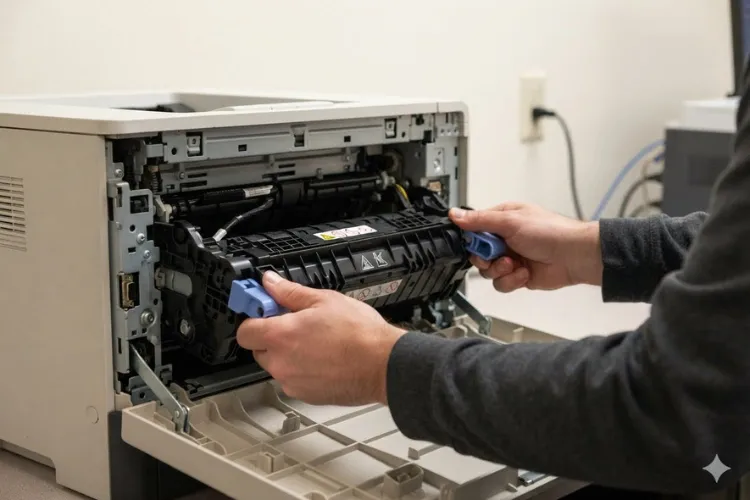
- Remove the fuser from the rear of the printer and reinstall it, pressing firmly until both blue levers click into place.
- Plug the printer directly into a wall outlet — no surge strips, no battery backups.
- Power on and retest. If the error persists, replace the fuser; if it continues after a known-good fuser is installed, the low-voltage power supply is the likely fault.
This is the most frequent HP Laserjet M601 M602 M603 Fuser Error we encounter on high-mileage machines. A fuser near the end of its service life simply cannot hold temperature under load, and replacement resolves it.
Why Does a 50.2 Fuser Error Appear During Warm-Up?
A 50.2 code is a warm-up failure — the fuser took too long to reach operating temperature after power-on or wake-from-sleep. If you see an HP LaserJet M601 50.2 Fuser Error, an HP LaserJet M602 50.2 Fuser Error, or an HP LaserJet M603 50.2 Fuser Error, suspect power quality first and the fuser second.
HP’s own troubleshooting for warm-up related fuser errors on this series directs users to power cycle, remove any power strip or UPS from the circuit, confirm the outlet voltage matches the printer, verify current firmware is installed, and confirm the selected paper type matches the paper loaded. Then: PiedPiper
- Reseat the fuser, confirming both blue locking levers engage.
- Inspect the fuser cavity for hidden jammed paper before reinstalling.
- Retest. If the warm-up failure returns, replace the fuser; if it survives fuser replacement, replace the low-voltage power supply. WordPress
Our technicians frequently trace this HP Laserjet M601 M602 M603 Fuser Error to printers sharing an overloaded circuit with space heaters, copiers, or coffee equipment. Moving the printer to a dedicated outlet has saved more than one office an unnecessary part.
What Should You Do About a 50.3 High Fuser Temperature Error?
A 50.3 code reports high fuser temperature — the thermistor detects heat above specification. An HP LaserJet M601 50.3 Fuser Error, HP LaserJet M602 50.3 Fuser Error, or HP LaserJet M603 50.3 Fuser Error typically traces to a failing thermistor circuit inside the fuser, an incorrect paper-type or fuser-mode setting, or a fuser that was never fully latched.
Verified remedy sequence:
- Power off and allow a full 30-minute cool-down before touching the fuser.
- Check the driver and control panel paper-type settings; heavy or glossy modes run the fuser hotter than plain-paper stock requires.
- Remove and firmly reseat the fuser. A fuser that is not locked in on both sides can produce a 50.3 fuser error message or a grinding noise. HP Support
- If the code returns, replace the fuser — temperature regulation faults are internal to the assembly and are not field-repairable.
Do not repeatedly power-cycle through this HP Laserjet M601 M602 M603 Fuser Error. Overheat conditions exist to protect the printer, and ignoring them risks damage beyond the fuser itself.
Need Help with an HP LaserJet M601 M602 M603 Fuser Error?
How Do We Resolve a 50.4 Fuser Error Caused by Power Problems?
A 50.4 code indicates a fuser drive circuit fault, and it is the error most directly tied to the building’s electrical supply. An HP LaserJet M601 50.4 Fuser Error, HP LaserJet M602 50.4 Fuser Error, or HP LaserJet M603 50.4 Fuser Error frequently appears when the printer runs on a UPS, a generator, or an unstable line.
HP’s service documentation notes that if the power source does not meet the printer’s 40–70 Hz frequency requirement, fuser temperature control fails and triggers this error, and directs technicians to check internal connectors and replace the low-voltage power supply if the fault persists. Field procedure:
- Remove the printer from any UPS, inverter, or shared surge protector and connect directly to wall power.
- Power cycle and retest — this alone clears a large share of 50.4 calls.
- If the error continues, an HP LaserJet Service Technician should inspect the fuser connections and the low-voltage power supply, since this fault sits in the power path rather than the fuser rollers.
This HP Laserjet M601 M602 M603 Fuser Error is one reason we always ask about power configuration before quoting parts. Replacing a fuser never fixes a building-power problem.
What Does a 50.5 Fuser Error Say About the Installed Fuser?
A 50.5 code means the printer detected an inconsistent or incompatible fuser — commonly the wrong model or wrong voltage unit installed. An HP LaserJet M601 50.5 Fuser Error, HP LaserJet M602 50.5 Fuser Error, or HP LaserJet M603 50.5 Fuser Error shows up most often right after a fuser or kit was swapped.
The M600-series fuser and the older P4015-series fuser look nearly identical, and installing the wrong one is a well-documented cause of incompatible-fuser conditions; the correct fuser for the M601, M602, and M603 carries part number RM1-8395, verifiable on the fuser’s barcode label.
- Power off, cool down, and remove the fuser.
- Read the part number on the fuser frame — confirm RM1-8395 for a 110V North American unit, and confirm the voltage matches your printer.
- Install the correct fuser, seating it until both levers click, then power on.
When Printer Repair Experts performs an HP LaserJet M601 Fuser Replacement, HP LaserJet M602 Fuser Replacement, or HP LaserJet M603 Fuser Replacement, part verification happens before installation — a thirty-second check that prevents this entire HP Laserjet M601 M602 M603 Fuser Error category.

How Is a 50.7 Fuser Pressure Release Error Repaired?
A 50.7 code reports a fuser pressure release mechanism failure — the system that opens and closes fuser roller pressure is not moving as commanded. An HP LaserJet M601 50.7 Fuser Error, HP LaserJet M602 50.7 Fuser Error, or HP LaserJet M603 50.7 Fuser Error is mechanical, and it often follows a jam that was pulled out with too much force.
Remedy sequence:
- Power off and remove the fuser after cool-down.
- Inspect the fuser and the fuser cavity for torn paper fragments, labels, or debris blocking the pressure mechanism. A prior HP LaserJet M601 M602 M603 Paper Jam cleared roughly is the classic trigger we find in the field.
- Check the fuser gears for cracked or stripped teeth, then reinstall and retest.
- If the code persists, replace the fuser — this is one of the 50-series conditions that fuser replacement is documented to resolve. Persistent failures after a new fuser call for technician-level diagnosis of the fuser drive components.
Because this HP Laserjet M601 M602 M603 Fuser Error involves moving parts, we also inspect the drive train that turns the fuser during service. Installing a new fuser against a worn drive gear shortens the new part’s life considerably.
Stop HP LaserJet M601 M602 M603 Fuser Errors Before They Impact Your Business
When Should You Replace the Fuser or the Full Maintenance Kit?
Replace the fuser when a 50.X code persists after reseating and power verification, and replace the full kit when the printer is at or near its maintenance interval. The HP LaserJet M601 M602 M603 Maintenance Kit (HP part CF064A for 110V units) includes the fuser plus the transfer and feed rollers, and it is the documented fix for maintenance-related fuser messages on this series. Solid HP LaserJet Printer Maintenance treats these components as a set — worn rollers cause the jams that in turn damage fusers.
We stock the HP LaserJet M601 Fuser Kit, HP LaserJet M602 Fuser Kit, and HP LaserJet M603 Fuser Kit for same-day installation, along with the complete HP LaserJet M601 Maintenance Kit, HP LaserJet M602 Maintenance Kit, and HP LaserJet M603 Maintenance Kit. Only HP Parts, Premium Parts, and High Quality Parts go into our repairs, and every installation carries our 6-month warranty.
A scheduled HP LaserJet M601 Maintenance Kit Replacement, HP LaserJet M602 Maintenance Kit Replacement, or HP LaserJet M603 Maintenance Kit Replacement is normally completed onsite in a single visit. Ordering an HP Laserjet Printer Maintenance Kit before the printer hard-stops is the cheapest downtime insurance a print fleet can buy.
After installation, complete the HP LaserJet M601 M602 M603 Reset so the page counter starts fresh. From the Ready state, press Home, then select Administration, Manage Supplies, Reset Supplies, New Maintenance Kit, and confirm Yes. Skipping this reset leaves stale maintenance warnings on the display and corrupts your service records. HP Support
Is It Worth Repairing an HP LaserJet 600 Series Printer in 2026?
For most offices, yes — a professionally repaired M601, M602, or M603 costs far less than replacing a proven 52-page-per-minute workhorse, and it protects your existing toner inventory, drivers, and workflows. Our third-party toner carries a 1-year warranty and pairs reliably with fresh fusers, so print quality holds up after repair. Every day one of these printers sits dead, invoices, shipping labels, and legal documents queue up behind it, which is why same-day Onsite HP Printer Repair exists as a service category.
Printer Repair Experts provides HP LaserJet M601 Service, HP LaserJet M602 Service, and HP LaserJet M603 Service throughout Orange County and much of Los Angeles County. If you have been searching for HP LaserJet Repair Near Me, Printer Repair Near Me, or Laserjet Printer Repair Near Me, our technicians come to you — no boxing up a 50-pound printer and waiting on a depot.
Businesses searching for Printer Repair Anaheim CA, Printer Repair Commerce CA, or HP Laserjet Printer Repair Orange County are inside our standard same-day coverage area. We handle HP Laserjet M601 Printer Repair, HP Laserjet M602 Printer Repair, and HP Laserjet M603 Printer Repair daily, plus full HP LaserJet M601 M602 M603 Printer Repair fleet contracts for offices running multiple units.
Mixed fleets are welcome. Our HP LaserJet M604 M605 M606 Printer Repair, HP LaserJet M607 M608 M609 Printer Repair, and HP Laserjet M610 M611 M612 Printer Repair services follow the same Onsite Printer Repair model, so one call covers every monochrome LaserJet generation in your building. That consistency matters when an HP Laserjet M601 M602 M603 Fuser Error hits the one printer your accounting department depends on at month-end close.
Conclusion
Every HP Laserjet M601 M602 M603 Fuser Error maps to a specific, fixable condition: 50.1 low temperature, 50.2 warm-up failure, 50.3 overheat, 50.4 power circuit fault, 50.5 wrong fuser, and 50.7 pressure mechanism failure. Work the verified steps — power cycle, direct wall power, reseat, verify the part, then replace — and most of these machines return to service the same day.
When you would rather have it handled, Printer Repair Experts brings over 20 years of office equipment experience, stocked fusers and maintenance kits, and a 6-month warranty on service and installed parts to your door. New clients qualify for our $69.99 flat-rate labor special on a qualifying HP LaserJet or HP Color LaserJet repair visit — promotion subject to limitations. Call (888) 657-0021 or email info@printer-repair-experts.net, and in many cases we can have a technician clearing that fuser error before the end of the business day.
FAQ's - Frequently Asked Questions -
Occasionally a single power cycle clears a one-time fault, but a code that returns is a hardware condition. Repeatedly forcing the printer through a 50.3 overheat condition in particular risks damage beyond the fuser. If the error comes back twice, stop and address the cause.
Cost depends on whether the fix is a reseat, a fuser, or a full maintenance kit, so we confirm the diagnosis before quoting parts. New clients qualify for our $69.99 flat-rate labor promotion on a qualifying HP LaserJet repair visit, subject to limitations. Call (888) 657-0021 for a quick estimate based on your exact error code.
Yes. Our service and installed parts carry a 6-month (180-day) warranty, and our high-quality third-party toner is separately backed for a full year. If a covered repair issue reappears within the warranty window, we return and make it right.
In many cases, yes. Because we stock fusers and maintenance kits for the M601, M602, and M603 on our service vehicles, most fuser error calls in our Orange County and Los Angeles County service area are diagnosed and completed in one same-day visit.
Poor toner more commonly causes print-quality defects and internal contamination than a 50-series code, which is an electrical or mechanical fuser fault. That said, debris and leaking cartridges accelerate fuser wear. Quality toner — like our 1-year-warrantied product — protects the fuser investment you just made.
First verify the new fuser’s part number and voltage, since look-alike P4015 fusers cause incompatibility errors on these models. If the part checks out, the fault likely sits upstream in the low-voltage power supply or related connections, which calls for technician-level diagnosis rather than another fuser.
If the printer is anywhere near its maintenance interval or you are also seeing feed problems and jams, install the complete kit — it includes the fuser plus the rollers that cause those jams. If the machine is mid-cycle with clean feeding, a fuser alone is often sufficient.
