
HP Laserjet 4240 4250 4350 Printer Repair:
Onsite Service From Technicians Who Know These Machines
HP Laserjet 4240 4250 4350 Printer Repair remains one of the most requested services we perform across Orange County and Los Angeles County offices. These monochrome workhorses were built to be serviced, and with over 20 years in the office equipment industry, Printer Repair Experts keeps hundreds of them running. Below, we explain what fails on this series, how we fix it onsite, and when repair beats replacement.
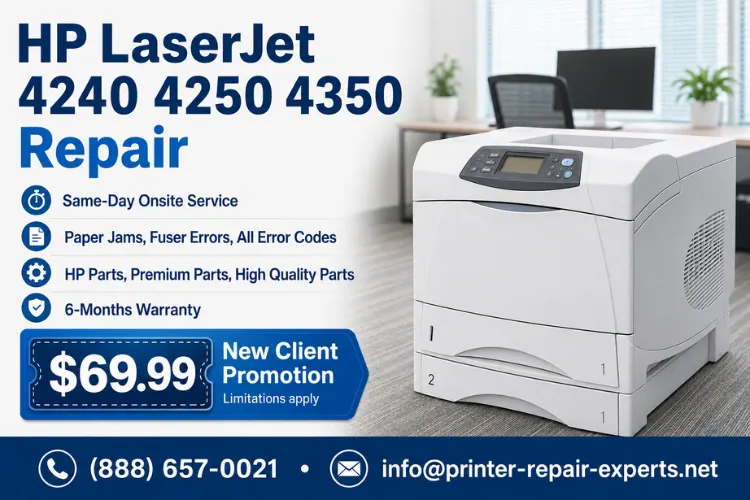
Quick Snapshot: What This HP Laserjet 4240 4250 4350 Printer Repair Guide Covers
- Why repairing this series is usually smarter than replacing it
- The paper jam patterns we see most on the 4240, 4250, and 4350
- What 50.X fuser errors actually mean and how we resolve them
- When the PERFORM PRINTER MAINTENANCE message requires a full kit
- How we correct streaks, splotches, smearing, and faded output
- Same-day onsite service, our $69.99 new client special, and our 180-day warranty
Same-Day HP LaserJet Repair Available
Why Do Businesses Still Repair the HP LaserJet 4240, 4250, and 4350 Instead of Replacing Them?
Because the math almost always favors repair. These printers were engineered with metal frames, user-replaceable fusers, and roller sets designed for hundreds of thousands of pages. A properly maintained 4250 or 4350 routinely outlasts newer lightweight printers that cost far more per page to run.
We provide HP LaserJet Printer Repair for offices that depend on this series for invoices, shipping documents, and high-volume reports. When an office manager asks whether a fifteen-year-old unit is worth fixing, we look at the page count, the condition of the feed assemblies, and the cost of the needed part. In most cases, a repair with quality components restores years of reliable service.
Replacement makes sense when the main logic board, laser scanner, and multiple assemblies fail at once. That combination is rare. More often, a single worn component causes the symptom, and targeted HP Printer Repair brings the machine back the same day. Our HP LaserJet 4240 Printer Repair calls, for example, frequently come down to one roller set or one fuser.
There is also a fleet argument. Offices running mixed inventories often standardize on this series precisely because parts remain plentiful and affordable. Keeping a proven fleet alive avoids new driver deployments, retraining, and the downtime that a full hardware transition creates.
HP Laserjet 4240 4250 4350 Printer Repair: What Does Our Onsite Service Include?
Every visit starts with Printer Diagnostics, not parts swapping. Our technician prints an event log and configuration page, reviews the recorded error history, and inspects the paper path before recommending anything. Guessing wastes your money; verifying the actual failure protects it.
Our Onsite Printer Repair service covers the complete series, including HP LaserJet 4250 Printer Repair and HP LaserJet 4350 Printer Repair in all configurations: base, n, tn, dtn, and dtnsl models. We repair paper jams, fuser errors, all error codes, network connectivity failures, driver and firmware problems, and every category of print quality defect from splotchy pages to lines in scanned or printed output.
We stock many fusers and maintenance kits for this series on our service vehicles, which is why so many calls close in a single visit. As part of our broader HP Laser Printer Repair coverage, we also service newer monochrome fleets, including HP Laserjet M601 M602 M603 Printer Repair for offices that run both generations side by side.
Every repair is backed by our 180-day warranty on labor and installed parts. We use HP Parts, Premium Parts, and High Quality Parts, and we tell you exactly which component was replaced and why.
Why Does the HP LaserJet 4250 Keep Jamming, and How Do We Fix It?
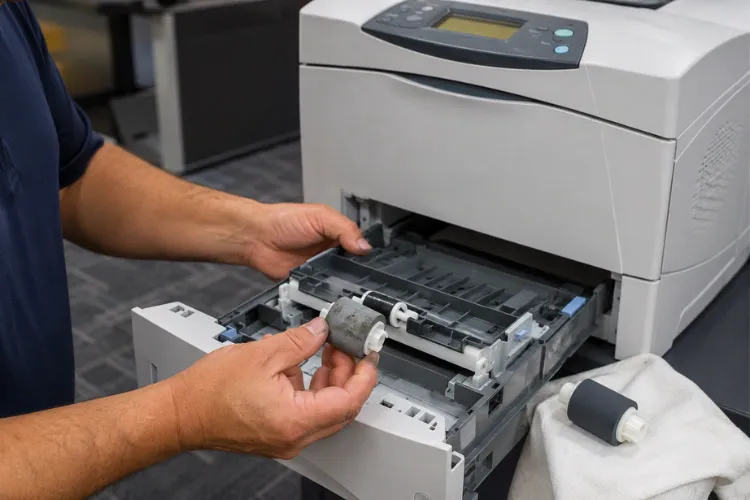
Repeated jams on this series almost always trace to worn rubber, not user error. The tray rollers harden and glaze with age, lose grip, and either fail to pick the sheet or pick two at once. The printer then reports a 13.XX jam code that tells us where the sheet stalled.
A recurring HP LaserJet 4250 Paper Jam at the tray is the classic sign of a tired HP Pickup Roller. Multi-sheet feeds point to the HP Separation Roller below it, and mid-path stalls implicate the HP Feed Roller pair. We replace these as a matched set because installing one fresh roller against two worn ones just moves the failure point.
The same wear pattern drives most HP LaserJet 4240 Paper Jam and HP LaserJet 4350 Paper Jam service calls. On higher-mileage units we also inspect the tray pickup solenoid. The dampening pad inside these solenoids deteriorates with age, and a sticky solenoid causes intermittent mispicks that fresh rollers alone will not cure.
Our technicians frequently encounter Paper Feed Problems that offices have tolerated for months, jiggling trays and fanning paper as a workaround. That routine costs real productivity. A one-hour roller service typically eliminates it entirely, and we verify the fix by running full-tray test feeds before we leave
What Does a 50.X Fuser Error Mean on the 4240, 4250, and 4350?
A 50.X error means the printer detected a fuser fault and shut the fuser down to protect itself. The number after the decimal narrows the cause: low fuser temperature, a warm-up failure, or an over-temperature condition are the patterns we see most. Power cycling sometimes clears the message temporarily, but the underlying fault returns.
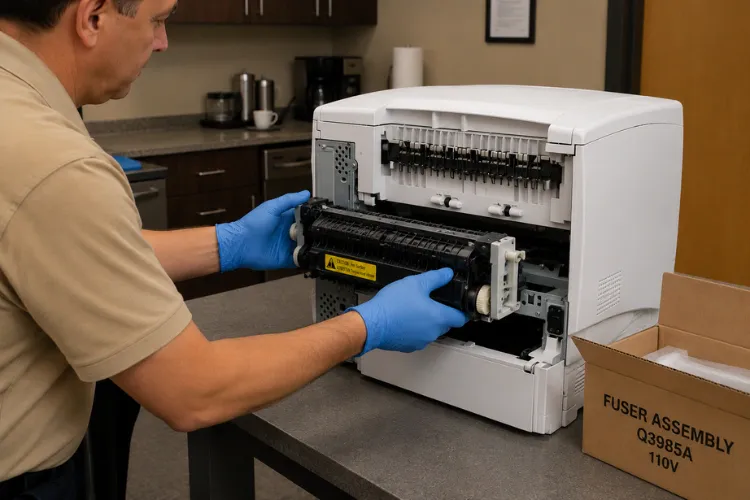
When we diagnose an HP LaserJet 4250 Fuser Error, we first confirm the printer is plugged directly into a wall outlet. These fusers draw significant current at warm-up, and a UPS or power strip can trigger false low-temperature faults. If the power source checks out, the fuser assembly itself is the usual culprit.
The good news is that HP Fuser Replacement on this series is fast. The fuser slides out of the rear of the print engine, and we can Replace Fuser assemblies from vehicle stock on most visits. We handle the same procedure during HP LaserJet 4240 Fuser Error and HP LaserJet 4350 Fuser Error calls, then verify temperature stability with extended test prints.
One field observation worth sharing: a grinding or growling noise from the left side of these printers often signals wear in the fuser drive swing plate assembly. Based on our field experience, we recommend addressing that noise early, because ignoring it eventually stops the fuser from turning at all.
$69.99 New Client Onsite Repair Promotion
When Should You Install an HP LaserJet Maintenance Kit?
Install one when the control panel displays PERFORM PRINTER MAINTENANCE, or sooner if feed and fusing problems are stacking up. This series is designed around a scheduled kit interval of roughly 225,000 pages. The message is not a suggestion; it means the wear parts have reached the end of their engineered service life.
An HP LaserJet Maintenance Kit for this series includes a fuser, transfer roller, and the complete tray roller sets. Installing everything together is the point: a HP LaserJet 4250 Maintenance Kit resets the entire paper path to a known-good baseline instead of chasing individual worn parts one service call at a time.
Professional HP Maintenance Kit Installation matters as much as the parts. After we Replace Maintenance Kit components, we reset the maintenance count in the service menu so the printer tracks the next interval correctly, then run print quality and feed tests from every tray. Skipping the reset leaves the reminder message stuck on the display.
We stock kits for the series, so an HP LaserJet 4240 Maintenance Kit or HP LaserJet 4350 Maintenance Kit can usually be installed the same day you call. Printer Repair Experts also inspects the drive train and solenoids during every kit installation, because catching a marginal component during planned service is far cheaper than a second emergency visit.
How Do We Fix Poor Print Quality on These Printers?
We fix it by identifying which stage of the print process is failing, because the defect pattern tells the story. Vertical lines, gray backgrounds, repeating marks, faded areas, and splotchy coverage each point to different components. Effective HP LaserJet Troubleshooting reads those symptoms instead of blindly swapping cartridges.
Poor Print Quality on this series usually traces to one of four sources: the toner cartridge, the fuser, the transfer roller, or paper condition. Repeating defects are especially diagnostic. We measure the interval between marks, and that spacing identifies which roller or drum is damaged.
Toner Smearing that wipes off the page with your thumb means the fuser is no longer bonding toner properly, either from worn fuser film or a temperature fault. Smearing confined to one edge often indicates a damaged fuser entry guide instead. Both are onsite repairs we complete from stock.
Paper condition is the overlooked fourth factor. Sheets stored near loading dock doors absorb humidity, and damp paper produces gray speckling, curl, and light print that no cartridge swap will fix. We check the media and its storage location on every print quality call, because correcting a paper handling habit is the cheapest repair we ever perform.
Toner reliability matters here too. Low-grade refill cartridges cause a large share of the splotchy and streaked output we are called to fix. We supply high-quality third-party toner backed by a full 1-year warranty, and the 4250 and 4350 also accept high-yield cartridges that materially lower cost per page for busy offices.
Can We Resolve Network, Driver, and Firmware Issues Onsite?
Yes, and these calls are more common than most offices expect. A printer that vanishes from the network after an IT change, prints gibberish pages, or drops jobs mid-stream usually has a configuration or firmware issue rather than a hardware failure. We diagnose both sides so you are not bounced between vendors.
Our technicians configure static IP addresses, restore JetDirect network settings, and set these printers up correctly on company networks. We also install and repair drivers on Windows print servers and individual workstations, which resolves most gibberish output and formatting complaints on the spot.
Firmware deserves attention on machines this age. HP published firmware updates for the series that corrected jam handling and network stability problems, and we apply the final released versions where appropriate. We follow official HP documentation for these procedures rather than improvised methods, because a failed firmware write can disable a formatter.
We also document the working configuration before we leave, including the assigned IP address and installed driver version, so your IT staff can restore settings quickly after future server changes. Small records like these prevent repeat service calls.
For multifunction fleets, we also correct scan-path defects such as lines in scanned pages, which trace to the scanner glass or document feeder rather than the print engine. Identifying the correct subsystem first is what keeps these visits short.
Trusted HP LaserJet 4240 • 4250 • 4350 Repair Experts
How Fast Can You Get Same Day Printer Repair for This Series?
In most of our service area, same-day onsite response is available for this series when you call in the morning. Because we stock the common fusers, kits, and roller sets on our vehicles, Same Day Printer Repair on a 4240, 4250, or 4350 usually means diagnosed and fixed in one visit, not a quote followed by a parts order.
Downtime is the real cost of a dead printer. When the unit that prints pick tickets or patient forms stops, staff improvise with slower devices and work piles up within hours. That is why our Commercial Printer Repair scheduling prioritizes down-hard machines over routine maintenance appointments.
We serve offices throughout Orange County, from Anaheim and Fullerton to Irvine and Santa Ana, plus Los Angeles County communities including Santa Fe Springs, Commerce, City of Industry, Whittier, and Long Beach. If your office sits in our service area, a technician, not a call center script, handles your problem.
For offices running several of these units, we also track patterns across the fleet. When two machines purchased together start jamming the same month, the rest are close behind, and scheduling proactive roller service across the group prevents a wave of emergency calls. One planned afternoon of maintenance is easier on your staff than five surprise breakdowns spread across a quarter.
Before dispatching, we ask for the model, the exact control panel message, and a description of the symptom. Sixty seconds of detail on the phone lets the technician arrive with the right parts the first time.
What Does the Repair Cost, and What Warranty Stands Behind It?
New clients can take advantage of our $69.99 onsite service special, a flat labor rate for one qualifying HP LaserJet or HP Color LaserJet printer repair visit. The promotion is subject to limitations, applies to qualifying commercial LaserJet models like the 4240, 4250, and 4350, and excludes OfficeJet, DeskJet, Envy, Smart Tank, and DesignJet products.
Beyond the promotion, we quote parts before installing them, so there are no surprises. Because this series shares components across all three models, parts pricing stays reasonable, and a typical roller or fuser repair costs a small fraction of replacing the printer.
Every repair carries our 6-month, 180-day warranty covering both the service work and the installed parts. Toner we supply is separately backed for a full year. A warranty only means something when the company answering the phone in month five is the same one that did the work, and ours is.
If a machine genuinely is not worth fixing, we say so. Printer Repair Experts performs a complete diagnosis before recommending major components, and when the honest answer is replacement, we tell you and help you plan the transition instead of selling a repair.
Conclusion: Keep Your 4240, 4250, and 4350 Fleet Productive
The HP LaserJet 4240, 4250, and 4350 earned their reputation the honest way, by surviving decades of office abuse. With scheduled maintenance kits, quality fusers, fresh rollers, and correct network configuration, these printers keep producing clean pages at a running cost newer machines struggle to match.
When yours jams, throws a fuser error, streaks pages, or drops off the network, one visit from Printer Repair Experts usually settles it. Call (888) 657-0021 or email info@printer-repair-experts.net to schedule onsite service, ask about the $69.99 new client special, and put a 180-day warranty behind your fleet.
FAQ's - Frequently Asked Questions - HP Laserjet 4240 4250 4350 Printer Repair
Yes. Fusers, maintenance kits, and roller sets for this series remain readily available, and we keep many of them stocked on our service vehicles. Because all three models share their core print engine components, parts sourcing is rarely a delay for these repairs.
Most single-issue repairs on this series — a roller set, a fuser swap, or a maintenance kit installation — are completed in about an hour once the technician arrives. Diagnosis-heavy problems like intermittent network drops can take longer, but we tell you before proceeding.
Yes, the 4240, 4250, and 4350 are qualifying HP LaserJet models. The promotion is a flat labor rate for one qualifying repair visit, is limited to new customers, and is subject to limitations, which we will confirm when you schedule.
It covers both the labor we performed and the parts we installed for six full months. If a component we replaced fails within that window, we return and make it right. Toner we supply carries its own separate 1-year warranty.
No. On this series, a grinding noise from the left side typically means drive components are wearing, and continuing to run it usually turns a modest repair into a larger one. Scheduling service while the printer still prints keeps the visit short and the cost down.
Absolutely. We diagnose the unit on its own merits — page count, feed condition, and print quality — regardless of where it came from. Used units of this series often need only a maintenance kit to perform like a well-kept machine.
Yes. Jams and feed failures in the duplexer or optional trays are common on high-mileage units, and we service those accessories during the same visit as the main engine.
