
Printer Repair Pico Rivera CA —
Onsite HP LaserJet Service That Comes to You
Printer Repair Pico Rivera CA is what an office manager types the moment an HP LaserJet quits in the middle of a billing run. Printer Repair Experts answers that search the practical way: a technician drives to your business address in Pico Rivera and fixes the machine where it sits. You never box up a printer or haul it to a shop, because our entire model is built around onsite service.
We repair HP LaserJet, HP Color LaserJet, and HP LaserJet MFP printers for offices, warehouses, and professional suites throughout ZIP 90660. Whether you need HP LaserJet MFP printer repair in Pico Rivera for a copier-class Enterprise machine or a quick roller swap on a hallway workhorse, every repair is backed by a 6-month warranty on service and installed parts.
What this page covers at a glance:
- Onsite HP LaserJet and HP Color LaserJet service across Pico Rivera and ZIP 90660 — our technicians travel to you
- Same-day availability for many common failures, including paper jams and fuser errors
- Full model coverage: HP LaserJet 4240, 4250, 4350, M601 through M612, and Enterprise MFP series
- Maintenance kit installation and Perform Printer Maintenance message resolution
- $69.99 new-client labor special (limitations apply) plus a 6-month parts-and-service warranty
Need Printer Repair in Pico Rivera, CA? We Keep Your Office Running.
Who Provides Printer Repair Pico Rivera CA Businesses Can Rely On?
Printer Repair Experts provides local HP printer repair by certified technicians with over 20 years in the office equipment industry. We specialize in HP Laserjet Printer Repair and HP Color Laserjet Printer Repair, and every visit happens at your location — that is the whole point of our dispatch model.
Generic repair shops ask you to disconnect a 50-pound network printer and drive it across town. We think that request is backwards. Our printer repair service in Pico Rivera sends the tools, the parts, and the technician to your building instead, so your team keeps working while we work.
In the field, the same pattern repeats: a machine that “suddenly died” usually gave warnings for weeks — grinding pickup rollers, faint streaks, a jam every morning. Catching those signs early is where an experienced onsite technician earns their keep. It is also what separates a dedicated Pico Rivera printer repair specialist from a general IT vendor who treats printers as an afterthought.
Which HP LaserJet Models Do We Repair Onsite in Pico Rivera?
HP LaserJet printer repair in Pico Rivera starts with knowing the installed base. We service the full monochrome and color LaserJet range that local offices actually run, including the Enterprise MFP M631, M632, M633, M634, M635, and M636 series and the Managed MFP E62555 and E62655. HP LaserJet MFP printer repair covers the scan, copy, and finishing hardware on those machines as well as the print engine.
Coverage includes:
- HP LaserJet 4240 printer repair, including tray and feed roller service
- HP LaserJet 4250 printer repair and fuser replacement
- HP LaserJet 4350 printer repair for high-volume monochrome fleets
- HP LaserJet M601 printer repair and jam-prone tray diagnosis
- HP LaserJet M602 printer repair
- HP LaserJet M603 printer repair for departmental workhorses
- HP LaserJet M604 printer repair
- HP LaserJet M605 printer repair and pickup roller replacement
- HP LaserJet M606 printer repair
- HP LaserJet M607 printer repair
- HP LaserJet M608 printer repair, a frequent flyer for fuser wear
- HP LaserJet M609 printer repair
- HP LaserJet M610 printer repair
- HP LaserJet M611 printer repair
- HP LaserJet M612 printer repair for current-generation fleets
We also handle HP Color LaserJet repair in Pico Rivera for color-critical work like client proposals and marketing proofs. If your model is not listed, call us — if it is an HP LaserJet family machine, we almost certainly service it.
What Causes Paper Jams and Fuser Errors on HP LaserJet Printers?
Most jams trace back to rubber, not paper. Pickup rollers and separation pads harden and glaze with age, so they grab two sheets or none at all. Paper jam repair on an HP LaserJet usually means replacing those wear parts and cleaning the paper path, not just pulling out the crumpled sheet and hoping.
Fuser error repair is the other call we run daily. A 50.X error on the control panel points to the fuser assembly — the heated unit that bonds toner to paper — and it typically needs replacement rather than a reset. Persistent 13.XX jam codes in the same location, toner smearing, and repetitive image defects are also classic fuser and roller symptoms.
Our technicians frequently encounter offices that restarted a printer around the same error for weeks. A restart clears the message; it does not un-wear the part. An onsite diagnosis tells you in one visit whether you need a $60 roller kit or a fuser, before wasted toner and lost hours pile up. Jam and fuser calls make up the bulk of printer repair services in Pico Rivera for our team, and both usually resolve in a single onsite visit.
When Should You Replace a Maintenance Kit on an HP LaserJet?
Replace the maintenance kit when the printer tells you to — the counter exists for a reason. An HP LaserJet maintenance kit bundles the fuser and the critical feed rollers, and HP designed the interval so those parts retire before they start shredding output. On many workhorse models the message appears in the neighborhood of 225,000 pages.
On the classic monochrome series, the control panel is blunt about it:
- HP LaserJet 4240 Perform Printer Maintenance — the machine has reached its maintenance interval and wants a full kit, not a reset
- HP LaserJet 4250 Perform Printer Maintenance — the kit includes the fuser plus tray pickup and feed rollers
- HP LaserJet 4350 Perform Printer Maintenance — after HP maintenance kit installation, the maintenance count must be cleared or the message returns
Newer M600-series and Enterprise machines phrase it as Maintenance Kit Low or Replace Maintenance Kit, but the meaning is identical. Printer maintenance is far cheaper than the downtime it prevents, which is why our printer maintenance service stocks many HP maintenance kits and fusers for same-day installation.
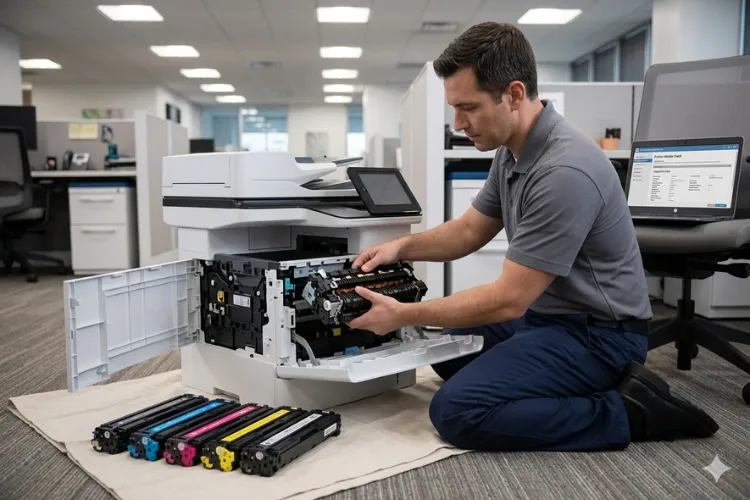
Based on our field experience, offices that replace kits on schedule see a fraction of the jam calls that reactive offices do. A scheduled kit install is the quietest printer repair Pico Rivera businesses ever book — no emergency, no downtime.
Looking for Reliable Printer Repair in Pico Rivera, CA?
How Fast Can a Technician Reach Your Building in 90660?
For most of Pico Rivera, we can offer same-day onsite response for common HP LaserJet failures, with morning calls typically seen the same business day. Our coverage includes every business address in ZIP 90660, and our dispatch routes already run through this part of Los Angeles County daily.
Our service area includes businesses near the industrial blocks of Industry Ave and Rex Rd, the distribution and manufacturing properties along San Gabriel River Pkwy and Gregg Rd, and the commercial frontage on Slauson Ave and Bermudez St. Businesses operating within these corridors can request onsite HP LaserJet printer repair without shipping anything anywhere.
That geography matters for speed. A warehouse office running an HP LaserJet M608 for pick tickets cannot wait three days for a depot repair, and same day printer repair in Pico Rivera exists precisely for that situation. Onsite printer repair in Pico Rivera moves fastest when the technician already knows the streets, and ours do. If you have been searching for printer repair near Pico Rivera from a neighboring city, the same dispatch team covers you too.
How Much Does Office Printer Repair Cost in Pico Rivera?
For new clients, one qualifying HP LaserJet or HP Color LaserJet repair visit carries a flat $69.99 labor rate — promotion subject to limitations, new customers only, and consumer inkjet models are excluded. Beyond the promotion, cost depends on the failed part: roller kits sit at the low end, fusers and maintenance kits higher, and we quote before we replace anything.
Before replacing expensive components, Printer Repair Experts performs a complete diagnosis to verify the actual cause of the failure. Office printer repair in Pico Rivera should never mean paying for parts you did not need.
There is also the repair-versus-replace question, and we answer it honestly. A mid-life HP LaserJet M605 with a worn fuser is nearly always worth fixing; a fifteen-year-old machine with a failing formatter and cracked frame may not be.
Commercial printer repair economics favor repair far more often than printer vendors like to admit, because HP LaserJet engines are built for hundreds of thousands of pages. That is the honest math behind Pico Rivera printer repair pricing: fix the wear part, keep the engine, skip the new-hardware invoice.

Why Choose Onsite Printer Repair Instead of a Drop-Off Shop?
Because your printer is not the only thing that stops when it leaves the building — invoicing, shipping labels, and client paperwork stop with it. Onsite Printer Repair keeps the machine on your network and your staff at their desks while the technician works beside the printer, and most visits end with test pages coming out the same afternoon.
Searches like Printer Repair Near Me exist because nobody wants to wrestle an office laser printer into a sedan. The same intent sits behind HP printer repair near me, laser printer repair near me, office printer repair near me, and commercial printer repair near me — and the honest answer to all of them in this area is a technician who drives to you.
Onsite work also produces better repairs. We see the actual environment: the overloaded power strip, the humid storage room warping the paper, the tray someone filled with label stock. Business printer repair in Pico Rivera goes smoother when the fix accounts for the office around the HP LaserJet, not just the machine on a bench.
Stop Fighting Your Printer. We'll Fix It Today.
How Do We Keep HP LaserJet Fleets Reliable for Tax Offices and IT Teams?
Fleet reliability comes from boring, scheduled attention: maintenance kits on interval, firmware upgrades, driver installation done correctly, and print-quality checks before symptoms become failures. For tax preparation offices, office managers, and IT professionals responsible for company-wide HP LaserJet and HP Color LaserJet inventory, we function as the field arm that keeps every unit printing.
Where to get enterprise printers serviced in 90660 is a real question for IT teams managing M607–M612 and Enterprise MFP fleets, and the answer does not require a service contract. We support network connectivity issues, printer setup on company networks, and poor print quality — lines, splotches, streaking, faded prints, and toner smearing included.
Parts and consumables matter just as much. We install HP Parts, Premium Parts, and High Quality Parts, and our high-quality third-party toner carries a 1-year warranty, because unreliable toner quietly causes half the print-quality complaints we investigate. Cheap no-name cartridges are the most expensive thing in many supply closets.
Same day printer repair paired with preventative scheduling is the combination that keeps a fleet honest. HP printer repair in Pico Rivera does not have to be an emergency-only relationship.
Which Nearby Cities Does Our Pico Rivera Service Area Border?
Pico Rivera sits in the middle of our Los Angeles County coverage, so the same technicians who handle onsite printer repair in Pico Rivera also serve Whittier, Montebello, El Monte, South El Monte, Downey, and Commerce. If your company runs offices in more than one of these cities, one call covers the whole cluster. Repairing printers in Pico Rivera and its neighbors from a single dispatch desk keeps response times short on both sides of the city line.
Businesses closer to the industrial corridors often search Printer Repair Commerce CA or Printer Repair City of Industry CA, while firms across the Orange County line look for Printer Repair Anaheim CA, Printer Repair Brea CA, or Printer Repair Santa Ana CA — all of it reaches the same dispatch desk and the same 6-month warranty.
Conclusion
Printer repair in Pico Rivera should end with a technician at your door, not a trip across town to a repair counter. When an HP LaserJet goes down mid-workday, that difference is measured in hours of recovered productivity. Printer Repair Experts brings two decades of HP LaserJet and HP Color LaserJet field experience, stocked fusers and maintenance kits, and a 6-month warranty to every onsite visit in ZIP 90660.
Call (888) 657-0021 or email info@printer-repair-experts.net to schedule service — and ask whether your first visit qualifies for the $69.99 new-client rate (limitations apply).
Commercial Areas We Provide Onsite Printer Repair Services - Pico Rivera CA
Gregg Road Corridor
4870-4854 Gregg Rd
Pico Rivera, CA 90660
San Gabriel River Area
3682-3676 San Gabriel River Pkwy
Pico Rivera, CA 90660
Industry Avenue Region
5256-5288 Industry Ave
Pico Rivera, CA 90660
Rex Road Area
8642-8670 Rex Rd
Pico Rivera, CA 90660
Slauson Avenue Corridor
8438-8498 Slauson Ave
PicoRivera, CA 90660
Bermudez Street Area
9128-9142 Bermudez St
Pico Rivera, CA 90660
FAQ's - Frequently Asked Questions -
Yes, for many common HP LaserJet and HP Color LaserJet issues. Calls placed in the morning can often be scheduled for onsite service the same business day, and we stock many fusers and maintenance kits so the repair finishes in one visit.
Our Pico Rivera coverage includes every business address in ZIP 90660, along with the surrounding cities of Whittier, Montebello, El Monte, South El Monte, Downey, and Commerce.
No — and please don’t. Our model is onsite only: the technician travels to your business, works on the printer where it is installed, and confirms it prints correctly on your network before leaving.
It applies to one qualifying HP LaserJet or HP Color LaserJet repair visit for new customers, subject to limitations. OfficeJet, DeskJet, Envy, Smart Tank, DesignJet, and non-HP LaserJet models are excluded.
It applies to one qualifying HP LaserJet or HP Color LaserJet repair visit for new customers, subject to limitations. OfficeJet, DeskJet, Envy, Smart Tank, DesignJet, and non-HP LaserJet models are excluded.
Service and installed parts carry a 6-month (180-day) warranty. Our high-quality third-party toner is backed separately by a 1-year (365-day) warranty.
It means the machine has reached its maintenance interval and needs a maintenance kit (fuser plus feed rollers), not just a reset. Ignoring it usually leads to jams and print defects; installing the kit and clearing the counter restores normal operation.
Both. Lines, splotches, streaking, faded output, toner smearing, and repetitive image defects are core diagnostic work for us, along with network connectivity issues, printer setup on company networks, driver installation, and firmware upgrades.
