
HP Laserjet MFP M634 M635 M636 Fuser Error:
Every 50.X Code Explained, With Real Repair Fixes
A HP Laserjet MFP M634 M635 M636 Fuser Error stops the printer cold — the engine will not print another page until the fault is cleared. The good news is that this error always reports a numbered 50.X code on the control panel, and that number tells you exactly which part of the fusing system failed. This guide breaks down each code, what causes it, and the remedy that actually fixes it.
Printer Repair Experts services these machines every week across Orange County and Los Angeles County offices, and we stock the fuser and HP LaserJet Maintenance Kit for this model series for same-day installation. Whether your display shows 50.1, 50.7, or a newer 50.AX.YZ variant, the sections below walk through the diagnosis the way our technicians approach it onsite.

Quick snapshot of what this guide covers:
- What a HP Laserjet MFP M634 M635 M636 Fuser Error actually means inside the machine
- Every numbered fuser code — HP 50.1 Fuser Error through HP 50.9 Fuser Error, plus 50.AX.YZ and 50.BX.YZ — with the reason and the remedy for each
- Safe troubleshooting steps an office user can try before calling for service
- When fuser replacement or a full maintenance kit is the right call
- How fuser trouble shows up as smearing, wrinkling, and other print defects
- Repair-versus-replace reasoning for M634, M635, and M636 fleets
$69.99 Onsite Printer Repair Promotion for Onsite Printer Repair
What Causes an HP Laserjet MFP M634 M635 M636 Fuser Error?
A HP Laserjet MFP M634 M635 M636 Fuser Error means the fusing system — the heated assembly that bonds toner to paper — failed a temperature or mechanical check. The printer monitors the fuser with thermistors and shuts the engine down the instant readings fall outside spec. That protective shutdown is what you see as a 50.X message on the control panel.
The underlying cause is usually one of four things: a worn or failed fuser assembly, unstable line voltage feeding the printer, a connection problem where the fuser seats into the engine, or, less often, a fault on the DC controller or low-voltage power supply. Age matters here. The fuser in the M634, M635, and M636 is a consumable rated to roughly 225,000 pages, and high-volume departments reach that interval faster than most people expect.
Printer Repair Experts routinely diagnoses this fault in busy offices, and in our field experience the fuser itself is the failed component in the clear majority of cases. Still, before replacing anything expensive, we run a complete diagnosis — including the event log and line-voltage checks — to verify the actual cause. An HP LaserJet M634 Fuser Error caused by a sagging UPS outlet will come right back after a new fuser if the power problem is never addressed.
What Do the Numbered 50.X Fuser Error Codes Mean on the M634, M635, and M636?
Each numbered code identifies a specific failure the engine detected, and each one points to its own remedy. HP formats these as 50.WX.YZ, where the first digit after “50.” identifies the fault type. Here is every numerical fuser error on this series, with the reason for the error and the fix for each:
- HP 50.1 Fuser Error (50.1X.YZ) — Reason: Low fuser temperature. The main thermistor reports the fuser cannot reach or hold operating temperature, usually from a worn heating element or degraded fuser film. Remedy: Power the printer off for 30 seconds, reseat the fuser firmly behind the right door, and confirm the printer is plugged directly into a wall outlet. If the code returns, replace the fuser.
- HP 50.2 Fuser Error (50.2X.YZ) — Reason: Fuser warm-up failure. The fuser did not reach target temperature within the allowed time — a classic sign of an HP LaserJet M634 Not Heating condition, low line voltage, or a printer running on a UPS or shared surge strip. Remedy: Move the printer to a dedicated wall outlet, power cycle, and replace the fuser if the warm-up failure repeats.
- HP 50.3 Fuser Error (50.3X.YZ) — Reason: High fuser temperature. The thermistor reads hotter than spec, which points to a contaminated or failing thermistor or a temperature-control fault. Remedy: Power cycle once; if the overheat code returns, replace the fuser rather than risk heat damage. A persistent recurrence after a new fuser points to the DC controller.
- HP 50.4 Fuser Error (50.4X.YZ) — Reason: Fuser drive-circuit or line-voltage fault. This is the code we most often trace to UPS units, generators, or building power that dips out of range. Remedy: Plug the printer straight into a known-good wall circuit and power cycle. If clean power does not clear it, the fuser or low-voltage power supply needs replacement.
- HP 50.5 Fuser Error (50.5X.YZ) — Reason: Incorrect fuser installed. The engine detected a fuser type or voltage that does not match this model — common after a well-meaning parts swap from a different LaserJet series. Remedy: Install the correct fuser for the M634, M635, or M636 and for your line voltage.
- HP 50.6 Fuser Error (50.6X.YZ) — Reason: Open fuser circuit. The heater circuit reads open, typically from a blown internal thermal cutoff or a failed heating element. Remedy: Reseat the fuser to rule out a connector issue; an open circuit almost always requires fuser replacement.
- HP 50.7 Fuser Error (50.7X.YZ) — Reason: Fuser pressure-release mechanism failure. The mechanism that engages and releases roller pressure did not move as commanded, from a jammed mechanism or a drive fault. Remedy: Remove the fuser, check for torn paper or debris in the mechanism, and reinstall. If movement still fails, replace the fuser; a stubborn repeat implicates the fuser drive assembly.
- HP 50.8 Fuser Error (50.8X.YZ) — Reason: Sub-thermistor low temperature. A secondary sensor toward the edge of the fuser reports below-spec heat, indicating uneven heating in an aging assembly. Remedy: Power cycle and reseat the fuser; replace the fuser if the code returns.
- HP 50.9 Fuser Error (50.9X.YZ) — Reason: Sub-thermistor high temperature. Edge overheating, often aggravated by long runs of narrow media that concentrate heat outside the paper path. Remedy: Let the printer cool, verify paper size settings match the loaded media, and replace the fuser if the code persists.
Printer Repair Experts is capable of handling all fuser errors and fuser paper jams on this series — every code above, in one onsite visit. Bring the exact code from the control panel when you call; it shortens the diagnosis considerably. HP LaserJet Enterprise MFP M634, M635, and M636 troubleshooting manual
How Are 50.AX.YZ and 50.BX.YZ Errors Different from the Standard Codes?
The 50.AX.YZ and 50.BX.YZ messages follow the same 50.WX.YZ pattern but extend it — they are low-temperature and high-temperature faults reported through an additional fuser thermistor zone on these newer FutureSmart engines. In plain terms, they tell the same story as the 50.1/50.8 and 50.3/50.9 families, just from a different sensor position along the fuser.
The practical remedy path is identical. Power the machine off for 30 seconds, reseat the fuser, confirm clean wall power, and note whether the sub-code changes between attempts. Because these codes report from within the fuser assembly itself, a repeating 50.AX.YZ or 50.BX.YZ almost always ends in fuser replacement rather than a formatter or firmware fix.
One field observation worth sharing: our technicians frequently encounter offices chasing these newer codes with firmware updates alone. Firmware should be current on any Enterprise MFP, but firmware does not repair a thermistor that has drifted out of tolerance. Accurate HP Printer Diagnostics — event log review, component tests from the service menus, and a voltage check — settle the question in minutes.
Can You Clear a Fuser Error Yourself Before Calling for Service?
Sometimes, yes — and it costs nothing to try the safe steps first. Effective HP LaserJet M634 Troubleshooting starts at the wall, not inside the machine. Work through this sequence in order:
- Power the printer off, wait a full 30 seconds, and power it back on. A one-time thermal glitch will clear.
- Plug the printer directly into a wall outlet. Remove any UPS, extension cord, or shared surge strip — these starve the fuser during warm-up.
- Open the right door, let the fuser cool, and reseat it firmly by its blue handles until it clicks home.
- Check the paper path for torn scraps. Residual jams at the fuser trigger 13.B4 and 13.B9 jam codes that offices often confuse with fuser hardware faults.
- Write down the full code, including the sub-digits, before restarting. The complete 50.WX.YZ string speeds up any service call.
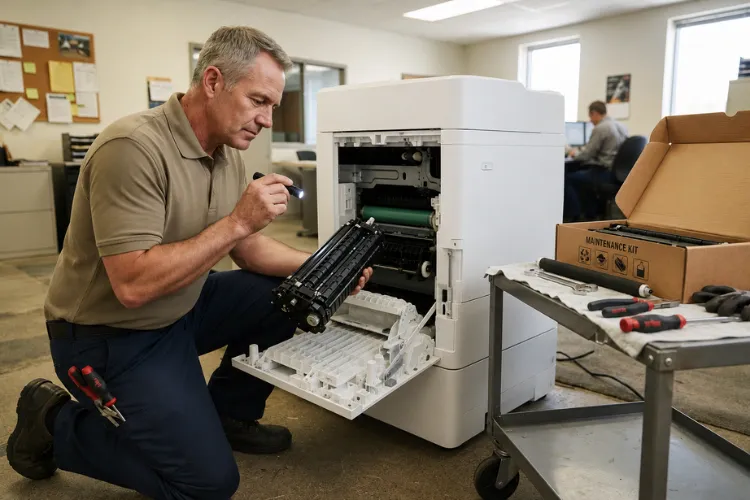
- Do not attempt to open the fuser assembly itself or bypass any thermal protection — the fuser runs hot enough to burn, and internal repairs are not field-serviceable at the office level. Sensible HP LaserJet M635 Troubleshooting stops at reseating and power checks.
If the code survives those steps, the fault is hardware, and that is where Onsite Printer Repair earns its keep. Based on our field experience, we recommend against repeatedly power cycling past a recurring overheat code; you risk cooking a fuser failure into a costlier one.
Need Fast HP LaserJet MFP M634 M635 M636 Fuser Error Repair?
When Is Fuser Replacement or a Maintenance Kit the Right Fix?
If a numbered fuser code returns after the safe resets above, replacement is the fix — the fuser is a wear part, not a repairable one. HP LaserJet Fuser Replacement on this series is a straightforward swap behind the right door, but the decision worth making carefully is fuser-only versus full kit.
Here is how we advise clients. If the machine is anywhere near its 225,000-page maintenance interval, install the complete kit — fuser, transfer roller, and tray rollers — in one visit. A standalone HP LaserJet M634 Fuser Replacement on a machine with 220,000 pages leaves worn pickup rollers behind, and those rollers will generate misfeeds and jam calls within weeks.
We stock the maintenance kit for this model series. That means an HP LaserJet M635 Maintenance Kit or HP LaserJet M636 Maintenance Kit can typically be installed the same day you call, using HP Parts backed by our 6-month warranty on service and installed parts. Professional HP Maintenance Kit Installation also includes resetting the maintenance count and test-printing across trays, steps that get skipped surprisingly often in do-it-yourself swaps.
The same-day logic applies to single-part jobs too. An HP LaserJet M636 Fuser Replacement takes our technicians well under an hour onsite, and an HP LaserJet M635 Fuser Replacement or HP LaserJet M634 Maintenance Kit install is not much longer. Either way the printer goes back to work the same afternoon instead of sitting d
Why Does a Failing Fuser Cause Smearing, Wrinkled Paper, and Bad Prints?
Because the fuser is where toner becomes permanent, a fuser that is dying — but not yet dead — shows up in the output before it shows up as an error code. HP LaserJet Toner Smearing is the classic early sign: toner that rubs off under a thumb was never fully fused, meaning the assembly is running cooler than it reports.
Wrinkled Paper is the mechanical version of the same decline. Worn pressure rollers grip unevenly, and sheets exit creased or accordion-folded at the trailing edge. Offices often blame the paper, switch reams, and lose weeks while the real culprit wears further.
Other fuser-driven defects include repeating marks spaced evenly down the page, gloss banding, and toner flaking along fold lines on cardstock. Any of these alongside an intermittent HP LaserJet M635 Not Heating or HP LaserJet M636 Not Heating symptom — long warm-ups, sleep-wake failures — means the fuser is on borrowed time. Persistent Poor Print Quality of this kind is a scheduling opportunity: replace the fuser on your calendar, before it fails on the printer’s.
An HP LaserJet M635 Fuser Error that finally locks the panel is usually just the last chapter of a story the print quality had been telling for a month. Field technicians read those pages the way a mechanic listens to an engine.
What Does a Down M634, M635, or M636 Cost Your Office?
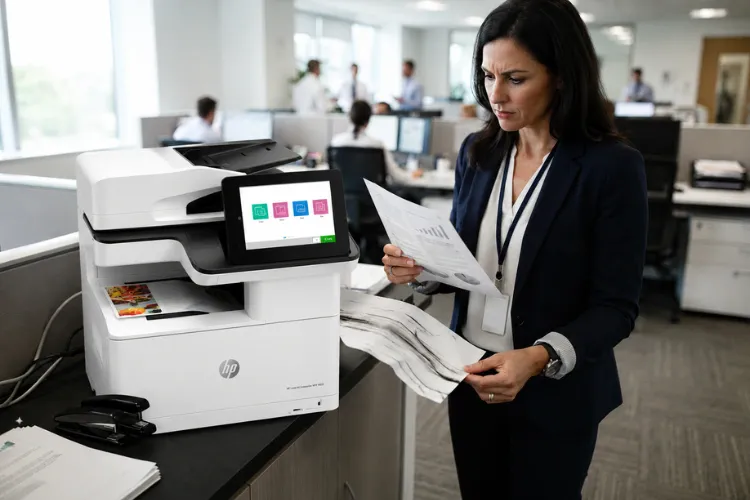
More than the repair, almost every time. These MFPs are typically the workhorse of a department — printing, copying, and scanning for dozens of users — so a locked-up HP LaserJet M636 Fuser Error does not idle one person, it idles a workflow. Invoices wait, shipping labels wait, and staff burn time walking jobs to a slower printer on another floor.
IT managers running mixed fleets feel this most sharply. When one high-volume MFP drops out, its print volume lands on lighter-duty machines that were never specified for it, and those units start jamming under the load. That cascade is why fleet reliability planning treats fuser maintenance as scheduled work rather than emergency response.
This is also where Same Day Printer Repair changes the math. A same-day onsite visit with the part on the truck turns a multi-day outage into a one-hour interruption. For most of the businesses we serve, that difference alone covers the cost of professional service — and it is precisely why we keep fusers and kits for this series in stock rather than ordering them per job.
Don't Let a Fuser Error Bring Your Office to a Stop
Should You Repair the Printer or Replace It?
For the M634, M635, and M636, repair wins in almost every realistic scenario — and the arithmetic is not close. These are heavy-duty Enterprise engines with a long service life, and a fuser is a consumable within that life, not a verdict on the machine. Replacing a capable MFP over a wear part is like replacing a car over brake pads.
The repair case gets stronger when you price it out. Professional HP LaserJet MFP Printer Repair with a quality fuser costs a small fraction of a replacement MFP of this class — no re-cabling, no driver redeployment, no user retraining.
Part quality matters in that equation. We install HP Parts and high-quality components rather than bargain fusers, because a premium part that runs its full rated life beats a cheap one replaced twice. Toner feeds the same reliability story — inconsistent formulations contaminate fusers early, which is why the high-quality toner we supply carries a 1-year warranty.
Replacement earns real consideration only at the margins: repeated board-level failures, a chassis past multiple maintenance cycles, or a documented history of major repairs stacking up. Honest Commercial Printer Repair advice includes telling you when a machine is genuinely done. Until then, an experienced provider of HP LaserJet Printer Repair will keep an M634-series machine profitable for years.
How Do You Prevent the Next Fuser Error?
Prevention on this series comes down to three habits: track the maintenance interval, feed the printer clean power, and act on early print-quality warnings. Watch the supplies status page and plan kit installation as the counter approaches 225,000 pages — proactive maintenance during a quiet week beats reactive Office Printer Repair during month-end invoicing, every time.
Power deserves more respect than it gets. Laser fusers draw heavy current in bursts, and a printer sharing a strip with space heaters or riding a small UPS will throw voltage-related fuser codes for years until someone fixes the outlet situation. One dedicated wall circuit prevents an entire category of repeat failures.
Prevention also means knowing your whole fleet, not just the newest machine. Many of our clients run older units alongside these MFPs, and we handle those too:
- An HP LaserJet M609 Fuser Error or HP LaserJet M612 Fuser Error on the single-function siblings of this series
- An HP LaserJet M603 Fuser Error or HP LaserJet M606 Fuser Error on the previous generation
- HP LaserJet P3015 Printer Repair work, whether an HP LaserJet P3015 Fuser Error or an HP LaserJet P3015 Paper Jam
- Even a veteran HP LaserJet 4350 Fuser Error on legacy hardware still earning its keep
Businesses searching for Printer Repair Santa Ana CA or Printer Repair South El Monte CA reach the same team that services this newer series.
When a code does appear, professional HP Printer Repair with genuine diagnostics beats guesswork. Our new-customer special — a $69.99 flat labor rate for one qualifying HP LaserJet or HP Color LaserJet onsite repair visit (promotion subject to limitations) — makes that first professional diagnosis an easy decision. Call (888) 657-0021 or email info@printer-repair-experts.net.
Conclusion
A fuser error on the M634, M635, or M636 is specific, diagnosable, and fixable — usually the same day. The numbered code tells you the failure mode, the safe resets in Section 4 rule out power and seating issues, and a recurring code means the fuser has reached the end of its service life. Thorough HP LaserJet M636 Troubleshooting simply follows that chain of evidence to the right part.
Printer Repair Experts brings over 20 years of office equipment experience to every visit, stocks the fuser and maintenance kit for this model series, and backs the work with a 6-month warranty on service and installed parts. When your M634, M635, or M636 posts a fuser code, call (888) 657-0021 — in most of Orange County and the surrounding Los Angeles County service area, we can have it printing again before the day is out.
FAQ's - Frequently Asked Questions -
When the part is in stock — and we stock the fuser and maintenance kit for this series — the onsite swap itself typically takes under an hour. Most calls in our Orange County and Los Angeles County service area are completed the same day, including testing across all trays before we leave.
One or two power cycles are a legitimate first step, but repeatedly restarting past a recurring code — especially an overheat code like 50.3 or 50.9 — risks turning a simple fuser swap into a costlier repair. If the code returns after two clean restarts on a proper wall outlet, stop and schedule service.
No. A fuser fault is purely a print-engine hardware condition. Stored jobs, address books, scan-to-email settings, and network configuration remain intact, and printing resumes normally once the fuser is replaced.
The fuser is classified by HP as a customer-replaceable maintenance part, so replacing it does not void the printer’s coverage. Our own work adds protection on top: every repair we perform carries a 6-month (180-day) warranty on service and installed parts.
The usual culprits are power and environment rather than the part itself. Printers running on UPS units, shared surge strips, or sagging circuits fail fusers early, and heavy runs of labels, narrow media, or incompatible toner accelerate wear. Part of our diagnosis is identifying which of these applies so the replacement lasts its full interval.
Mechanically capable IT staff can swap the parts, but the jobs we get called to rescue usually failed on the details: the maintenance count never reset, rollers installed in the wrong tray positions, or a jam flag disturbed during the swap. Professional installation includes those steps plus post-install testing, which is why many IT teams hand it off.
We install HP Parts, fusers and maintenance kit, backed by our 6-month parts-and-labor warranty. We also supply high-quality 3rd party toner covered by a 1-year (365-day) warranty — relevant here because poor toner formulations are a genuine contributor to premature fuser contamination.
Often, yes. The 13.B4 and 13.B9 jams occur in the fuser area, and a worn fuser or a stuck fuser exit flag is a frequent root cause of repeat right-door jams. We handle all fuser errors and fuser paper jams on this series, so either symptom is worth the same call.
