
Printer Repair La Mirada CA:
Onsite HP LaserJet Service for Local Offices
Printer Repair La Mirada CA means something specific at Printer Repair Experts: a technician drives to your office, opens the machine where it sits, and returns it to production the same visit whenever parts allow. We never ask a La Mirada business to unplug a sixty-pound HP LaserJet Enterprise MFP and haul it across town. Our printer repair services in La Mirada cover ZIP 90638, from the distribution buildings near Alondra Boulevard to the office suites off Beach Boulevard.

What this page covers:
- Which HP LaserJet, HP Color LaserJet, and MFP families we service onsite
- Realistic response times and drive-time coverage inside 90638
- Paper feed failures, fuser faults, maintenance kit timing, and print defects
- How we decide between repairing and replacing an aging machine
- Warranty terms, parts sourcing, and the current new-client promotion
If an HP LaserJet in your office is jammed, streaking, or throwing a code nobody can clear, the fastest path back to production is a technician standing in front of it. Printer Repair Experts has spent more than twenty years on HP LaserJet and HP Color LaserJet hardware, and we stock fusers, rollers, and maintenance kits for same-day installation on many models.
New clients can start printer repair in La Mirada under our $69.99 onsite promotion, which covers flat labor on one qualifying visit; limitations apply. Call (888) 657-0021 or email info@printer-repair-experts.net to get a technician scheduled. Service and installed parts carry a 6-month warranty.
Professional Onsite Printer Repair - $69.99 Onsite Printer Repair Promotion
What Does Printer Repair La Mirada CA Actually Cover?
Printer Repair La Mirada CA covers onsite diagnosis and repair of HP monochrome and color laser hardware at your business address, not at a shop counter. HP Printer Repair La Mirada work in our queue is almost entirely enterprise-class equipment: workgroup singles, heavy-duty floor units, and multifunction machines that scan, copy, and fax alongside printing.
The bulk of our HP LaserJet Printer Repair La Mirada calls involve the M600 series and its successors. Owners of the M601, M602, M603, M604, M605, M606, M607, M608, M609, M610, M611, and M612 will recognize the same short list of failure points, because those chassis share a great deal of engineering.
HP LaserJet MFP Repair adds a second layer of complexity. Document feeders, flatbed scanner assemblies, and finishing hardware all fail differently than a print engine does, and a technician who only knows print paths will misread those symptoms. La Mirada printer repair calls on the M631, M632, M633, M634, M635, and M636 lines land here often.
HP Color LaserJet Printer Repair La Mirada requests usually arrive from marketing departments, design studios, and medical offices that need consistent color. Those machines carry four toner stations, a transfer belt, and calibration routines that a monochrome unit simply does not have.
What we do not service is the consumer inkjet side. OfficeJet, DeskJet, Envy, Smart Tank, and DesignJet models fall outside our specialization, and we would rather say so plainly than take a call we cannot finish well.
How Quickly Can a Technician Reach a La Mirada Business?
Most of the time, same day or next business day, because 90638 sits at an unusually convenient junction. La Mirada is bracketed by the I-5 and the 91, with the 605 a short run west, which means a van dispatched for printer repair in La Mirada is rarely fighting a long surface-street crawl.
Same Day Printer Repair La Mirada availability depends on two things: what time the call lands, and whether the failed component is already on the truck. Fusers and maintenance kits for common HP LaserJet families are stocked, so those calls close quickly. A rare formatter or an obsolete MFP scanner assembly may need a second visit.
Onsite Printer Repair La Mirada service also means we plan around your workflow. The industrial buildings along Industry Circle run early shifts, while the office suites near Trojan Way generally prefer mid-morning. We schedule La Mirada printer repair visits accordingly rather than making you wait through a four-hour window.
We provide onsite service for businesses located along Alondra Boulevard, and our service area includes businesses near Canary Avenue and Knott Avenue. Those corridors carry a heavy mix of warehousing, light manufacturing, and professional office space, which is exactly the printer density our technicians are built around.
Why Does an HP LaserJet Keep Jamming in a High-Volume Office?
Nine times out of ten, the answer is rubber. Feed components are wear items, and a machine that jams every twenty pages is usually telling you its rollers have gone hard and glassy rather than announcing a catastrophic failure.
Printer Paper Jam Repair starts with identifying where in the path the sheet stops. A jam at the tray is a pickup problem. A jam mid-transit is often registration. A sheet that crumples at the exit points toward the fuser or the delivery assembly, and each location leads to a different part.
When a machine reports Printer Not Picking Up Paper, the tray rollers have usually lost their grip surface. Pickup Roller Replacement resolves most of these calls outright. Feed Roller Replacement follows close behind, since those two components wear at similar rates in cassette-fed HP LaserJet units.
Multi-feeds are the other half of the story. When two or three sheets travel together, Separation Roller Replacement is the usual correction, because the separation pad or roller is no longer holding back the sheets underneath the top one.
Registration Roller Replacement comes into play when pages arrive skewed or when the leading edge is inconsistent. A page that prints crooked is often blamed on the tray guides, but worn registration hardware produces the same symptom and does not respond to guide adjustment.
An HP Laserjet M602 Paper Jam is a good example of a failure that looks alarming and resolves simply. So is an HP Laserjet MFP M634 Paper Jam, where the document feeder and the print path can each produce a jam message and need to be ruled out separately.
An HP LaserJet Paper Jam that returns within a day of clearing is not a fluke. It is a worn part still in the machine, and roughly a third of the printer repair in La Mirada we perform on feed faults involves a sheet that was a symptom rather than a cause.
Before you approve a quote for a formatter, an engine board, or a full replacement machine, it is worth confirming that the failed part is actually the failed part. Our technicians see plenty of HP LaserJet units quoted for major component swaps when a roller kit and a firmware correction would have restored them.
We diagnose first, explain what we found, then recommend parts, using HP Parts and Premium Parts on every repair. New clients can book a first La Mirada printer repair visit under the $69.99 onsite promotion, limitations apply. Reach us at (888) 657-0021 or info@printer-repair-experts.net, and remember that our work carries a 6-month warranty.
What Does a Fuser Error Really Mean on an HP LaserJet?
A Printer Fuser Error is the machine reporting that the assembly responsible for bonding toner to paper is not reaching, holding, or reporting its target temperature. It is a protective stop, not the printer being difficult, and it accounts for a steady share of our printer repair services in La Mirada.
An HP LaserJet Fuser Error can trace back to the fuser itself, to the sleeve or roller inside it, to a thermistor reading incorrectly, or occasionally to a power delivery problem upstream. The error code narrows the field, but it rarely names the part outright.
Field symptoms are worth learning. Toner that smudges when you drag a thumb across a fresh page means the fuser is not reaching temperature. Repetitive marks at a fixed interval down the page suggest a damaged fuser roller surface.
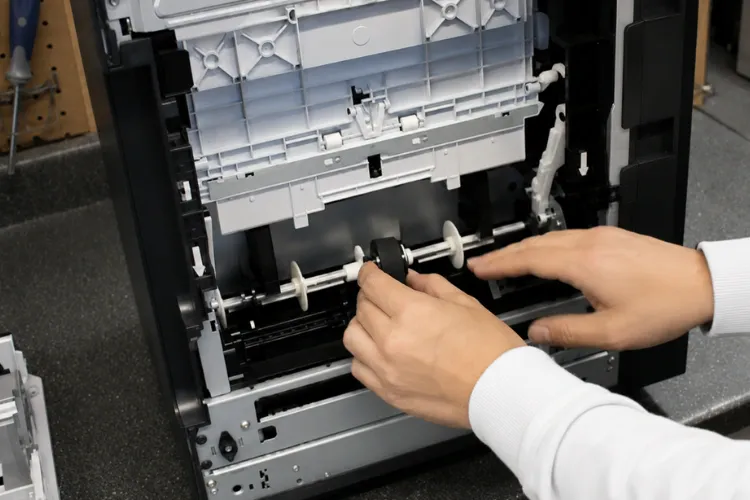
An HP Laserjet M603 Fuser Error on a machine well past its rated page count usually ends in fuser replacement, and we stock those. An HP Laserjet MFP M635 Fuser Error deserves the same treatment, though on multifunction units we also verify that the reported fault is not a secondary effect of a power or firmware condition.
One caution from experience: fusers run hot enough to cause real burns, and they should be handled only after a proper cool-down. This is a component we would rather replace during an onsite printer repair in La Mirada than talk you through over the phone.
Onsite Laserjet Printer Repair - Same Say Service Available
When Does an HP LaserJet Need a Maintenance Kit?
When the machine asks, and often a little before. HP LaserJet units track page count against a service interval and display a maintenance prompt when they cross it, which is a planning tool rather than an emergency.
A Printer Maintenance Kit bundles the components that wear on a predictable schedule into one part number. On typical HP LaserJet units that means the fuser, transfer roller, and feed and pickup rollers, replaced together so the machine returns to a known baseline.
Ignoring the HP LaserJet Perform Maintenance message does not break anything immediately. What it does is guarantee that the eventual failure happens without warning, usually during a billing run or a proposal deadline, which is far more expensive than scheduled printer repair in La Mirada.
An HP Maintenance Kit installed on time also stabilizes print quality, because the same rollers that feed paper affect image placement and toner transfer. Maintenance Kit installation is straightforward for a trained technician and typically fits inside a single onsite visit.
We generally advise offices to Replace Maintenance Kit components during a slow period rather than waiting for a hard stop. Printer Repair Experts stocks kits for many HP LaserJet and HP Color LaserJet families precisely so La Mirada printer repair can be scheduled rather than reacted to.
How Do We Diagnose Print Quality Problems Onsite?
By reading the defect pattern before touching a single part. Printer Print Quality Problems fall into recognizable families, and the spacing, orientation, and repeatability of a mark tell a technician more than a verbal description ever will.
Vertical lines that run the full page length usually point to a drum, a cleaning blade, or a scratched transfer component. Horizontal banding at a consistent interval points to a rotating part, and the interval itself identifies which one. Faded output across the whole page is typically toner or transfer voltage.
HP Color LaserJet Printer Repair adds registration and calibration to that list. A color machine can be mechanically healthy and still produce shifted or muddy output if the color planes are misaligned or the calibration routine has drifted. Much of the color printer repair in La Mirada we handle ends in calibration rather than parts.
HP Color LaserJet MFP Repair brings the scanner into the conversation as well. When only copies look wrong and direct prints are clean, the problem is on the scan side, and no amount of engine work will correct it.
Toner quality matters more than most offices expect. We supply high-quality third-party toner backed by a 1-year warranty, and we are candid that bargain cartridges are behind a meaningful share of the streaking and background haze we are called out to investigate.
What Should You Check When the Printer Stops Printing Entirely?
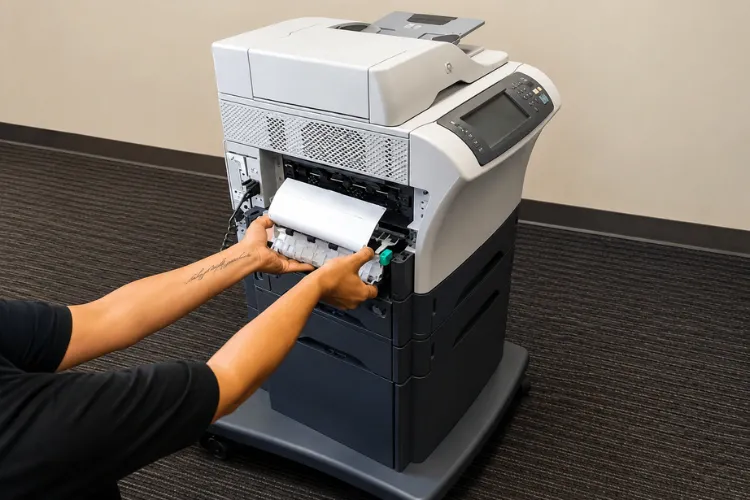
Start by proving whether the machine is dead or simply unreachable. A unit reporting Printer Not Printing while its control panel is responsive and its configuration page prints fine is a network or driver issue, not a hardware failure.
Printer Troubleshooting at this stage follows a sequence. Confirm the configuration page. Confirm the IP address has not changed after a DHCP lease renewal. Confirm the print queue is not holding a stalled job.
Only after those checks do we move to the machine itself. Skipping that order is the single most common reason a La Mirada printer repair call turns into an unnecessary parts quote.
Printer Error Codes give a technician a starting coordinate, not a verdict. HP error codes identify the subsystem reporting the fault, and interpreting them correctly requires official HP service documentation rather than a guess based on a similar-looking number.
Printer Diagnostic Service is where we earn our keep. We check firmware level, review the event log, print internal diagnostic pages, and verify network configuration before recommending any part. That process is why our recommendations tend to hold up.
Our mobile technicians travel to commercial properties throughout 90638 for exactly this work, including driver reinstallation, network reconfiguration, and firmware updates that resolve faults no replacement part would have fixed.
Downtime on a shared workgroup printer is rarely one person’s problem. It backs up invoicing, shipping paperwork, and anything with a signature deadline attached. Printer Repair Experts restores reliability rather than patching symptoms, and we tell you honestly when a machine is worth keeping and when it is not.
Same-day onsite printer repair in La Mirada is available for many HP LaserJet failures, our parts and labor are covered for six months, and first-time clients can schedule under the $69.99 onsite repair promotion, limitations apply. Call (888) 657-0021 to reserve a slot, or send the model and error code to info@printer-repair-experts.net and we will tell you what we expect to find.
Reliable Repairs Backed by Warranty
Should You Repair or Replace an Aging HP LaserJet?
The honest test is cost per remaining page, not the age on the label. An enterprise HP LaserJet built for a two-hundred-thousand-page life is usually worth repairing at eighty thousand pages, even if the model has been discontinued.
Repair makes sense when the failure is a wear item, when parts remain available, and when the machine’s duty cycle still matches your volume. HP Laserjet M601 Printer Repair falls into that category regularly, because the chassis is durable and the common failures are serviceable.
Replacement makes sense when a structural component fails on a machine already past its rated life, when the unit is chronically undersized for the department, or when parts availability has genuinely dried up. HP LaserJet MFP M636 Printer Repair is a different calculation, since multifunction units carry more subsystems and more residual value.
There is a third option offices forget: redeploy. A machine failing under twelve thousand pages a month may run cleanly for years in a five-person department, and that HP Printer Service decision often saves more than either repair or purchase.
Based on our field experience, the most expensive outcome is replacing a repairable machine on a vendor’s recommendation without an independent diagnosis. Before quoting printer repair in La Mirada, we give you the numbers and let you decide.
Which La Mirada ZIP Codes and Nearby Cities Do We Cover?
Our printer repair services in La Mirada center on ZIP code 90638, which encompasses the city’s residential neighborhoods, its office suites, and the industrial and distribution buildings that generate most of our service volume.
Businesses operating within the corridors along 14590-14634 Alondra Blvd, 15231-15299 Canary Ave, 16284-16200 Trojan Way, 16675-16755 Knott Ave, and 14567-14385 Industry Cir can request onsite HP LaserJet printer repair. Those blocks concentrate warehousing, light manufacturing, and professional offices, and printer density there runs well above the city average.
Coverage does not stop at the city line. We regularly dispatch into Buena Park, Fullerton, Santa Fe Springs, La Palma, and La Habra, all of which sit inside a short drive of 90638. Whittier is covered on the same routes.
That regional footprint is why our dispatch works. A technician handling Printer Repair Anaheim CA or Printer Repair Brea CA in the morning can reasonably reach La Mirada printer repair calls the same afternoon, and the same is true of routes running Printer Repair Commerce CA and Printer Repair City of Industry CA.
As an independent HP LaserJet Service Provider and HP Color LaserJet Service Provider, we are not tied to a single manufacturer’s replacement agenda. Our recommendation is whatever keeps your fleet running at the lowest sensible cost.
Conclusion
Printer repair in La Mirada should be measured by one thing: how quickly your people stop working around a broken machine and get back to using it. Onsite diagnosis, stocked parts, and a technician who reads the defect before ordering components are what make that possible.
Printer Repair Experts brings more than twenty years of HP LaserJet and HP Color LaserJet field experience to 90638, backs its work with a 6-month warranty, and treats an accurate diagnosis as the product rather than the paperwork. When your next paper jam, fuser fault, or print quality problem surfaces, La Mirada printer repair is a short drive away.
Commercial Areas We Provide Onsite Printer Repair Services - La Mirada CA
Alondra Blvd. Corridor
14590-14634 Alondra Blvd
La Mirada, CA 90638
Canary Ave. Area
15231-15299 Canary Ave
La Mirada, CA 90638
Trojan Way Vicinity
16284-16200 Trojan Way
La Mirada, CA 90638
Knott Ave. Area
Knott16675-16755 Knott Ave
La Mirada, CA 90638
Industry Circle Corridor
14567-14385 Industry Cir
La Mirada, CA 90638
FAQ's - Frequently Asked Questions -
Often, yes. Calls that come in during the morning have the best chance of a same-day slot, and availability improves further when the failure is a stocked item such as a fuser, a maintenance kit, or a roller set. If we cannot reach you the same day, we will tell you honestly rather than leave you waiting.
No. Our model is onsite only. A technician comes to your business address with tools and parts, and the machine never leaves your building. Enterprise HP LaserJet units are heavy, awkward, and easy to damage in transit, which is one of the reasons we built the business this way.
It is a flat labor rate for one qualifying onsite visit for a new customer, applied to a single HP LaserJet or HP Color LaserJet commercial printer. Parts are separate. Limitations apply, and consumer inkjet models such as OfficeJet, DeskJet, Envy, Smart Tank, and DesignJet are excluded.
Most single-machine calls run between forty-five minutes and two hours, depending on what we find. A roller replacement or a maintenance kit install is usually the shorter end. A fault that requires diagnostic pages, event log review, and firmware verification takes longer, because we would rather spend the time than guess.
Service labor and installed parts are covered for six months, which is 180 days. Toner we supply carries a separate one-year warranty. If something we touched fails inside that window, we come back out.
Yes, and it is usually the more economical way to do it. Offices along the industrial corridors near Alondra Boulevard and Industry Circle frequently have us look at two or three machines on a single trip, which spreads the visit cost and lets us flag units approaching their maintenance interval before they fail.
Our specialization is HP LaserJet and HP Color LaserJet equipment, including multifunction models, and that focus is deliberate. We would rather be genuinely expert on one family of machines than superficially capable across a dozen. If your fleet is something else entirely, we will say so up front.
The printer model number, any error code showing on the display, and a rough idea of monthly page volume. If you can print a configuration page, that helps a great deal. With those three pieces of information we can usually predict what we will find and whether the part is already on the truck.
